测试环境为eclipse-4.5.1,内置已经支持maven,本机已经配置伪分布式hadoop-2.7.1环境,并且已经启动start-dfs.sh和start-yarn.sh。
注意:以下所有配置中的
hadoop-username,需要修改成实际测试环境中的用户名。
新建maven项目
pom.xml文件内容如下:
<project xmlns="http://maven.apache.org/POM/4.0.0" xmlns:xsi="http://www.w3.org/2001/XMLSchema-instance" xsi:schemaLocation="http://maven.apache.org/POM/4.0.0 http://maven.apache.org/xsd/maven-4.0.0.xsd"> <modelVersion>4.0.0</modelVersion> <groupId>com.example</groupId> <artifactId>hadoop</artifactId> <version>0.0.1</version> <name>hadoop mapreduce</name> <description>test hadoop-2.7.1 mapreduce.</description> <build> <plugins> <plugin> <groupId>org.apache.maven.plugins</groupId> <artifactId>maven-compiler-plugin</artifactId> <version>3.5</version> <configuration> <source>1.8</source> <target>1.8</target> </configuration> </plugin> <plugin> <groupId>org.codehaus.mojo</groupId> <artifactId>exec-maven-plugin</artifactId> <version>1.2.1</version> </plugin> </plugins> </build> <properties> <hadoop.version>2.7.1</hadoop.version> </properties> <dependencies> <dependency> <groupId>org.apache.hadoop</groupId> <artifactId>hadoop-hdfs</artifactId> <version>${hadoop.version}</version> </dependency> <dependency> <groupId>org.apache.hadoop</groupId> <artifactId>hadoop-common</artifactId> <version>${hadoop.version}</version> </dependency> <dependency> <groupId>org.apache.hadoop</groupId> <artifactId>hadoop-mapreduce-client-common</artifactId> <version>${hadoop.version}</version> </dependency> </dependencies></project> |
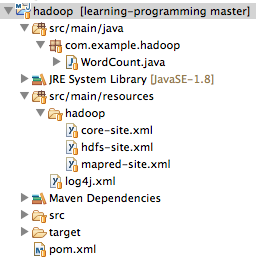
在src/main/resources目录下添加log4j.xml配置文件,内容如下:
<log4j:configuration xmlns:log4j="http://jakarta.apache.org/log4j/"> <appender name="console" class="org.apache.log4j.ConsoleAppender"> <layout class="org.apache.log4j.PatternLayout"> <param name="ConversionPattern" value="%-5p: %c - %m%n" /> </layout> </appender> <root> <priority value="info" /> <appender-ref ref="console" /> </root></log4j:configuration> |
复制hadoop伪分布式的配置文件到eclipse中
将${HADOOP_HOME}/etc/hadoop/目录中以下3个xml文件复制到前面maven项目的src/main/resources/hadoop/目录中:
- core-site.xml
- hdfs-site.xml
- mapred-site.xml
core-site.xml文件内容:
<configuration> <property> <name>hadoop.tmp.dir</name> <value>file:///Users/hadoop-username/Applications/hadoop/tmp</value> <description>Abase for other temporary directories.</description> </property> <property> <name>fs.defaultFS</name> <value>hdfs://localhost:9000</value> </property></configuration> |
hdfs-site.xml文件内容:
<configuration> <property> <name>dfs.replication</name> <value>1</value> </property> <property> <name>dfs.namenode.name.dir</name> <value>file:///Users/hadoop-username/Applications/hadoop/tmp/dfs/name</value> </property> <property> <name>dfs.datanode.data.dir</name> <value>file:///Users/hadoop-username/Applications/hadoop/tmp/dfs/data</value> </property> <property> <name>dfs.permissions</name> <value>false</value> </property></configuration> |
mapred-site.xml文件内容:
<configuration> <property> <name>mapreduce.framework.name</name> <value>yarn</value> </property></configuration> |
新建mapreduce测试类
在src/main/java新建package为com.example.hadoop,在此package下新建如下WordCount.java文件:
package com.example.hadoop;import java.io.IOException;import java.util.Date;import java.util.Iterator;import java.util.StringTokenizer;import org.apache.hadoop.fs.Path;import org.apache.hadoop.io.IntWritable;import org.apache.hadoop.io.Text;import org.apache.hadoop.mapred.FileInputFormat;import org.apache.hadoop.mapred.FileOutputFormat;import org.apache.hadoop.mapred.JobClient;import org.apache.hadoop.mapred.JobConf;import org.apache.hadoop.mapred.MapReduceBase;import org.apache.hadoop.mapred.Mapper;import org.apache.hadoop.mapred.OutputCollector;import org.apache.hadoop.mapred.Reducer;import org.apache.hadoop.mapred.Reporter;import org.apache.hadoop.mapred.TextInputFormat;import org.apache.hadoop.mapred.TextOutputFormat;public class WordCount { public static class WordCounterMapper extends MapReduceBase implements Mapper<Object, Text, Text, IntWritable> { private final static IntWritable one = new IntWritable(1); private Text word = new Text(); public void map(Object key, Text value, OutputCollector<Text, IntWritable> output, Reporter reporter) throws IOException { StringTokenizer itr = new StringTokenizer(value.toString()); while (itr.hasMoreTokens()) { word.set(itr.nextToken()); output.collect(word, one); } } } public static class WordCounterReducer extends MapReduceBase implements Reducer<Text, IntWritable, Text, IntWritable> { private IntWritable result = new IntWritable(); public void reduce(Text key, Iterator<IntWritable> values, OutputCollector<Text, IntWritable> output, Reporter reporter) throws IOException { int sum = 0; while (values.hasNext()) { sum += values.next().get(); } result.set(sum); output.collect(key, result); } } public static void main(String[] args) throws Exception { String home = "hdfs://localhost:9000/user/hadoop-username/"; String input = home + "input"; String output = home + "output-" + new Date().getTime(); JobConf conf = new JobConf(WordCount.class); conf.setJobName("WordCount"); conf.addResource("classpath:/hadoop/core-site.xml"); conf.addResource("classpath:/hadoop/hdfs-site.xml"); conf.addResource("classpath:/hadoop/mapred-site.xml"); conf.setOutputKeyClass(Text.class); conf.setOutputValueClass(IntWritable.class); conf.setMapperClass(WordCounterMapper.class); conf.setCombinerClass(WordCounterReducer.class); conf.setReducerClass(WordCounterReducer.class); conf.setInputFormat(TextInputFormat.class); conf.setOutputFormat(TextOutputFormat.class); FileInputFormat.setInputPaths(conf, new Path(input)); FileOutputFormat.setOutputPath(conf, new Path(output)); JobClient.runJob(conf); System.exit(0); }} |
遇到的异常
Caused by: java.io.IOException: Cannot initialize Cluster. Please check your configuration for mapreduce.framework.name and the correspond server addresses. at org.apache.hadoop.mapreduce.Cluster.initialize(Cluster.java:120) at org.apache.hadoop.mapreduce.Cluster.<init>(Cluster.java:82) at org.apache.hadoop.mapreduce.Cluster.<init>(Cluster.java:75) at org.apache.hadoop.mapred.JobClient.init(JobClient.java:475) at org.apache.hadoop.mapred.JobClient.<init>(JobClient.java:454) at org.apache.hadoop.mapred.JobClient.runJob(JobClient.java:861) at com.example.hadoop.WordCounter.main(WordCounter.java:81) ... 6 more |
需要在pom.xml中引入hadoop-mapreduce-client-common依赖。如果引入依赖包仍然报错,请确认hadoop伪分布式配置的3个xml文件是否在src/main/resources/hadoop目录下。
Exception in thread "main" java.io.IOException: No FileSystem for scheme: hdfs at org.apache.hadoop.fs.FileSystem.getFileSystemClass(FileSystem.java:2644) at org.apache.hadoop.fs.FileSystem.createFileSystem(FileSystem.java:2651) at org.apache.hadoop.fs.FileSystem.access$200(FileSystem.java:92) at org.apache.hadoop.fs.FileSystem$Cache.getInternal(FileSystem.java:2687)... more |
需要在pom.xml中引入hadoop-hdfs依赖。
项目截屏
最后完成的目录结构如下图所示: