初始化本地 git 仓库的脚本
git init --bare spring-boot-debug.gitgit clone spring-boot-debug.gitcd spring-boot-debugmkdir -p src/main/java/com/example/boot/controllermkdir -p src/main/resources### create pom.xml and java files ###touch pom.xmltouch src/main/java/com/example/boot/SpringBootDebugApplication.javatouch src/main/java/com/example/boot/controller/DebugController.javagit add -A :/git commit -am "init spring boot application"git push |
spring boot 项目的 pom.xml
<project xmlns="http://maven.apache.org/POM/4.0.0" xmlns:xsi="http://www.w3.org/2001/XMLSchema-instance" xsi:schemaLocation="http://maven.apache.org/POM/4.0.0 http://maven.apache.org/xsd/maven-4.0.0.xsd"> <modelVersion>4.0.0</modelVersion> <parent> <groupId>org.springframework.boot</groupId> <artifactId>spring-boot-starter-parent</artifactId> <version>1.5.9.RELEASE</version> </parent> <groupId>com.example.spring</groupId> <artifactId>spring-boot-debug</artifactId> <packaging>jar</packaging> <name>${project.artifactId}</name> <version>0.0.1-SNAPSHOT</version> <properties> <java.version>1.8</java.version> </properties> <dependencies> <dependency> <groupId>org.springframework.boot</groupId> <artifactId>spring-boot-starter-web</artifactId> </dependency> <dependency> <groupId>org.springframework.boot</groupId> <artifactId>spring-boot-starter-test</artifactId> <scope>test</scope> </dependency> <dependency> <groupId>org.springframework.boot</groupId> <artifactId>spring-boot-starter-actuator</artifactId> </dependency> </dependencies> <build> <finalName>${project.artifactId}</finalName> <plugins> <plugin> <groupId>org.springframework.boot</groupId> <artifactId>spring-boot-maven-plugin</artifactId> <version>${project.parent.version}</version> <executions> <execution> <goals> <goal>build-info</goal> <goal>repackage</goal> </goals> </execution> </executions> </plugin> <plugin> <groupId>pl.project13.maven</groupId> <artifactId>git-commit-id-plugin</artifactId> <version>2.2.4</version> <executions> <execution> <id>get-the-git-infos</id> <goals> <goal>revision</goal> </goals> </execution> </executions> <configuration> <generateGitPropertiesFile>true</generateGitPropertiesFile> <dotGitDirectory>${project.basedir}/.git</dotGitDirectory> </configuration> </plugin> </plugins> </build></project> |
spring boot 应用程序 SpringBootDebugApplication
package com.example.boot;import org.springframework.boot.autoconfigure.SpringBootApplication;import org.springframework.boot.builder.SpringApplicationBuilder;public class SpringBootDebugApplication { public static void main(String[] args) { new SpringApplicationBuilder(SpringBootDebugApplication.class).run(args); }} |
测试的 DebugController
1234567891011121314151617181920212223 | package com.example.boot.controller;import javax.servlet.http.HttpServletRequest;import org.slf4j.Logger;import org.slf4j.LoggerFactory;import org.springframework.web.bind.annotation.RequestMapping;import org.springframework.web.bind.annotation.RestController;public class DebugController { private static final Logger LOGGER = LoggerFactory.getLogger(DebugController.class); ("index") public String index(HttpServletRequest httpServletRequest) { String host = httpServletRequest.getRemoteHost(); int port = httpServletRequest.getRemotePort(); LOGGER.info("add breakpoint at this line, host is {}, and port is {}", host, port); return host; }} |
mvnDebug spring-boot:run
如下方式运行项目,虽然这里提示在8000端口监听客户端的连接,并且可以使用jdb连接调试,也可以用vscode连接调试,但使用IDEA开发工具Attach to Local Process...时,并没有发现待调试程序在8000端口上运行。
mvnDebug spring-boot:runPreparing to execute Maven in debug modeListening for transport dt_socket at address: 8000 |
jdb attach
jdb是基于命令行的工具,设置好断点,再访问http://localhost:8080/index页面,就会进入断点。
jdb -attach 8000Set uncaught java.lang.ThrowableSet deferred uncaught java.lang.ThrowableInitializing jdb ...>VM Started: No frames on the current call stack main[1] run > stop at com.example.boot.controller.DebugController:19Set breakpoint com.example.boot.controller.DebugController:19Breakpoint hit: "thread=http-nio-8080-exec-2", com.example.boot.controller.DebugController.index(), line=19 bci=14 http-nio-8080-exec-2[1] print port port = 60249 |
vscode attach
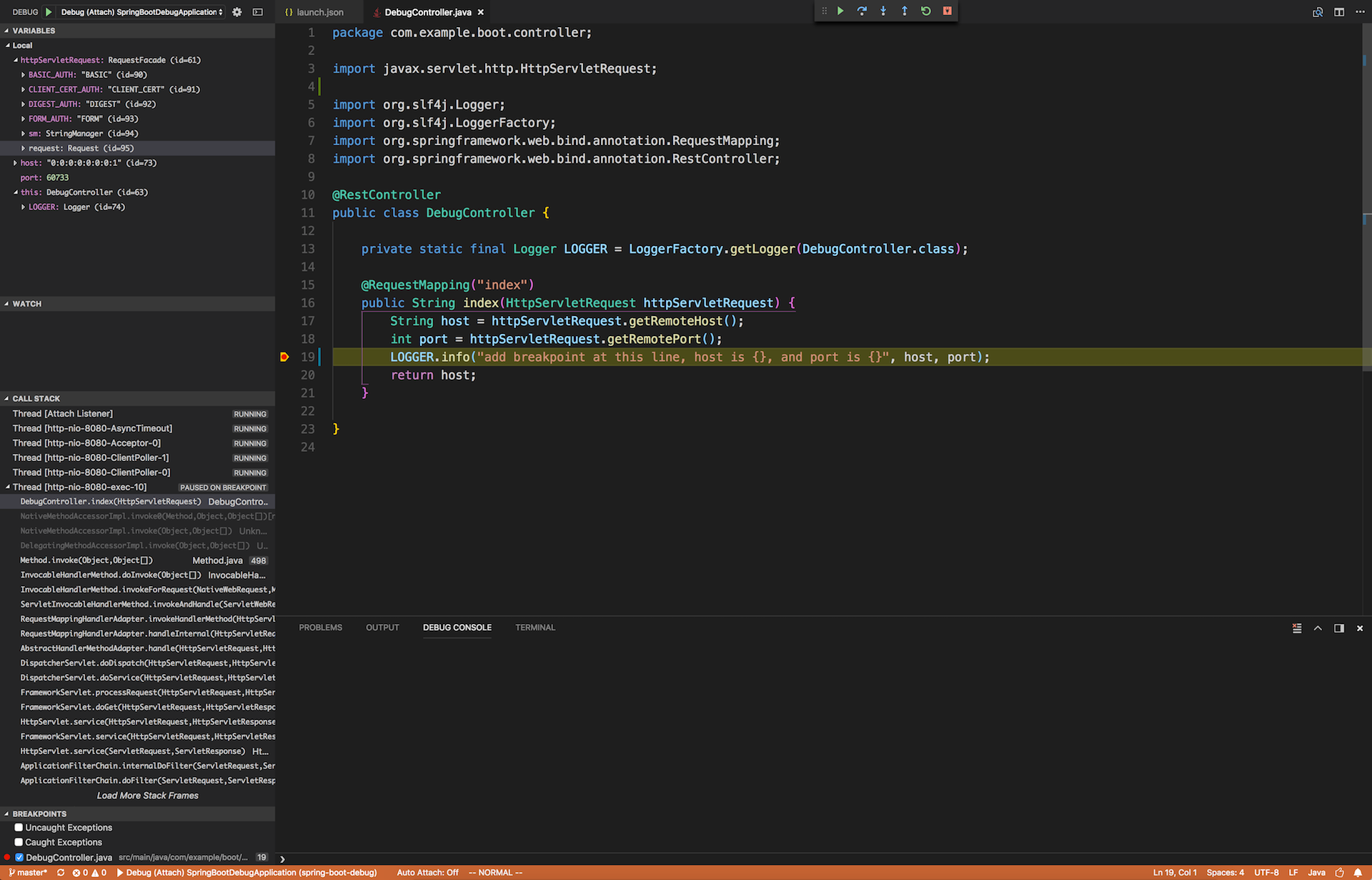
vscode中的launch.json内容如下,在DebugController第19行打上断点,按F5运行程序,访问http://localhost:8080/index即可进入断点。
{ "version": "0.2.0", "configurations": [ { "type": "java", "name": "Debug (Attach) SpringBootDebugApplication", "request": "attach", "hostName": "localhost", "port": 8000 } ]} |
mvnDebug exec:java -Dstart-class="..."
mvnDebug exec:java -Dstart-class="com.example.boot.SpringBootDebugApplication"Preparing to execute Maven in debug modeListening for transport dt_socket at address: 8000 |
与前面一样,在jdb和vscode中是可以连接调试的,在IDEA中不行。
mvn spring-boot:run -Drun.jvmArguments="-agentlib:jdwp=..."
官方文档推荐使用插件spring-boot-maven-plugin的目标spring-boot:run运行spring-boot应用,如果有设置jvmArguments参数,就会自动派生新的 Java 进程来运行spring-boot中的main方法,所以可以用-Drun.jvmArguments把参数传给派生的 Java 进程,如下示例。
mvn spring-boot:run -Drun.jvmArguments="-agentlib:jdwp=transport=dt_socket,server=y,suspend=y,address=8000"[INFO] Scanning for projects...[INFO][INFO] ----------------< com.example.spring:spring-boot-debug >----------------[INFO] Building spring-boot-debug 0.0.1-SNAPSHOT[INFO] --------------------------------[ jar ]---------------------------------[INFO][INFO] >>> spring-boot-maven-plugin:1.5.9.RELEASE:run (default-cli) > test-compile @ spring-boot-debug >>>[INFO][INFO] --- spring-boot-maven-plugin:1.5.9.RELEASE:build-info (default) @ spring-boot-debug ---[INFO][INFO] --- maven-resources-plugin:2.6:resources (default-resources) @ spring-boot-debug ---[INFO] Using 'UTF-8' encoding to copy filtered resources.[INFO] Copying 0 resource[INFO] Copying 0 resource[INFO][INFO] --- maven-compiler-plugin:3.1:compile (default-compile) @ spring-boot-debug ---[INFO] Nothing to compile - all classes are up to date[INFO][INFO] --- maven-resources-plugin:2.6:testResources (default-testResources) @ spring-boot-debug ---[INFO] Using 'UTF-8' encoding to copy filtered resources.[INFO] skip non existing resourceDirectory /test/spring-boot-debug/src/test/resources[INFO][INFO] --- maven-compiler-plugin:3.1:testCompile (default-testCompile) @ spring-boot-debug ---[INFO] No sources to compile[INFO][INFO] <<< spring-boot-maven-plugin:1.5.9.RELEASE:run (default-cli) < test-compile @ spring-boot-debug <<<[INFO][INFO][INFO] --- spring-boot-maven-plugin:1.5.9.RELEASE:run (default-cli) @ spring-boot-debug ---[INFO] Attaching agents: []Listening for transport dt_socket at address: 8000 |
程序启动的前一部分[INFO]日志是由主进程输出的,派生的子进程启动spring-boot应用,因为调试参数suspend=y,因此在8000端口等待客户端连接,这时一共启动了2个 Java 进程,如下所示,其中84974这个进程就是84952这个进程fork出来的子进程:
ps -ef | grep java 501 84952 1177 0 11:15PM ttys001 0:07.06 /Library/Java/JavaVirtualMachines/jdk1.8.0_77.jdk/Contents/Home/bin/java -classpath /usr/local/Cellar/maven/3.5.3/libexec/boot/plexus-classworlds-2.5.2.jar -Dclassworlds.conf=/usr/local/Cellar/maven/3.5.3/libexec/bin/m2.conf -Dmaven.home=/usr/local/Cellar/maven/3.5.3/libexec -Dlibrary.jansi.path=/usr/local/Cellar/maven/3.5.3/libexec/lib/jansi-native -Dmaven.multiModuleProjectDirectory=/github.com/test/spring-boot-debug org.codehaus.plexus.classworlds.launcher.Launcher spring-boot:run -Drun.jvmArguments=-agentlib:jdwp=transport=dt_socket,server=y,suspend=y,address=8000 501 84974 84952 0 11:15PM ttys001 0:00.07 /Library/Java/JavaVirtualMachines/jdk1.8.0_77.jdk/Contents/Home/jre/bin/java -agentlib:jdwp=transport=dt_socket,server=y,suspend=y,address=8000 -cp /test/spring-boot-debug/target/classes:...:~/.m2/repository/com/fasterxml/jackson/core/jackson-databind/2.8.10/jackson-databind-2.8.10.jar com.example.boot.SpringBootDebugApplication |
jdb attach
jdb -attach 8000Set uncaught java.lang.ThrowableSet deferred uncaught java.lang.ThrowableInitializing jdb ...>VM Started: No frames on the current call stack main[1] stop at com.example.boot.controller.DebugController:19Deferring breakpoint com.example.boot.controller.DebugController:19.It will be set after the class is loaded. main[1] run> Set deferred breakpoint com.example.boot.controller.DebugController:19Breakpoint hit: "thread=http-nio-8080-exec-2", com.example.boot.controller.DebugController.index(), line=19 bci=14 http-nio-8080-exec-2[1] print host host = "0:0:0:0:0:0:0:1" http-nio-8080-exec-2[1] print port port = 58781 http-nio-8080-exec-2[1] print httpServletRequest httpServletRequest = "org.apache.catalina.connector.RequestFacade@7d5cdff" http-nio-8080-exec-2[1] print httpServletRequest.getHeader("user-agent") httpServletRequest.getHeader("user-agent") = "Mozilla/5.0 (Macintosh; Intel Mac OS X 10_13_4) AppleWebKit/537.36 (KHTML, like Gecko) Chrome/65.0.3325.181 Safari/537.36" http-nio-8080-exec-2[1] cont |
使用 IDEA 客户端连接
jdb与 IDE 相比还是不方便的,可以使用 IntelliJ IDEA 和 Eclipse 之类的工具进行 debug,vscode的调试功能也很不错,以IDEA为例,IDEA - Run - Attach to Local Process...,可以看到运行中的调试程序,点击连接之后,客户端提示如下,并且主程序会继续启动spring-boot应用。
Connected to the target VM, address: '127.0.0.1:8000', transport: 'socket'
java -cp "..." -agentlib:jdwp="..."
下面用最基本的java命令来启动main方法所在的应用程序进行调试。
在pom.xml文件所在目录下运行以下命令得到项目依赖的classpath,并将target/classes目录加入classpath中,然后运行main方法所在应用程序SpringBootDebugApplication:
mvn dependency:build-classpath | grep -v "INFO\|WARN"maven project classpath output here ...... java -cp "target/classes:$(mvn dependency:build-classpath | grep -v "INFO\|WARN")" -agentlib:jdwp=transport=dt_socket,server=y,suspend=y,address=8000 com.example.boot.SpringBootDebugApplicationListening for transport dt_socket at address: 8000 |
然后用IDEA连接8000端口后开始调试代码。
spring-boot 2.0 参数变化
在spring-boot 2.x版本中,需要注意-Drun.jvmArguments被调整为-Dspring.boot.run.jvmArguments。