下面是Dean Edwards关于javascript事件机制处理的源码
// written by Dean Edwards, 2005// with input from Tino Zijdel, Matthias Miller, Diego Perini// http://dean.edwards.name/weblog/2005/10/add-event/function addEvent(element, type, handler) { if (element.addEventListener) { element.addEventListener(type, handler, false); // copy handler function. } else { // assign each event handler a unique ID if (!handler.$$guid) handler.$$guid = addEvent.guid++; // create a hash table of event types for the element if (!element.events) element.events = {}; // create a hash table of event handlers for each element/event pair var handlers = element.events[type]; if (!handlers) { handlers = element.events[type] = {}; // store the existing event handler (if there is one, else this value is 'undefined') if (element["on" + type]) { // alert('exist on' + type + ' handler! copy existing event handler to handlers[0]'); handlers[0] = element["on" + type]; } } // store the event handler in the hash table handlers[handler.$$guid] = handler; // assign a global event handler to do all the work element["on" + type] = handleEvent; }};// a counter used to create unique IDs, Static variable: addEvent.guidaddEvent.guid = 1;function removeEvent(element, type, handler) { if (element.removeEventListener) { element.removeEventListener(type, handler, false); } else { // delete the event handler from the hash table if (element.events && element.events[type]) { delete element.events[type][handler.$$guid]; } }};function handleEvent(event) { var returnValue = true; // grab the event object (IE uses a global event object) event = event || fixEvent(((this.ownerDocument || this.document || this).parentWindow || window).event); // get a reference to the hash table of event handlers var handlers = this.events[event.type]; // execute each event handler for (var i in handlers) { this.$$handleEvent = handlers[i]; if (this.$$handleEvent(event) === false) { returnValue = false; } } return returnValue;};function fixEvent(event) { // add W3C standard event methods, IE has not those methods event.preventDefault = fixEvent.preventDefault; event.stopPropagation = fixEvent.stopPropagation; return event;};fixEvent.preventDefault = function() { this.returnValue = false;};fixEvent.stopPropagation = function() { this.cancelBubble = true;};// This little snippet fixes the problem that the onload attribute on the body-element will overwrite// previous attached events on the window object for the onload eventif (!window.addEventListener) { document.onreadystatechange = function() { if (window.onload && window.onload != handleEvent) { addEvent(window, 'load', window.onload); window.onload = handleEvent; } }} |
###javascript中keyEvent按键事件说明(录自javascript权威指南第5版)
有3种按键类型,分别是keydown. keypress和keyup,它们分别对应onkeydown、onkeypress和onkeyup这几个事件监听器。
一个按键操作会产生这3个事件,依次是keydown. keypress,然后在按键释放的时候keyup。
这3个事件类型中,keypress事件是最为用户友好的:和它们相关的事件对象包含了所产生的实际字符的编码。keydown和keyup事件是较底层的,它们的按键事件包含一个和键盘所生成的硬件编码相关的“虚拟按键码”。对于ASCII字符集中的数字和字符,这些虚拟按键码和ASCII码相同。如果按下SHIFT键并按下数字2,keydown事件将通知发生了“SHITF-2”的按键事件。keypress事件会解释这一事件,说明这次按键产生了一个可打印的字符"@"。
对于不能打印的功能按键,如Backspace. Enter、Escape和箭头方向键、Page Up、Page Down以及F1到F12,它们会产生keydown和keyup事件。
在不同的浏览器中,按键事件的一些细节区别如下:
- 对于不能打印的功能按键,在Firefox中,也会产生keypress事件,在IE和Chrome中,则不会触发keypress事件,只有当按键有一个ASCII码的时候,即此字符为可打印字符或者一个控制字符的时候,keypress事件才会发生。对于这些不能打印的功能按键,可通过和keydown事件相关的keyCode来获取。
- 作为一条通用的规则,keydown事件对于功能按键来说是最有用的,而keypress事件对于可打印的按键来说是最有用的,按下大写的"A",keypress获取到的charCode为65,而按下小写的"a",keypress获取到的charCode为97,但对于keydown事件来说,其获得的keyCode都是65,不能区分出实际按键是"A"还是"a",所以keypress事件对用户最为友好。
- 在IE中,Alt按键组合被认为是无法打印的,所以并不会触发keypress事件。
- 在Firefox中,按键事件定义有二个属性,keyCode存储了一个按键的较低层次的虚拟按键码,并且和keydown事件一起发送。charCode存储了按下一个键时所产生的可打印的字符的编码,并且和keypress事件一起发送。在Firefox中,功能按键会产生一个keypress事件,在这种情况下,charCode是0,而keyCode包含了虚拟按键码。在Firefox中,发生keydown事件时,charCode都为0,所以在keydown时获取charCode是无意义的。
- 在IE中,只有一个keyCode属性,并且它的解释也取决于事件的类型。对于keydown事件来说,keyCode是一个虚拟按键码,对于keypress事件来说,keyCode是一个字符码。
- 在Chrome中,功能键与IE中表现一样,不会触发keypress事件,对于keydown事件,也会在事件的keyCode中存储虚拟按键码,而charCode为0,与IE和Firefox表现一样,然而在发生可打印字符的keypress事件时,除了与Firefox一样,会在事件的charCode中存储实际按键编码之外,也会在keyCode中存储实际按键编码,这二个值相同。
- charCode字符码可以使用静态方数String.fromCharCode()转为字符。
var a1 = document.getElementById('a1');var a2 = document.getElementById('a2');var handler = function (e) { $.console.log('handler:' + e.type); e.preventDefault();};var otherHandler = function (e) { $.console.log('otherHandler: ' + e.type + e.eventPhase); e.preventDefault();};var handlerSelf = function (e) { $.console.log(e.type + ': ' + e.eventPhase + ', handlerSelf handler'); e.preventDefault();};var keyPressHandler = function (e) { $.console.log("keyPress keyCode: " + e.keyCode); $.console.log("keyPress charCode: " + e.charCode);};var keyDownHandler = function (e) { $.console.log("keyDown keyCode: " + e.keyCode); // The 'charCode' property of a keydown event should not be used. The value is meaningless. $.console.log("在keydown事件中获取charCode毫无意义,IE中不能获取,其他浏览器中此值都为0");};a1.onmouseover = handlerSelf; // this handler will override by addEvent function.addEvent(a1, 'mouseover', handler); // addEvent.guid = 1(handler), element.events['mouseover'][0] = element['on' + 'mouseover'] = handlerSelf, element.events['mouseover'][1] = handleraddEvent(a1, 'click', handler); // addEvent.guid = 1(handler), element.events['click'][1] = handleraddEvent(a1, 'click', otherHandler); // addEvent.guid = 2(otherHandler), element.events['click'][2] = otherHandleraddEvent(a2, 'keydown', keyDownHandler);addEvent(a2, 'keypress', keyPressHandler); |
jQuery-1.4.2版本的事件管理机制是以此代码为原型的,之前jQuery-1.2.6版本中的event管理机制稍显简单。
与Dean Edwards稍有不同的是,jQuery并不是将events作为原生element对象的属性保存的,而是巧妙的通过jQuery.data中的以key为events进行保存,并且events[type]对应不是以object对象形式存放了handle事件处理方法,而是一个数组(events[type] = []),在数组里放入了进一步封闭的handleObj,handleObj对象包括以下属性:handle. data、namespace、type、guid。
其事件管理的机制非常简单清晰:每个事件处理方法handler都有一个全局的ID,每个element都增加了一个events对象属性(element.events={}),而此events对象中键值即为事件类型type,每个事件类型(element.events[type])对应一个object(element.events[type]={}),在此object中存放了与此element,此type事件类型相关的所有事件处理方法handlers,而且object的key值即为对应每个handler分配到的全局ID。
最后再为element["on" + type]添加事件处理方法handleEvent,在此方法内遍历运行element.events[type]对象中的所有handle,如果其中有一个handle方法返回false,则由handleEvent返回false作为element["on" + type]事件触发的最后结果。
jQuery.event对象定义源码部分,jQuery.event对象中的这些方法是在jQuery源码内部使用的,是其事件管理的核心代码,与jQuery.data(elem, "events")关联在一起,关于jQuery.data()部分可参考data源码阅读笔记。
/** * A number of helper functions used for managing events. * Many of the ideas behind this code originated from * Dean Edwards' addEvent library. */jQuery.event = { // Bind an event to an element // Original by Dean Edwards add: function( elem, types, handler, data ) { // Node.TEXT_NODE = 3; // Text // Node.COMMENT_NODE = 8; // Comment // 将事件添加到Element上,对于text node和comment node上的事件绑定忽略 if ( elem.nodeType === 3 || elem.nodeType === 8 ) { return; } // For whatever reason, IE has trouble passing the window object // around, causing it to be cloned in the process // 对IE中的window对象进行处理 if ( elem.setInterval && ( elem !== window && !elem.frameElement ) ) { elem = window; } var handleObjIn, handleObj; // handler对象可以是一个object,需要绑定的事件监听器实际为handler.handler,如在jQuery.fn.live()方法定义中用到的: // jQuery.event.add(this, liveConvert( type, selector ), // { data: data, selector: selector, handler: fn, origType: type, origHandler: fn, preType: preType }); // 将传入的handler参数记到临时变量handleObjIn,将其回调方法handleObjIn.handler作为handler事件回调方法 if ( handler.handler ) { handleObjIn = handler; handler = handleObjIn.handler; } // 为事件监听器handler添加一个全局的guid,此guid会作为key,进行事件添加和删除操作 // Make sure that the function being executed has a unique ID if ( !handler.guid ) { handler.guid = jQuery.guid++; } // Init the element's event structure var elemData = jQuery.data( elem ); // 参考jQuery.data()的代码阅读笔记:如果想将data附在embed/object/applet上,将无法生效,并且jQuery.data(elem)方法返回undefined // If no elemData is found then we must be trying to bind to one of the // banned noData elements if ( !elemData ) { return; } // jQuery中,事件通过elemData而绑定到对应的element之上,并不是直接添加在element元素本身上 // jQuery代码的一个原则就是不会修改和添加javascript原生对象的属性 var events = elemData.events = elemData.events || {}, eventHandle = elemData.handle, eventHandle; // 如果eventHandle没有初始化,则进行初始化 // jQuery实际是通过将这个eventHandle方法绑到DOM元素上,其他用jQuery绑定的各种事件,包括用户自定义的事件以及更高级的支持命名空间的事件,实际上jQuery都将之存在jQuery.data(elem, "events")缓存中,当浏览器触发了相应的事件,就会通过eventHandle,执行缓存中的与此事件类型相关的全部事件处理器 // 注意这个eventHandle方法的代码中,没有使用关键字this来指向这个被监听的DOM元素,而是使用了Function.prototype.apply()方法,将jQuery.event.handle()作为DOM元素的方法进行调用,从而用jQuery绑定的事件处理器中的this关键字可以正确指向发生事件的DOM元素 // 之所以使用Function.prototype.apply()将事件处理方法重新绑到正确的作用域上,是为了解决IE事件绑定方法的错误,因为elem.addEventListener(type, handler, useCapture)方法将handler绑定在elem之上,当事件发生时,handler中的this关键字是正确指向elem的。但是在IE中,使用elem.attachEvent('on' + type, handler)方法,将handler绑定到elem之上,在事件发生时,handler中的this却永远是指向全局的window对象的,并不是指向发生事件的elem元素,这使得handler中的this关键字全无用处,或者被误用 // 另外可以看到attachEvent()方法只接收二个参数,所以在IE中绑定的handler都是在冒泡阶段被调用,没有机会将handler绑定在事件的捕获阶段,因为IE的事件模型的冒泡型的,与标准的DOM 2级别的事件模型不一样,jQuery为了兼容性,所以事件也是在冒泡(包括第2阶段到达事件目标节点阶段)阶段时,调用下面这个eventHandle,因此使用jQuery进行事件绑定也是不能将事件绑定到捕获阶段的 if ( !eventHandle ) { elemData.handle = eventHandle = function() { // Handle the second event of a trigger and when an event is called after a page has unloaded return typeof jQuery !== "undefined" && !jQuery.event.triggered ? // 当绑定在elem元素上的事件发生时,调用jQuery.event.handle进行事件处理 // eventHandle作为事件监听器,事件发生时,会调用此方法,浏览器会将event做为参数传给eventHandle此方法,arguments[0]即为event jQuery.event.handle.apply( eventHandle.elem, arguments ) : undefined; }; } // 将elem作为eventHandle方法的一个参数,在事件被添加完成之后,会将elem置为null // Add elem as a property of the handle function // This is to prevent a memory leak with non-native events in IE. eventHandle.elem = elem; // 通过空格分隔事件名,可以一次绑定多个事件 // Handle multiple events separated by a space // jQuery(...).bind("mouseover mouseout", fn); types = types.split(" "); // 关于namespaces的作用,可看后面关于unbind方法的官方文档说明,是为了可以有选择的移除事件监听器 var type, i = 0, namespaces; while ( (type = types[ i++ ]) ) { // 因为可能同时绑定多个事件到jquery对象匹配的DOM元素上,所以每次需要重新初始化handleObj handleObj = handleObjIn ? jQuery.extend({}, handleObjIn) : { handler: handler, data: data }; // jQuery的自定义事件支持namespace // Namespaced event handlers if ( type.indexOf(".") > -1 ) { namespaces = type.split("."); // 第一个点号前的字符串为实际的事件类型,如live.keyup.input中live做为事件类型 type = namespaces.shift(); // 将后面部分字符串再次有序的拼成一个以点号分隔的字符串,做为事件的namespace:input.keyup,并且在做unbind时,input.keyup同keyup.input作用一样 handleObj.namespace = namespaces.slice(0).sort().join("."); } else { namespaces = []; handleObj.namespace = ""; } // 为handleObj设置type和guid // type与events[ type ]重复,handleObj.guid与handler.guid相同是为了后面做jQuery.event.remove()操作时方便比较 handleObj.type = type; handleObj.guid = handler.guid; // 从events[ type ]中获取到已经存储在jQuery.data(elem, "events")[ type ]中的事件处理方法列表 // Get the current list of functions bound to this event var handlers = events[ type ], // 获取jQuery.event.special中type类型的特殊事件处理方法 // 如type为live类型的特殊事件添加时,会获取此类事件的特殊处理对象,对于live事件,有add/remove方法 special = jQuery.event.special[ type ] || {}; // Init the event handler queue // 第一次添加type类型的事件时,因为handlers为undefined,所以会进入下面handlers初始化,以及将事件绑定到elem元素上 // 所以type类型的事件绑定操作只会发生一次 if ( !handlers ) { // 如果此elem元素没有绑定过该type类型的事件,则在此进行初始化 // 在Dean Edwards中这里初始化为一个object直接量,而jQuery此处是初始化为一个数组 // 如果handlers已经被初始化为[],则因为[]为true,不会运行到此处代码 handlers = events[ type ] = []; // 在这里调用special.setup()方法,通过此方法调用,jQuery.fn.live()实现blur/focus/submit/change/mouseenter/mouseleave等类型的事件代理 // should notice difference between special.setup and special.add, special.setup only call once for per type per element, but special.add will call every event bind. The functionality that can be skipped is the actual binding of the event to the element using the addEventListener or attachEvent methods. This functionality is skipped based on the return value. Any value other than false prevents jQuery from actually binding the event to the element. In other words if you add return false to the setup and teardown methods of your special event, it will actually use the native DOM APIs to bind the event to the element. // special.add每次事件绑定都会调用,而special.setup只是在每个元素此事件类型第一次绑定时调用一次,可查看后面multiclick的例子说明 // http://brandonaaron.net/blog/2009/03/26/special-events // Check for a special event handler // Only use addEventListener/attachEvent if the special // events handler returns false if ( !special.setup || special.setup.call( elem, data, namespaces, eventHandle ) === false ) { // Bind the global event handler to the element // IE中没有实现elem.addEventListener()方法,Opera中elem.addEventListener/elem.attachEvent二个方法都有 if ( elem.addEventListener ) { // 将type类型的事件绑定到elem元素上,同样type类型的事件,绑定只发生一次,触发时则调用eventHandle事件监听器 // 对于特殊的事件类型,如live,这么绑定也没有意义 elem.addEventListener( type, eventHandle, false ); } else if ( elem.attachEvent ) { // 将事件绑定到elem元素上(IE) elem.attachEvent( "on" + type, eventHandle ); } } } // jQuery 1.4 add two new special event hooks: add and remove. These two events hooks brought lots of power by being able to manipulate the event details for each event handler registered. This is different from the existing setup and teardown hooks (added in 1.2.2) that only worked once per an event, per an element. // In jQuery 1.4 there are two new special event hooks: add and remove. These two hooks, unlike setup and teardown, are called for each event being bound. The add hook receives the handler, data, and namespaces as arguments. The remove hook receives the data and namespaces as arguments. The add and remove hooks enable the creation of more complex, even customizable, events. // 有special.add方法的特殊事件,在jQuery.event.special本身的特殊事件中就只有live事件有add方法 // 通过jQuery.event.special.live.add()方法再次调用到当前方法jQuery.event.add(),将live代理的实际事件类型也绑定到elem上 if ( special.add ) { // .live()绑定事件监听器时,除了会在events中添加live类型的事件监听器,也会调用special.add()再往events中添加live代理的实际事件类型 special.add.call( elem, handleObj ); // 注意下面这个处理是为了防止在第3方的special.add方法中将handleObj.handler重写之后,将原来的guid丢失了,可参考这二篇文章中的说明: // http://brandonaaron.net/blog/2009/06/4/jquery-edge-new-special-event-hooks // http://brandonaaron.net/blog/2010/02/25/special-events-the-changes-in-1-4-2 if ( !handleObj.handler.guid ) { handleObj.handler.guid = handler.guid; } } // 将handleObj加入此elem的type类型的事件回调方法列表中 // Add the function to the element's handler list handlers.push( handleObj ); // 全局标记,说明type类型的事件已经被使用 // Keep track of which events have been used, for global triggering jQuery.event.global[ type ] = true; } // 关于IE中内存泄漏的细节可查看微软MSDN上官方解释:http://msdn.microsoft.com/en-us/library/bb250448%28VS.85%29.aspx // IE下面用来检查内存泄漏和DOM使用情况的工具sIEve:http://home.orange.nl/jsrosman/ // Nullify elem to prevent memory leaks in IE elem = null; }, // 缓存jQuery.event全局事件类型 global: {}, // 从一个element上,移除一个或者一组事件 // [.die()->].unbind()->.remove() // Detach an event or set of events from an element remove: function( elem, types, handler, pos ) { // 过滤文本和注释节点上的事件绑定 // don't do events on text and comment nodes if ( elem.nodeType === 3 || elem.nodeType === 8 ) { return; } var ret, type, fn, i = 0, all, namespaces, namespace, special, eventType, handleObj, origType, elemData = jQuery.data( elem ), events = elemData && elemData.events; // 如果在element上没有发现elemData和elemData.events,则无事件可移除 if ( !elemData || !events ) { return; } // 如果types是一个handleObj对象,则重置handler和types的值 // types is actually an event object here if ( types && types.type ) { handler = types.handler; types = types.type; } // 如果没有传types或者是传入了某个( "." + namespace )的types,则将从elem上移除所有类型的事件监听器或者全部namespace名命空间下的事件 // Unbind all events for the element if ( !types || typeof types === "string" && types.charAt(0) === "." ) { types = types || ""; for ( type in events ) { // 这里type + types举例如: "click" + ".namespace" // 再次调用当前方法,移除elem指定的事件类型 // 这里就没有再传入handler这第三个参数,因为remove方法在运行时,可从其作用域链上拿到handler这个值 jQuery.event.remove( elem, type + types ); } return; } // 如果types是以空格分隔的多个事件类型,则分离之后逐一移除elem上的事件 // Handle multiple events separated by a space // jQuery(...).unbind("mouseover mouseout", fn); types = types.split(" "); while ( (type = types[ i++ ]) ) { // 将原来的type置入一个变量中,以备后用,因为type值可能被覆写 origType = type; handleObj = null; // 如果type中没有分隔字符".",则表示type事件类型不包括namespace,需要将此type的事件全部从当前elem上移除 all = type.indexOf(".") < 0; namespaces = []; if ( !all ) { // 如果事件类型type是有特定的namespace,则重新解析,得到新的type值和namespace // Namespaced event handlers namespaces = type.split("."); type = namespaces.shift(); namespace = new RegExp("(^|\\.)" + jQuery.map( namespaces.slice(0).sort(), fcleanup ).join("\\.(?:.*\\.)?") + "(\\.|$)") } // 获取指定事件类型为type的所有事件监听器集合 eventType = events[ type ]; // 如果无此type类型的事件监听器(或者是前面有操作将此type类型的事件监听器已经全部删除了),则继续下一循环 if ( !eventType ) { continue; } if ( !handler ) { // 如果remove方法没有传入handler参数,则需要根据当前elem上type类型的事件监听器进行remove操作 // 因为下面eventType的内容会被Array的splice方法所修改,因此eventType.length是个不定长度,所以用"j < eventType.length"进行比较 for ( var j = 0; j < eventType.length; j++ ) { handleObj = eventType[ j ]; if ( all || namespace.test( handleObj.namespace ) ) { // 如果前面调用jQuery.event.remove()方法没有指定handler,则在遍历时传入handleObje.handler,再次调用当前方法 // 移除origType类型中的handler事件监听器 // 传入了第四个参数j,是个重要的标识符,用于说明jQuery.event.remove()操作时,是没有传入handler事件监听器的操作 // 与后面的代码"pos != null && eventType.length === 1"相对应 // 并且jQuery.event.remove()中传入第四个参数说明已经处于eventType.length这个循环中,根据循环中的handleObj进行remove操作 // 与后面pos != null处break跳出循环体相对应 // 如果是调用jQuery.fn.die(type),没有传事件监听器进入此处代码时,最后会调用当前方法jQuery.event.remove()的代码:delete events[ type ],这样执行之后,将移除对应于.live()的context上elemData.events.live属性,配合jQuery.event.special.live.remove()方法中remove标识符,通过将remove标识符置为false,从而只是移除了context上的live事件,并不移除context上通过live代理的原生事件,因此context上的原生事件仍然被绑定,只是执行到liveHandler()方法中,因为events.live属性不存在,被立即return jQuery.event.remove( elem, origType, handleObj.handler, j ); // 利用Array的splice方法将当前操作的handleObj从eventType中移除,最后eventType长度变为0时,j也会自减成为-1,结束当前for循环 // splice( start, deleteCount, value,...): Deletes the specified number of elements from the array starting at the specified index, then inserts any remaining arguments into the array at that location. Returns an array containing the deleted elements. eventType.splice( j--, 1 ); } } continue; } // 获取type类型的特殊事件监听器对象 special = jQuery.event.special[ type ] || {}; // eventType数组可能是变长的,取决于是否传入第四个参数pos,所以for循环中比较中使用eventType.length与j进行比较 for ( var j = pos || 0; j < eventType.length; j++ ) { handleObj = eventType[ j ]; // 此处进行事件监听器移除的操作,是根据guid进行判断的,所以如果2个不同的hanlder具有相同的的guid,这可以经过jQuery.proxy(fn1, fn2)方法代理绑定相同的guid,这2个handler都被绑定到这个elem上的话,如果移除其中任何一个handler,另一个handler也会被一起移除,因为它们的guid是相同的,参考utitilies部分的jQuery.proxy()方法说明 // 当传入参数handler事件监听器的guid与当前handleObj的guid一致,则需要将此handleObj从eventType列表中移除 if ( handler.guid === handleObj.guid ) { // remove the given handler for the given type if ( all || namespace.test( handleObj.namespace ) ) { // 将handleObj从eventType列表中移除 if ( pos == null ) { // 利用Array的splice方法将当前操作的handleObj从eventType中移除 // 所以eventType数组是变长的 eventType.splice( j--, 1 ); } // 如果当前的special特殊事件监听器对象有remove方法,则调用之 // 与special.add对应,每个事件监听器被删除时,都会有机会调用special.remove方法,而special.teardown是在最后一个事件处理器被删除时发生调用 if ( special.remove ) { // 调用jQuery.event.special.live.remove()方法 special.remove.call( elem, handleObj ); } } // 如果有pos传入,即此处代码是由于"jQuery.event.remove( elem, origType, handleObj.handler, j )"调用产生 // 实际只是在eventType数组的指定位置pos上,调用完当前方法后就任务完成,在此跳出循环 if ( pos != null ) { break; } } } // 当有第四个参数pos传入时,是移除指定的handler,而当eventType.length为1时,表示这是最后一个此type类型的事件监听器被移除,后面因为调用eventType.splice( j--, 1 )之后,eventType数组长度就会成为0了,这时需要移除elem元素上的事件监听器eventHandle // elemData.handle = eventHandle = function(){...},是在jQuery.event.add()方法中定义的一个事件监听器 // eventHandle这个事件监听器是通过elem元素原来的addEventListener/attachEvent方法绑定的,需要通过removeEvent()方法调用removeEventListener/detachEvent移除事件绑定 // remove generic event handler if no more handlers exist if ( eventType.length === 0 || pos != null && eventType.length === 1 ) { // 如果定义了special.teardown,则调用之,如果此回调方法返回false,则调用removeEvent()方法从DOM节点elem上移除对应type类型的handler,special.teardown只调用一次,与special.setup相对应 if ( !special.teardown || special.teardown.call( elem, namespaces ) === false ) { removeEvent( elem, type, elemData.handle ); } ret = null; // 当这里的type值"live"的时候,将移除elemData.events.live属性,而通过live绑定在其context上的原生事件却不会被删除,因为在jQuery.event.special.live.remove()方法中的remove标识符会被置为false delete events[ type ]; } } // delete操作符说明:Deletes an object property. // Note that this is not the same as simply setting the property to null. // Evaluates to false if the property could not be deleted, or true otherwise. // 关于javascript delete操作符的一篇文章:http://perfectionkills.com/understanding-delete/ // 此文的翻译链接:http://www.denisdeng.com/?p=858 // 另一篇原文是日语,国人翻译链接:http://tech.idv2.com/2008/01/09/javascript-variables-and-delete-operator/ // 如果elemData.events为空对象,则同时移除elemData上的handle和events属性,释放内存 // Remove the expando if it's no longer used if ( jQuery.isEmptyObject( events ) ) { var handle = elemData.handle; // 在jQuery.event.add()方法中在handle上绑定了一个属性elem,其值即为当前元素elem if ( handle ) { handle.elem = null; } // 因为当前jQuery.event.remove()方法可能被自身调用过一次,elemData.events/handle已经被删除过,会重复执行,删除一个不存在的events/handle属性 // 这个jQuery.event.remove()方法写得比较绕,后续的jQuery版本肯定会做改进 delete elemData.events; delete elemData.handle; // 如果elemData本身也已经是空对象,那么也调用jQuery.removeData()方法,将elem对应的data从jQuery.cache中全部删除 if ( jQuery.isEmptyObject( elemData ) ) { jQuery.removeData( elem ); } } }, // bubbling is internal trigger: function( event, data, elem /*, bubbling */ ) { // Event object or event type // 获取事件类型,第四个参数用于控制是否事件冒泡 var type = event.type || event, bubbling = arguments[3]; if ( !bubbling ) { // 利用jQuery.Event()构造方法,构造一个jQuery模拟规范重写过的仿event对象 event = typeof event === "object" ? // jQuery.Event object // 如果event[expando]属性存在,说明此event已经是jQuery.Event对象 event[expando] ? event : // Object literal // 不然这个event对象是一个object直接量,将其属性合并到jQuery.Event(type)生成的event对象中 jQuery.extend( jQuery.Event(type), event ) : // Just the event type (string) // 根据传入的type创建一个jQuery.Event对象 jQuery.Event(type); // 如果type有后缀"!",表示取反操作 if ( type.indexOf("!") >= 0 ) { // 将原type中最后一个字符去掉 event.type = type = type.slice(0, -1); event.exclusive = true; } // 如果当前方法是全局调用的,没有传入具体的elem元素,则将所有元素上的type类型的事件全部触发 // Handle a global trigger if ( !elem ) { // Don't bubble custom events when global (to avoid too much overhead) // 只触发当前对象上的事件监听器,阻止事件向上冒泡 event.stopPropagation(); // 根据全局标识符jQuery.event.global[ type ]确认文档中type类型的事件绑定,才进行触发操作 // Only trigger if we've ever bound an event for it if ( jQuery.event.global[ type ] ) { jQuery.each( jQuery.cache, function() { if ( this.events && this.events[type] ) { // 调用方法本身,此时的event对象,已经是被jQuery.Event()方法修复之后的对象 jQuery.event.trigger( event, data, this.handle.elem ); } }); } } // Handle triggering a single element // don't do events on text and comment nodes if ( !elem || elem.nodeType === 3 || elem.nodeType === 8 ) { return undefined; } // Clean up in case it is reused event.result = undefined; event.target = elem; // Clone the incoming data, if any data = jQuery.makeArray( data ); // 将修复之后的event对象也压入data数组之中 data.unshift( event ); } // 在W3C中,用currentTarget来说明在捕获阶段和冒泡阶段时,事件正在处理的DOM对象,此时currentTarget与event.target可能不同,IE中不支持此属性 // event.currentTarget: The current DOM element within the event bubbling phase. event.currentTarget = elem; // 在jQuery.event.add()方法中为elemData添加了handle属性:elemData.handle = eventHandle = function() {...} // Trigger the event, it is assumed that "handle" is a function var handle = jQuery.data( elem, "handle" ); if ( handle ) { // 触发DOM2级别的事件监听器,包括IE中通过attachEvent形式注册的事件监听器 // 将handle作为elem的方法进行调用,并将data做为参数传给handle事件监听器,其中第一个参数正是修复后的event对象 handle.apply( elem, data ); } var parent = elem.parentNode || elem.ownerDocument; // 触发DOM0级别的事件监听器,即原始事件模型(事件监听器以HTML属性方式存在) // Trigger an inline bound script try { if ( !(elem && elem.nodeName && jQuery.noData[elem.nodeName.toLowerCase()]) ) { // 定义为HTML属性的事件监听器具有更加复杂的作用域链,它执行的作用域和其他的函数的作用域不同,更详细说明可查看javascript权威指南的第17章1.6节 // 触发定义为HTML属性的事件监听器 if ( elem[ "on" + type ] && elem[ "on" + type ].apply( elem, data ) === false ) { event.result = false; } } // prevent IE from throwing an error for some elements with some event types, see #3533 } catch (e) {} // 当事件经过捕获. 到达目标、冒泡三个阶段之后,才会触发浏览器中事件的默认行为 // 如果事件event没有被阻止向上冒泡,则触发祖先节点上的事件监听器,并传入第四个参数bubbling为true if ( !event.isPropagationStopped() && parent ) { jQuery.event.trigger( event, data, parent, true ); // jQuery.event.trigger()方法模拟了浏览器执行事件的过程,在处理了DOM 2和DOM 0级别的事件监听器之后,触发事件原生行为 // 触发事件event应该发生的原生行为,即事件在浏览器中的默认行为 } else if ( !event.isDefaultPrevented() ) { // 如果事件event没有被取消浏览器默认行为,如表单提交. 链接跳转 var target = event.target, old, // isClick表示链接上发生的点击事件 isClick = jQuery.nodeName(target, "a") && type === "click", special = jQuery.event.special[ type ] || {}; // 排除无_default行为属性或者_default返回false的special对象 // 因为前面用jQuery.event.trigger( event, data, parent, true)冒泡到document,此时_default是在document上调用的,而不是在event.target上调用的,这里设计可能不是作者的原意 if ( (!special._default || special._default.call( elem, event ) === false) && // 排除链接上的点击事件 !isClick && // 排除发生在embed/object/applet上的事件 !(target && target.nodeName && jQuery.noData[target.nodeName.toLowerCase()]) ) { try { if ( target[ type ] ) { // Make sure that we don't accidentally re-trigger the onFOO events old = target[ "on" + type ]; // 因为后面target[ type ]()代码触发默认行为会执行elem.onTYPE事件监听器 // 为防止elem.onTYPE事件再次被触发,先将其置于临时变量old中,并将其置为null if ( old ) { target[ "on" + type ] = null; } // 表示当前elem上type类型的事件已经触发,作为一个标识符,避免eventHandle事件监听器被重复触发 jQuery.event.triggered = true; // 触发elem元素上的默认浏览器行为,如input.blur(). input.focus()、form.submit()等 target[ type ](); } // prevent IE from throwing an error for some elements with some event types, see #3533 } catch (e) {} if ( old ) { // 根据临时变量old,还原event.target上的HTML属性形式的事件监听器 target[ "on" + type ] = old; } // 事件event触发原生行为完成后,重置jQuery.event.triggered为false jQuery.event.triggered = false; } } }, handle: function( event ) { var all, handlers, namespaces, namespace, events; // handle事件处理方法在eventHandle这个事件监听器被触发时调用时jQuery.event.handle.apply( eventHandle.elem, arguments ),其event为浏览器本身的event对象 // 其中的arguments是在jQuery.event.trigger()方法中生成的data数组,数组中第一个值即是经过修复的event对象,这个event对象也就被传到当前handle方法的参数event上,再调用jQuery.event.fix()方法,对当前event对象模拟实现规范里的属性和方法 event = arguments[0] = jQuery.event.fix( event || window.event ); event.currentTarget = this; // Namespaced event handlers all = event.type.indexOf(".") < 0 && !event.exclusive; if ( !all ) { namespaces = event.type.split("."); event.type = namespaces.shift(); namespace = new RegExp("(^|\\.)" + namespaces.slice(0).sort().join("\\.(?:.*\\.)?") + "(\\.|$)"); } var events = jQuery.data(this, "events"), handlers = events[ event.type ]; if ( events && handlers ) { // Clone the handlers to prevent manipulation // Array.prototype.slice: Returns a new array that contains the elements of the array from the element numbered start, up to, but not including, the element numbered end. 数组的slice方法返回一个新数组,也就是根据原来的数组内容新创建了一个数组对象,利用slice进行数组的复制也很巧妙 handlers = handlers.slice(0); for ( var j = 0, l = handlers.length; j < l; j++ ) { var handleObj = handlers[ j ]; // Filter the functions by class if ( all || namespace.test( handleObj.namespace ) ) { // Pass in a reference to the handler function itself // So that we can later remove it event.handler = handleObj.handler; // Contains the optional data passed to jQuery.fn.bind when the current executing handler was bound. event.data = handleObj.data; event.handleObj = handleObj; // 依次运行handlers中的每个handleObj.handler事件监听器 var ret = handleObj.handler.apply( this, arguments ); if ( ret !== undefined ) { // 最后运行结果非undefined的handleObj.handler,其运行结果被作为jQuery.event.handle()方法的结果返回 event.result = ret; if ( ret === false ) { // handlers数组中任意一个handleObj.handler事件监听器结果为false,则取消事件冒泡和事件的默认行为 // 所以如果想取消一个事件的向上冒泡和默认行为,只要使用绑定的事件监听器return false // 此处的代码也说明了在事件处理器中使用return false和event.preventDefault()二者的区别 event.preventDefault(); event.stopPropagation(); } } // 如果事件要求立即停止事件传播,则跳出循环体,之后的handleObj.handler事件监听器将不再执行,立即停止 // 如果只是event.isPropagationStopped(),是会继续执行其他的handleObj.handler事件监听器的 // stopImmediatePropagation可以看后面其与stopPropagation区别的一段说明,这是DOM3的事件API方法 if ( event.isImmediatePropagationStopped() ) { break; } } } } // result: This attribute contains the last value returned by an event handler that was triggered by this event, unless the value was undefined. return event.result; }, props: "altKey attrChange attrName bubbles button cancelable charCode clientX clientY ctrlKey currentTarget data detail eventPhase fromElement handler keyCode layerX layerY metaKey newValue offsetX offsetY originalTarget pageX pageY prevValue relatedNode relatedTarget screenX screenY shiftKey srcElement target toElement view wheelDelta which".split(" "), fix: function( event ) { // 如果event[ expando ]为true,则说明当前event对象已经被修复(或者是一个jQuery.Event对象),可以直接返回 if ( event[ expando ] ) { return event; } // store a copy of the original event object // and "clone" to set read-only properties var originalEvent = event; event = jQuery.Event( originalEvent ); for ( var i = this.props.length, prop; i; ) { prop = this.props[ --i ]; event[ prop ] = originalEvent[ prop ]; } // event.target: The DOM element that initiated the event. // Fix target property, if necessary if ( !event.target ) { event.target = event.srcElement || document; // Fixes #1925 where srcElement might not be defined either } // check if target is a textnode (safari) if ( event.target.nodeType === 3 ) { event.target = event.target.parentNode; } // relatedTarget: The other DOM element involved in the event, if any. // For mouseout, indicates the element being entered; for mousein, indicates the element being exited. // Add relatedTarget, if necessary if ( !event.relatedTarget && event.fromElement ) { event.relatedTarget = event.fromElement === event.target ? event.toElement : event.fromElement; } // DOM 2事件模型规范: // clientX, clientY // These properties specify the X and Y coordinates of the mouse pointer, relative to the client area of the browser window. Note that these coordinates do not take document scrolling into account. Defined for mouse events. // 不直接pageX/Y的浏览器,如IE中,有clientX/Y这二个属性,通过这2个值和scroll的位置计算pageX/Y值: // clientX, clientY // The X and Y coordinates, relative to the web browser page, at which the event occurred. // 支持pageX/Y的浏览器,则直接使用这二个属性: // pageX, pageY // The X and Y coordinates, relative to the web browser page, at which the event occurred. Note that these coordinates are relative to the top-level page, not to any enclosing layers. // pageX/Y这二个属性在drag事件中最常用到 // pageX: The mouse position relative to the left edge of the document. // pageY: The mouse position relative to the top edge of the document. // Calculate pageX/Y if missing and clientX/Y available if ( event.pageX == null && event.clientX != null ) { var doc = document.documentElement, body = document.body; event.pageX = event.clientX + (doc && doc.scrollLeft || body && body.scrollLeft || 0) - (doc && doc.clientLeft || body && body.clientLeft || 0); event.pageY = event.clientY + (doc && doc.scrollTop || body && body.scrollTop || 0) - (doc && doc.clientTop || body && body.clientTop || 0); } // event.which: For key or button events, this attribute indicates the specific button or key that was pressed. // Add which for key events if ( !event.which && ((event.charCode || event.charCode === 0) ? event.charCode : event.keyCode) ) { event.which = event.charCode || event.keyCode; } // Add metaKey to non-Mac browsers (use ctrl for PC's and Meta for Macs) if ( !event.metaKey && event.ctrlKey ) { event.metaKey = event.ctrlKey; } // event.button是DOM 2级别标准事件模型中事件的只读属性,0代表鼠标左键,1代表中键,2代表右键: // During mouse events caused by the depression or release of a mouse button, button is used to indicate which mouse button changed state. The values for button range from zero to indicate the left button of the mouse, one to indicate the middle button if present, and two to indicate the right button. For mice configured for left handed use in which the button actions are reversed the values are instead read from right to left. // Netscape 6.0 uses the values 1, 2, and 3 instead of 0, 1, and 2. This is fixed in Netscape 6.1. // 在IE中,没有event.which属性,并且其event.button的值也与标准不同:1代表左键,4代表中键,2代表右键,并且event.button只在onmousedown,onmousemove和onmouseup这三个事件中才有值的,其他的如click事件都为0。 // 非IE浏览器中,event.which: For keyboard and mouse events, which specifies which key or mouse button was pressed or released. For keyboard events, this property contains the character encoding of the key that was pressed. For mouse events, it contains 1, 2, or 3, indicating the left, middle, or right buttons. // jQuery使用event.which,并且用1, 2, 3分指鼠标的左键,中键,右键 // Add which for click: 1 === left; 2 === middle; 3 === right // Note: button is not normalized, so don't use it if ( !event.which && event.button !== undefined ) { // 修复IE中event.which,在IE中event.button的值:1代表左键,2代表右键,4代表中键 event.which = (event.button & 1 ? 1 : ( event.button & 2 ? 3 : ( event.button & 4 ? 2 : 0 ) )); } return event; }, // Deprecated, use jQuery.guid instead guid: 1E8, // Deprecated, use jQuery.proxy instead proxy: jQuery.proxy,// should notice difference of add/setup and teardown/remove in special event.// http://brandonaaron.net/blog/2009/03/26/special-events // http://brandonaaron.net/blog/2009/06/4/jquery-edge-new-special-event-hooks // http://brandonaaron.net/blog/2010/02/25/special-events-the-changes-in-1-4-2 // jQuery.event.special对象定义,此处定义了ready/live/beforeunload三个属性 // 后面还定义了mouseenter/mouseleave/submit/change/focusin/focusout六个属性,用于处理一些事件的浏览器兼容性问题和事件冒泡问题 special: { ready: { // Make sure the ready event is setup setup: jQuery.bindReady, teardown: jQuery.noop }, live: { add: function( handleObj ) { // 调用jQuery.event.add()方法,传入在jQuery.fn.live()方法中设置的handleObj.origType,并且使用liveHandler覆盖handleObj.handler // 将origType绑定到live事件的context对象上,事件监听器则为liveHandler jQuery.event.add( this, handleObj.origType, jQuery.extend({}, handleObj, {handler: liveHandler}) ); }, // 参考jQuery.event.remove()方法中的说明 remove: function( handleObj ) { var remove = true, // 从origType中获取实际的事件类型 type = handleObj.origType.replace(rnamespaces, ""); // 当前的remove()方法是以elem作为调用对象执行的,此处this指向.live()方法中的context jQuery.each( jQuery.data(this, "events").live || [], function() { // 当调用jQuery.fn.die(type),并且不传入事件监听器fn时,则删除jquery对象上的elemData.events.live属性,并不移除在.live()方法的context上绑定的事件监听器 if ( type === this.origType.replace(rnamespaces, "") ) { remove = false; return false; } }); if ( remove ) { // 如果以jQuery.fn.die(type, fn)形式调用到当前remove方法,则会同时移除context上type类型和live类型对应fn事件监听器 jQuery.event.remove( this, handleObj.origType, liveHandler ); } } }, beforeunload: { setup: function( data, namespaces, eventHandle ) { // We only want to do this special case on windows if ( this.setInterval ) { // beforeunload事件类型只能绑定在window对象上 this.onbeforeunload = eventHandle; } return false; }, teardown: function( namespaces, eventHandle ) { if ( this.onbeforeunload === eventHandle ) { this.onbeforeunload = null; } } } }}; |
在jQuery.event.remove(elem, types, handler, pos)方法中,事件监听器的移除操作是由handler.guid值决定的,而不是handler的名字决定的,结合utilities部分的jQuery.proxy()方法说明如下:
var fn1 = function() { $.console.log('fn1'); $.console.log(fn1.guid);};var fn2 = function() { $.console.log('fn2'); $.console.log(fn2.guid);};// fn1代理fn2,也可以说是fn2代理fn1,这个没有关系jQuery.proxy(fn1, fn2);$('body').click(fn1).click();$('body').click(fn2).click();// 因为fn1和fn2都使用了fn1的guid,所以在移除fn1时,会将fn2绑定的事件监听器也一起移除,反之亦然// $('body').unbind('click', fn1);// 如果修改了fn2的guid值,则使用unbind将无法达到移除事件监听器的目的,jQuery.event.remove实际上是根据传进来的handler.guid控制事件监听器删除的fn2.guid = jQuery.guid++;// 因为fn2的guid发生了变化,下面的这个操作实际上并不会从body上移除fn1和fn2的这2个事件监听器,因为那二个事件监听器的guid是使用fn1的guid进行控制的$('body').unbind('click', fn2); |
定义从elem上移除绑定事件的方法removeEvent,在这个方法中处理了浏览器的兼容性:var removeEvent = document.removeEventListener ? function( elem, type, handle ) { elem.removeEventListener( type, handle, false ); } : function( elem, type, handle ) { elem.detachEvent( "on" + type, handle ); };
jQuery.Event对象构造方法定义,jQuery自定义了一个event对象,模拟实现W3C标准的DOM 3级别事件模型
jQuery.Event = function( src ) { // Allow instantiation without the 'new' keyword // 如果当前对象有preventDefault属性,则此时的this关键字已经指向jQuery.Event对象,因为jQuery帮助new创建了jQuery.Event(src) if ( !this.preventDefault ) { // 如果当前对象(注意此时的this关键字代表jQuery这个方法对象)没有preventDefault属性,表示jQuery.Event()方法被调用 // 便于构造函数调用,不需要使用new关键字 return new jQuery.Event( src ); } // Event object if ( src && src.type ) { this.originalEvent = src; this.type = src.type; // Event type } else { this.type = src; } // 重写了事件event发生的时间戳 // timeStamp is buggy for some events on Firefox(#3843) // So we won't rely on the native value this.timeStamp = now(); // 利用event[ expando ]标记event已经被修复,这个标识符在事件trigger时会用于判断event是否已经被修复 // Mark it as fixed this[ expando ] = true;};function returnFalse() { return false;}function returnTrue() { return true;} |
jQuery.Event.prototype原型链定义,参考W3C中DOM 3级别的标准事件模型和DOM 2级别的标准事件模型说明。
DOM 3级别标准事件模型中关于事件默认行为和可取消默认行为的事件说明:
###Default actions and cancelable events
Implementations may have a default action associated with an event type. An example is the [HTML 4.01] form element. When the user submits the form (e.g. by pressing on a submit button), the event {"http://www.w3.org/2001/xml-events", "submit"} is dispatched to the element and the default action for this event type is generally to send a request to a Web server with the parameters from the form.
The default actions are not part of the DOM Event flow. Before invoking a default action, the implementation must first dispatch the event as described in the DOM event flow.
A cancelable event is an event associated with a default action which is allowed to be canceled during the DOM event flow. At any phase during the event flow, the triggered event listeners have the option of canceling the default action or allowing the default action to proceed. In the case of the hyperlink in the browser, canceling the action would have the result of not activating the hyperlink. Not all events defined in this specification are cancelable events.
Different implementations will specify their own default actions, if any, associated with each event. The DOM Events specification does not attempt to specify these actions.
This specification does not provide mechanisms for accessing default actions or adding new ones.
可取消默认行为的事件有:submit表单提交,链接转向,鼠标事件(mousemove事件除外,click/mousedown/mouseup/mouseout/mouseover),DOMActivate
// http://www.w3.org/TR/2000/REC-DOM-Level-2-Events-20001113/events.html#Events-Event-initEventjQuery.Event.prototype = { // preventDefault: If an event is cancelable, the preventDefault method is used to signify that the event is to be canceled, meaning any default action normally taken by the implementation as a result of the event will not occur. If, during any stage of event flow, the preventDefault method is called the event is canceled. Any default action associated with the event will not occur. Calling this method for a non-cancelable event has no effect. Once preventDefault has been called it will remain in effect throughout the remainder of the event's propagation. This method may be used during any stage of event flow. preventDefault: function() { this.isDefaultPrevented = returnTrue; var e = this.originalEvent; if ( !e ) { return; } // if preventDefault exists run it on the original event if ( e.preventDefault ) { e.preventDefault(); } // otherwise set the returnValue property of the original event to false (IE) e.returnValue = false; }, // stopPropagation: The stopPropagation method is used prevent further propagation of an event during event flow. If this method is called by any EventListener the event will cease propagating through the tree. The event will complete dispatch to all listeners on the current EventTarget before event flow stops. This method may be used during any stage of event flow. stopPropagation: function() { this.isPropagationStopped = returnTrue; var e = this.originalEvent; if ( !e ) { return; } // 如果原始事件(被存在临时变量originalEvent中)存在.stopPropagation()方法,则调用之 // if stopPropagation exists run it on the original event if ( e.stopPropagation ) { e.stopPropagation(); } // 对于IE,因为其事件模型没有按标准事件模型进行实现,而是定义了一个.cancelBubble属性,将其置为true,阻止事件向上冒泡传递 // otherwise set the cancelBubble property of the original event to true (IE) e.cancelBubble = true; }, // 关于stopImmediatePropagation见后面单独一节的说明,在当前1.4.2版本中这个方法其实还没有使用 stopImmediatePropagation: function() { this.isImmediatePropagationStopped = returnTrue; this.stopPropagation(); }, isDefaultPrevented: returnFalse, isPropagationStopped: returnFalse, isImmediatePropagationStopped: returnFalse}; |
jQuery.event相关的一些特殊事件定义,因为在jQuery 1.3版本中,jQuery.fn.live()方法不能完全代理以下事件类型:blur, focus, mouseenter, mouseleave, change and submit,这个也有事件如change因为浏览器差异常的原因,在当前jQuery 1.4.2版本中,都做了修复。在W3C的DOM 2标准事件模型中,blur/focus/load/unload这四个事件类型不支持事件冒泡,同时也不支持使用preventDefault()方法取消默认行为(更多信息可查阅javascript权威指南第五版表17-3说明)。
但是在W3C标准中另外提供了二个事件类型叫DOMFocusIn和DOMFocusOut,而这二个事件则是支持事件冒泡的。Firefox与其他浏览器实现了这2个事件类型,但是IE实现了focusin和focusout二个事件类型,并且也支持事件冒泡。jQuery团队采用了IE的二个事件类型名称focusin和focusout,在此基础上,实现了blur/focus事件代理机制,这其中IE是在focusin/focusout事件冒泡时触发事件监听器,其他浏览器其实是在blur/focus的事件捕获阶段触发事件监听器。
在IE中mouseenter.aspx)和mouseleave这2个事件类型也不支持事件冒泡,但是mouseover和mouseout在IE中却是支持事件冒泡的,同blur/focus类似处理,使mouseenter和mouseleave借mouseover和mouseout这2个事件类型,实现事件代理。
IE支持的事件列表及事件说明:http://msdn.microsoft.com/en-us/library/ms533051(v=VS.85).aspx
// Checks if an event happened on an element within another element// Used in jQuery.event.special.mouseenter and mouseleave handlersvar withinElement = function( event ) { // 检查当前鼠标移动时发生的mouseover/mouseout事件,是否在mouseenter/mouseleave所绑定的对象内部移动 // jQuery在这里是很好的利用event.relatedTarget属性,因为在鼠标移动的过程中会涉及event.target/currentTarget之外,mouseover/mouseout还会多一个事件属性即event.relatedTarget,通过判断此relatedTarget是否为mouseenter/mouseleave事件绑定对象的子节点,如果不是其子节点或者对象本身,则触发事件监听器 // event.relatedTarget对于mouseout而言,是指鼠标在离开当前元素,即将进入的下一个元素,对于mouseover则是指鼠标进入另一个元素,即将离开的元素 // For mouseout, indicates the element being entered; for mousein, indicates the element being exited. // Event.relatedTarget: For mouseover events, this is the document node that the mouse left when it moved over the target. For mouseout events, it is the node that the mouse entered when leaving the target. It is undefined for other types of events. // Check if mouse(over|out) are still within the same parent element var parent = event.relatedTarget; // 关于Firefox中的这个异常,可参考以下二个链接中的bug报告,此问题在firefox3.6 beta1版本之后修复 // https://bugzilla.mozilla.org/show_bug.cgi?id=208427 // http://code.google.com/p/fbug/issues/detail?id=2075 // 本地的测试页面: ../test_js/firefox_xul_bug.html // Firefox sometimes assigns relatedTarget a XUL element // which we cannot access the parentNode property of try { // 在DOM树往上追溯时,document.parent为null // 另外在Chrome中,当鼠标从DIV内移到DIV本身的margin中时,event.relatedTarget也为null,在IE和Firefox中此时event.relatedTarget是: [object HTMLHtmlElement] // Traverse up the tree while ( parent && parent !== this ) { parent = parent.parentNode; } // 在发生mouseover/mouseout事件时,其relatedTarget已经不在mouseenter和mouseleave事件所绑定的对象范围内,触发其事件监听器 // 在Chrome中,虽然鼠标移到margin上时,其relatedTarget为null,但仍然符合判断parent !== this,会触发事件监听器 if ( parent !== this ) { // 在handleObj.handler.apply( this, arguments )调用时触发当前方法withinElement()运行,其中arguments[0]就是jQuery修改过的event对象,其中包含一个event.data属性,是jQuery.event.add(elem, type, handler, data)的第4个参数,此处即event.data为mouseenter或者是mouseleave // set the correct event type event.type = event.data; // handle event if we actually just moused on to a non sub-element jQuery.event.handle.apply( this, arguments ); } // assuming we've left the element since we most likely mousedover a xul element } catch(e) { }},// 下面这个方法应该没有用处,事件代理.live()方法已经使用liveMap对象转换mouseenter/mouseleave事件类型为mouseover/mouseout事件类型// In case of event delegation, we only need to rename the event.type,// liveHandler will take care of the rest.delegate = function( event ) { event.type = event.data; jQuery.event.handle.apply( this, arguments );};// Create mouseenter and mouseleave eventsjQuery.each({ mouseenter: "mouseover", mouseleave: "mouseout"}, function( orig, fix ) { // 为jQuery.event.special添加了2个属性mouseenter/mouseleave jQuery.event.special[ orig ] = { setup: function( data ) { // 此处代码有问题,一般的事件绑定不会传入data到此处,只有通过.bind(type, data, fn)方法将data传进来,如: // $('div p:first').bind('mouseenter', {selector: ''}, function(){}),这样会绑定delegate()方法作为事件监听器,这样绑定却没有将mouseover/mouseout绑定到liveHandler()上,所以代码运行只有mouseover/mouseout的效果,没有实现mouseenter/mouseleave事件类型 // 其实因为.live()方法里已经将mouseenter/mouseleave方法通过liveMap对象映身到mouseover/mouseout上去,并绑定事件监听器liveHandler(),跟此处代码并无关系 // 所以此处代码其实可以直接写为:jQuery.event.add( this, fix, withinElement, orig ); // mouseenter/mouseleave事件通过mouseover/mouseout事件上绑定withinElement()作为事件监听器,在withinElement()方法中去触发mouseenter/mouseleave事件欲绑定的事件监听器 jQuery.event.add( this, fix, data && data.selector ? delegate : withinElement, orig ); }, teardown: function( data ) { jQuery.event.remove( this, fix, data && data.selector ? delegate : withinElement ); } };});// Although all events are subject to the capturing phase of event propagation, not all types of events bubble: for example, it does not make sense for a submit event to propagate up the document beyond the <form> element to which it is directed.// 表单提交一直冒泡到DOM根节点其实毫无意义,只要冒泡到事件发生时的<form>对象即可,所以事件代理时的context应该选择form对象// 在Firefox和Chrome中submit事件都支持事件冒泡,因此不存在jQuery.event.special.submit对象// submit delegationif ( !jQuery.support.submitBubbles ) { // 参考jQuery.support.submitBubbles说明 jQuery.event.special.submit = { setup: function( data, namespaces ) { if ( this.nodeName.toLowerCase() !== "form" ) { // 为form对象绑定一个click事件,并加入specialSubmit命名空间 jQuery.event.add(this, "click.specialSubmit", function( e ) { var elem = e.target, type = elem.type; // 如果被点击的elem是submit/image组件,并且该组件位于form表单之中,则触发表单提交 if ( (type === "submit" || type === "image") && jQuery( elem ).closest("form").length ) { return trigger( "submit", this, arguments ); } }); // 为form对象绑定一个keypress事件,并加入specialSubmit命名空间 jQuery.event.add(this, "keypress.specialSubmit", function( e ) { var elem = e.target, type = elem.type; // 当按键为回车键,回车时位于text input组件或者password input组件中,并且该组件位于form表单之中,则触发表单提交 if ( (type === "text" || type === "password") && jQuery( elem ).closest("form").length && e.keyCode === 13 ) { return trigger( "submit", this, arguments ); } }); } else { return false; } }, teardown: function( namespaces ) { jQuery.event.remove( this, ".specialSubmit" ); } };}// change事件只对input/textarea/select元素生效,其中select/checkbox/radio在值被改变后立即触发相应的事件监听器,其他的如textfield/textarea则延时到对象失去焦点时生效// IE中的change事件不支持事件冒泡,Firefox和Chrome中change事件支持事件冒泡,下面的这部分代码其实是针对IE重新实现change事件的监听,但目前这份代码实现有些小问题,如: http://dev.jquery.com/ticket/6686// change delegation, happens here so we have bind.if ( !jQuery.support.changeBubbles ) { var formElems = /textarea|input|select/i, changeFilters, getVal = function( elem ) { var type = elem.type, val = elem.value; // 获取radio/checkbox是否被选中,val为true/false if ( type === "radio" || type === "checkbox" ) { val = elem.checked; // 如果是multi-select,则被选中的的option标记为true,反之为false,用中划线"-",将这些true/false按顺序拼成字符串 } else if ( type === "select-multiple" ) { val = elem.selectedIndex > -1 ? jQuery.map( elem.options, function( elem ) { return elem.selected; }).join("-") : ""; // 如果是select单选组件,val取被被选中的option的index位置 } else if ( elem.nodeName.toLowerCase() === "select" ) { val = elem.selectedIndex; } return val; }, testChange = function testChange( e ) { var elem = e.target, data, val; // 对于readonly的元素和非input/textarea/select元素不作检查 if ( !formElems.test( elem.nodeName ) || elem.readOnly ) { return; } // 获取当前元素对应缓存中"_change_data"所对应的值 data = jQuery.data( elem, "_change_data" ); val = getVal(elem); // 当前元素没有失去焦点,或者元素类型不是radio,将元素通过getVal(elem)获取到的值记入此元素的缓存对象中 // the current data will be also retrieved by beforeactivate if ( e.type !== "focusout" || elem.type !== "radio" ) { jQuery.data( elem, "_change_data", val ); } // 当前元素在缓存中没有_change_data对应的值,或者值没有发生变化,则中断方法 if ( data === undefined || val === data ) { return; } // val !== data,触发事件监听器 if ( data != null || val ) { e.type = "change"; return jQuery.event.trigger( e, arguments[1], elem ); } }; jQuery.event.special.change = { filters: { // 当元素失去焦点时,马上调用testChange()方法检查元素值是否发生变化,并且在发生变化时触发事件监听器 focusout: testChange, click: function( e ) { var elem = e.target, type = elem.type; // 对于radio/checkbox/select上发生的change事件,立即调用testChange()方法检查元素的值是否发生变化,有变化则通过testChange()方法触发事件监听器 if ( type === "radio" || type === "checkbox" || elem.nodeName.toLowerCase() === "select" ) { return testChange.call( this, e ); } }, // keydown和keyup是比较底层的事件类型,keydown先于keypress事件发生,参考按键事件的相关说明 // Change has to be called before submit // Keydown will be called before keypress, which is used in submit-event delegation keydown: function( e ) { var elem = e.target, type = elem.type; // 13是回车链,32是空格键 // 当回车键按下,并且不是在textarea中按下的回车键 if ( (e.keyCode === 13 && elem.nodeName.toLowerCase() !== "textarea") || // 在radio/checkbox上按下空格键(选中/取消选中) (e.keyCode === 32 && (type === "checkbox" || type === "radio")) || // 多选select组件上有任何按键操作都会进行testChange()检查 type === "select-multiple" ) { return testChange.call( this, e ); } }, // 在DOM 2级别事件说明中(http://www.w3.org/TR/DOM-Level-2-Events/events.html#Events-eventgroupings-htmlevents),对于change事件的说明如下: // change: The change event occurs when a control loses the input focus and its value has been modified since gaining focus. This event is valid for INPUT, SELECT, and TEXTAREA. element. ( * Bubbles: Yes * Cancelable: No * Context Info: None ) // 如上说明,那么change事件应该是在focusout之后检查其与原始值相比是否发生变化,并且事件只持冒泡,但IE中的change事件不支持冒泡 // 在一个multi-select上绑定一个jQuery.fn.change(fn)事件监听器,IE8上如果用按键进行选择时,会延迟一步触发change事件,在其他浏览器上正常,其他的浏览器change事件支持冒泡,不会调用jQuery.event.special.change这部分代码,可查看后面的例子 // 要解决这个问题,需要为IE多监听一个keyup事件,下面部分代码不是jQuery的源码 // add keyup filter for IE8 select-multiple keyup: function(e) { var elem = e.target, type = elem.type; if (type == "select-multiple") { return testChange.call(this, e); } }, // IE中支持<a href="http://msdn.microsoft.com/en-us/library/ms536791(VS.85).aspx">onbeforeactive event</a>,此事件类型发生位置:onbeforeeditfocus -> onbeforeactivate -> onactivate -> onfocusin -> onfocus,可以用此事件将元素在发生变化之前将其原来的值记录到此元素对应的缓存中。在按键事件或者鼠标事件发生之后,将元素的当前值与缓存中的值进行比较,判断是否发生改变。 // 参考文章:http://www.neeraj.name/2010/01/14/how-jquery-1-4-fixed-rest-of-live-methods.html // Beforeactivate happens also before the previous element is blurred // with this event you can't trigger a change event, but you can store // information/focus[in] is not needed anymore beforeactivate: function( e ) { var elem = e.target; jQuery.data( elem, "_change_data", getVal(elem) ); } }, setup: function( data, namespaces ) { if ( this.type === "file" ) { return false; } for ( var type in changeFilters ) { // 根据jQuery.event.special.change.filters,添加自定义事件 jQuery.event.add( this, type + ".specialChange", changeFilters[type] ); } // 如果当前元素是input/select/textarea,则返回true,否则返回false // 如果返回true,则通过jQuery.event.add()方法中调用special.setup()方法,将changeFilters中的几个方法以自定义事件的事件监听器绑在当前元素上 // 而返回false时,则在jQuery.event.add()方法中,会调用elem.attachEvent()进行事件绑定 return formElems.test( this.nodeName ); }, teardown: function( namespaces ) { jQuery.event.remove( this, ".specialChange" ); return formElems.test( this.nodeName ); } }; changeFilters = jQuery.event.special.change.filters;}function trigger( type, elem, args ) { args[0].type = type; return jQuery.event.handle.apply( elem, args );}// 在jQuery中,事件代理是通过.live()实现的,对于非IE浏览器,在其中加入了focusin/focusout二个自定义的特殊事件,当jQuery.event.add()方法运行代码 special.setup.call( elem, data, namespaces, eventHandle ) === false 时,就会通过addEventListener()方法将这里定义的捕获阶段事件监听器handler绑定在elem对象上,此elem为.live()方法的context,默认为document对象,当blur/focus事件发生时,在事件捕获阶段就可以触发context上的handler事件监听器// Firefox中document支持focus/blur事件类型,Chrome/IE不支持document上绑定focus/blur事件监听器// Create "bubbling" focus and blur eventsif ( document.addEventListener ) { // 在.live()方法定义中循环types时,会往types中添加focusin/focusout二个事件类型,借助这2个事件类型的special.setup()方法,在事件捕获阶段为focus/blur注册事件监听器到.live()的context,当focus/blur事件发生,在事件捕获阶段触发事件监听器。对于IE,因为本身支持这2个事件类型,是直接用elem.attachEvent()进行事件监听器注册的,在focusin/focusout冒泡到context元素上,就可以触发事件监听器。 jQuery.each({ focus: "focusin", blur: "focusout" }, function( orig, fix ) { jQuery.event.special[ fix ] = { setup: function() { // 事件传播的三过程中,blur/focus/load/unload这4个事件类型不支持最后的冒泡阶段,但是所有事件的第1阶段事件捕获阶段和第2阶段到达目标阶段都是有的 // Node.addEventListener( type, listener, useCapture): Registers an event listener for this node. type is a string that specifies the event type minus the "on" prefix (e.g., "click" or "submit"). listener is the event handler function. When triggered, it is invoked with an Event object as its argument. If useCapture is true, this is a capturing event handler. If false or omitted, it is a regular event handler. Returns nothing. DOM Level 2; not supported in IE 4, 5, or 6. // IE中是在focusout/focusin二个支持冒泡的事件类型的帮助下,在jQuery.event.add()方法中的代码elem.attachEvent()将focusout/focusin绑定在context上,在事件冒泡阶段触发绑定在focusout/focusin事件上的监听器,从而实现blur/focus的事件代理 // 在其他浏览器中并没有这2种事件类型,所以是通过在blur/focus事件的捕获阶段注册事件监听器实现事件代理 this.addEventListener( orig, handler, true ); }, teardown: function() { this.removeEventListener( orig, handler, true ); } }; function handler( e ) { // 因为当前事件监听器是注册在event的捕捉阶段(eventPhase=1),如果代码执行进入到这里,对应的e.eventPhase肯定是1,处于Event.CAPTURING_PHASE阶段 // 在google的Chrome调试时,都很正常,但在firebug中调试时,在Event.AT_TARGET阶段(eventPhase=2)也会进入此块代码,这是不正确的,在事件到达目标阶段时,应该是进入eventHandle这个事件监听器,虽然Firefox实际运行时是进入eventHandle这个监听器里,并且执行的结果也是正常的,只是在firebug中调试过程显示不正常 // 所以此处代码需要使用google的Chrome进行调试,事件发生的情况与预期的行为一致,只有在e.eventPhase=1时才会进入到此块代码中 e = jQuery.event.fix( e ); // fix = focusin or focusout e.type = fix; return jQuery.event.handle.call( this, e ); } });} |
/** * 下面代码是为了修复jquery中$.event.special.change事件,在IE上该事件还是有较多小问题 * 因为不能将代码加入到jQuery.event.special.change.filters中,所以另外以插件形式提供 * 利用控件失去焦点从而触发绑定在元素上的change事件,其中click上绑定是为了修复IE6上的change事件需要双击才能触发,keyup是解决IE多选控件中正确触发change事件 * Example: * $('#select_multiple').change(function(){alert('changed')}) * // IE6中需要双击才能发生change事件,利用失去焦点来触发单击事件 * .click($.event.fixChangeForIE) * // 在IE中如果用键盘选择时,不能正确触发change事件,IE总是在第2次选择时才触发前一次的change事件,所以加一个键盘keyup监听事件 * .keyup($.event.fixChangeForIE); */(function($){ $.extend($.event, { fixChangeForIE: function(e) { if(!$.support.changeBubbles) { // 通过下面blur/focus触发IE中的jQuery注册的change事件 // 不要在事件处理器里用this.blur();this.focus();操作DOM,而是利用timer往javascript事件队列中添加新事件 var self = this; setTimeout(function(){self.blur()}, 0); setTimeout(function(){self.focus()}, 0); } } });})(jQuery); |
jQuery.fn.bind()和jQuery.fn.one()这二个事件绑定方法的定义,官方文档对于.bind()/.one()方法中的第1个参数eventType说明:
Any string is legal for eventType; if the string is not the name of a native JavaScript event, then the handler is bound to a custom event. These events are never called by the browser, but may be triggered manually from other JavaScript code using .trigger() or .triggerHandler().
If the eventType string contains a period (.) character, then the event is namespaced. The period character separates the event from its namespace. For example, in the call .bind('click.name', handler), the string click is the event type, and the string name is the namespace. Namespacing allows us to unbind or trigger some events of a type without affecting others. See the discussion of .unbind() for more information.
jQuery.each(["bind", "one"], function( i, name ) { jQuery.fn[ name ] = function( type, data, fn ) { // Handle object literals if ( typeof type === "object" ) { // .bind( events ): events: A map of one or more JavaScript event types and functions to execute for them. // 如果type是一个object直接量,则遍历type,调用当前方法(bind/one)根据这个object的key/value键值对进行事件的绑定 for ( var key in type ) { // 此时bind/one方法中原来的第3个参数fn则被抛弃,在for循环中传入的第4个参数fn其实已经没有再作用 this[ name ](key, data, type[key], fn); } return this; } if ( jQuery.isFunction( data ) ) { fn = data; data = undefined; } // 对于只能触发一次的事件绑定(one),通过jQuery.proxy()方法代理,在事件触发前先将其unbind var handler = name === "one" ? jQuery.proxy( fn, function( event ) { // 从当前元素上移除事件监听器handler(就是当前定义的变量) jQuery( this ).unbind( event, handler ); // 代理之后的proxy方法最后也是会以当前elem元素的方法调用,所以这里的this仍然是指向当前元素的 return fn.apply( this, arguments ); }) : fn; // 对于unload事件只能触发一次,如果使用.bind()方法来绑定unload类型的事件,则转换成.one()方法绑定 if ( type === "unload" && name !== "one" ) { this.one( type, data, fn ); } else { // 通过jQuery.event.add()方法为jquery对象匹配的全部DOM元素添加type类型的事件监听器 for ( var i = 0, l = this.length; i < l; i++ ) { jQuery.event.add( this[i], type, handler, data ); } } // 最后事件绑定完成之后,仍然返回当前的jquery对象,可以方便链式事件绑定和链式操作 return this; };}); |
jQuery.fn.unbind()方法官方文档说明中,详细说明了事件加入命名空间的作用,避免把别的方法添加的事件同时移除掉,摘录部分官方文档说明:
$('#foo').unbind('click'); |
By specifying the click event type, only handlers for that event type will be unbound. This approach can still have negative ramifications if other scripts might be attaching behaviors to the same element, however. Robust and extensible applications typically demand the two-argument version for this reason:
var handler = function() { alert('The quick brown fox jumps over the lazy dog.');};$('#foo').bind('click', handler);$('#foo').unbind('click', handler); |
By naming the handler, we can be assured that no other functions are caught in the crossfire. Note that the following will not work:
$('#foo').bind('click', function() { alert('The quick brown fox jumps over the lazy dog.');});$('#foo').unbind('click', function() { alert('The quick brown fox jumps over the lazy dog.');}); |
Even though the two functions are identical in content, they are created separately and so JavaScript is free to keep them as distinct function objects. To unbind a particular handler, we need a reference to that function and not a different one that happens to do the same thing.
###Using Namespaces
Instead of maintaining references to handlers in order to unbind them, we can namespace the events and use this capability to narrow the scope of our unbinding actions. As shown in the discussion for the .bind() method, namespaces are defined by using a period (.) character when binding a handler:
$('#foo').bind('click.myEvents', handler); |
When a handler is bound in this fashion, we can still unbind it the normal way:
$('#foo').unbind('click'); |
However, if we want to avoid affecting other handlers, we can be more specific:
$('#foo').unbind('click.myEvents'); |
If multiple namespaced handlers are bound, we can unbind them at once:
$('#foo').unbind('click.myEvents.yourEvents'); |
This syntax is similar to that used for CSS class selectors; they are not hierarchical. This method call is thus the same as:
$('#foo').unbind('click.yourEvents.myEvents'); |
We can also unbind all of the handlers in a namespace, regardless of event type:
$('#foo').unbind('.myEvents'); |
It is particularly useful to attach namespaces to event bindings when we are developing plug-ins or otherwise writing code that may interact with other event-handling code in the future.
###Using the Event Object
The second form of the .unbind() method is used when we wish to unbind a handler from within itself. For example, suppose we wish to trigger an event handler only three times:
var timesClicked = 0;$('#foo').bind('click', function(event) { alert('The quick brown fox jumps over the lazy dog.'); timesClicked++; if (timesClicked >= 3) { $(this).unbind(event); }}); |
The handler in this case must take a parameter, so that we can capture the event object and use it to unbind the handler after the third click. The event object contains the context necessary for .unbind() to know which handler to remove. This example is also an illustration of a closure. Since the handler refers to the timesClicked variable, which is defined outside the function, incrementing the variable has an effect even between invocations of the handler.
jQuery.fn.unbind(). jQuery.fn.delegate()、jQuery.fn.trigger()等方法定义
jQuery.fn.extend({ unbind: function( type, fn ) { // type可能是个event对象,见jQuery( this ).unbind( event, handler)处调用 // Handle object literals if ( typeof type === "object" && !type.preventDefault ) { for ( var key in type ) { this.unbind(key, type[key]); } } else { // 遍历jquery对象,从匹配到的元素上移除type类型fn事件监听器 for ( var i = 0, l = this.length; i < l; i++ ) { jQuery.event.remove( this[i], type, fn ); } } // 返回jquery对象本身,便于链式操作 return this; }, // .delegate()方法与.live()方法一样,用于事件代理机制中,但一般来说,因其selector选择器简单而更具效率 // .live()方法中this.selector是指被事件代理的元素的选择器 // .delegate()方法中this.selector指的却是事件代理后监听器所绑定的元素,即context的选择器,.delegate()方法的第一个参数是指被事件代理的元素,同.live()中的this.selector // 这二个方法在链式操作中也有所区别,.live()方法在.next()/.nextAll()/.children()/.parent()等方法一起作链式操作时会碰到错误: // jQuery("div").find("p").next().live("click", function(){}),因为最后调用到Sizzle("div p.next()")发生错误 // 另外直接传一个DOM节点给jQuery()方法也会同样错误,如jQuery(document.body).live("click", function(){}),因为jQuery(document.body).selector为空字符串"",在.live()中会引用this.selector给后面Sizzle()使用 // 更多关于这二个方法的区别可参考这二篇文章: // http://net.tutsplus.com/tutorials/javascript-ajax/quick-tip-the-difference-between-live-and-delegate/ // http://www.learningjquery.com/2010/03/using-delegate-and-undelegate-in-jquery-1-4-2 delegate: function( selector, types, data, fn ) { // .delegate()方法看上去只是selector与context位置不同而已,但其中的差别却是很多,效率和链式操作性二个问题前面已经有比较说明 return this.live( types, data, fn, selector ); }, undelegate: function( selector, types, fn ) { if ( arguments.length === 0 ) { return this.unbind( "live" ); } else { return this.die( types, null, fn, selector ); } }, // trigger(type, data) // type: A string containing a JavaScript event type, such as click or submit. // data: An array of additional parameters to pass along to the event handler. trigger: function( type, data ) { // Execute all handlers and behaviors attached to the matched elements for the given event type. // 对jquery对象匹配到的全部元素,执行这些元素上绑定指定type类型的事件监听器,并会触发这些事件的默认行为,如提交表单,链接跳转 return this.each(function() { // 在每个匹配的节点上调用jQuery.event.trigger()方法,触发事件执行 jQuery.event.trigger( type, data, this ); }); }, // To trigger handlers bound via jQuery without also triggering the native event, use .triggerHandler() instead. // 如果只是想触发通过jQuery绑定到对象上的事件监听器,但却不想这些处理器触发默认行为,如单表提交,可使用jQuery.fn.triggerHandler()方法替代jQuery.fn.trigger() // 并且triggerHandler()方法还有以下几个特点,需要注意: // * The .triggerHandler() method does not cause the default behavior of an event to occur (such as a form submission). // * While .trigger() will operate on all elements matched by the jQuery object, .triggerHandler() only affects the first matched element. // * Events created with .triggerHandler() do not bubble up the DOM hierarchy; if they are not handled by the target element directly, they do nothing. // * Instead of returning the jQuery object (to allow chaining), .triggerHandler() returns whatever value was returned by the last handler it caused to be executed. If no handlers are triggered, it returns undefined triggerHandler: function( type, data ) { // triggerHandler方法只对jquery对象匹配到的第一个DOM元素生效 if ( this[0] ) { var event = jQuery.Event( type ); // 事件触发的浏览器默认行为不会被执行 event.preventDefault(); // 事件传播被中止,不会按DOM节点结构向上冒泡 event.stopPropagation(); jQuery.event.trigger( event, data, this[0] ); // 返回结果为最后一个事件监听器的执行结果,如果没有事件监听器被触发,返回undefined return event.result; } }, toggle: function( fn ) { // Save reference to arguments for access in closure var args = arguments, i = 1; // link all the functions, so any of them can unbind this click handler while ( i < args.length ) { jQuery.proxy( fn, args[ i++ ] ); } return this.click( jQuery.proxy( fn, function( event ) { // Figure out which function to execute var lastToggle = ( jQuery.data( this, "lastToggle" + fn.guid ) || 0 ) % i; jQuery.data( this, "lastToggle" + fn.guid, lastToggle + 1 ); // Make sure that clicks stop event.preventDefault(); // and execute the function return args[ lastToggle ].apply( this, arguments ) || false; })); }, // The .hover() method binds handlers for both mouseenter and mouseleave events. We can use it to simply apply behavior to an element during the time the mouse is within the element. // jQuery.fn.hover()方法是一个便捷方法,主要是控制鼠标进入或者离开某个元素范围时,触发mouseenter和mouseleave这二个事件 hover: function( fnOver, fnOut ) { return this.mouseenter( fnOver ).mouseleave( fnOut || fnOver ); }}); |
jQuery.fn.live()和jQuery.fn.die()方法定义,jQuery官方文档中关于事件代理机制的说明如下:
###Event Delegation
The .live() method is able to affect elements that have not yet been added to the DOM through the use of event delegation: a handler bound to an ancestor element is responsible for events that are triggered on its descendants. The handler passed to .live() is never bound to an element; instead, .live() binds a special handler to the root of the DOM tree. In our example, when the new element is clicked, the following steps occur:
- A click event is generated and passed to the for handling.
- No handler is directly bound to the , so the event bubbles up the DOM tree.
- The event bubbles up until it reaches the root of the tree, which is where .live() binds its special handlers by default. As of jQuery 1.4, event bubbling can optionally stop at a DOM element "context".
- The special click handler bound by .live() executes.
- This handler tests the target of the event object to see whether it should continue. This test is performed by checking if $(event.target).closest('.clickme') is able to locate a matching element.
- If a matching element is found, the original handler is called on it.
Because the test in step 5 is not performed until the event occurs, elements can be added at any time and still respond to events.
###blur和mouseenter事件代理的绑定和触发过程
jQuery.fn.live('blur', fn)方法在Firefox/Chrome中的事件绑定过程:
- jQuery.fn.live('blur', fn)->jQuery.event.add(elem, 'live.blur.input', fn)->jQuery.event.special.live.add()->jQuery.event.add(elem, 'blur', liveHandler),完成这一系列方法调用之后,已经为context绑定了一个blur非捕获阶段的事件监听器eventHandle,但因为在.live()方法中的types数组被添加了jQuery定义的特殊事件focusout,所以从.live()方法开始产生第2次事件绑定。
- jQuery.fn.live('blur', fn)->jQuery.event.add(elem, 'live.foucsout.input', fn)->jQuery.event.special.live.add()->jQuery.event.add(elem, 'focusout', liveHandler)->jQuery.event.special.focusout.setup()->elem.addEventListener('blur', handler, true),完成第二次的一系列方法调用之后,会为context再绑定一个捕获阶段的事件监听器handler,并且在jQuery(context).data('events').focusout中加入handleObj,其handler为liveHandler,其origHandler为传给.live()方法的fn。
jQuery.fn.live('blur', fn)方法绑定的事件在Firefox/Chrome中的处理过程:
- handler(e)是由blur事件捕获阶段触发的,e.type=blur,e.eventPhase=1,在handler(e)方法中将e.type设置为focusout。
- handler(e)->jQuery.event.handle(event)
在jQuery.event.handle(event)中会根据event.type将jQuery.data(context, 'events')中的handlers取出来,逐一运行其中的handler,前面blur事件捕获阶段的事件监听器handler(e)中已经将event.type设置为focusout,jQuery.data(context, 'events').focusout数组的handleObj.handler包括了liveHandler。
handler(e)->jQuery.event.handle(event)->liveHandler(event)->match.handleObj.origHandler.apply( match.elem, args ),在liveHandler(event)方法中会根据当前事件提供的信息进行检查,找到需要触的发handleObj后逐一调用handleObj.origHandler()。
jQuery.fn.live('blur', fn)方法在IE中的事件绑过程第1步与Firefox/Chrome一样:
- jQuery.fn.live('blur', fn)->jQuery.event.add(elem, 'live.blur.input', fn)->jQuery.event.special.live.add()->jQuery.event.add(elem, 'blur', liveHandler),完成这一系列方法调用之后,已经为context绑定了一个blur非捕获阶段的事件监听器eventHandle,但因为在.live()方法中的types数组被添加了jQuery定义的特殊事件focusout,所以从.live()方法开始产生第2次事件绑定。
- 在进行focusout事件绑定时,与Firefox/Chrome不同,因为IE中原来就有此事件类型,并且focusout事件支持事件冒泡,jQuery没有在IE中设置jQuery.event.special.focusout对象,所以通过:jQuery.fn.live('blur', fn)->jQuery.event.add(elem, 'live.foucsout.input', fn)->elem.attachEvent('onfocusout', fn, false)直接绑定事件,并且jQuery(context).data('events').focusout中加入的handleObj,其handler为liveHandler,其origHandler为传给.live()方法的fn。
jQuery.fn.live('blur', fn)方法绑定的事件在IE中的处理过程:
在IE中,因为focusout事件冒泡阶段触发了context上的eventHandle事件监听器,由eventHandle()调用jQuery.event.handle(),后面的处理方式与Firefox/Chrome一致。
jQuery.fn.live('mouseenter', fn)方法调用过程,经过.live()方法之后,.live()方法中的事件监听器被保存在origHandler变量中,另外注意其中type变化:jQuery.fn.live('mouseenter', ...)->jQuery.event.add(elem, 'live.mouseover.div', ...)->jQuery.event.special.live.add()->jQuery.event.add(elem, 'mouseover', liveHandler, ...),最后在.live()方法的context上为mouseover绑定了liveHandler事件监听器(虽然实际是通过eventHandle事件监听器调用jQuery.event.handle(),再在handle()中调用此liveHandler方法的),也就是说mouseenter的事件代理其实是利用mouseover事件冒泡进行过渡后实现的。
既然mouseenter事件代理是用mouseover事件来实现,那么为mouseenter事件绑定的事件监听器又是如何触发的呢:
因为实际上是在.live()的context对象上绑定了mouseover事件监听器liveHandler(),那么在context上发生的mouseover事件都会触发事件监听器liveHandler(),其中代码的调用过程为:
elemData.handle.apply(elem) or eventHandle()->jQuery.event.handle(event)->liveHandler(event)->match.handleObj.origHandler.apply( match.elem, args ),最后将.live()方法提供的事件监听器(origHandler)作为match.elem对象的方法调用,完成事件代理的过程。
整个代码处理过程中,最核心的是liveHandler方法中二个.closest()的调用处理。
var liveMap = { focus: "focusin", blur: "focusout", mouseenter: "mouseover", mouseleave: "mouseout"};// jQuery.fn.live()方法在很多方面都有缺陷,只适用明确指定selector的jquery对象的调用或者是一些简单场合下的调用,更多说明可参考jQuery.fn.delegate()方法// 此方法中的关键代码是在liveHandler中调用jQuery.fn.closest()方法,从event.target及其parents中找到符合事件代理的selector的第一个节点,在此节点上调用事件监听器// jQuery.fn.live(): Attach a handler to the event for all elements which match the current selector, now or in the future.jQuery.each(["live", "die"], function( i, name ) { jQuery.fn[ name ] = function( types, data, fn, origSelector /* Internal Use Only */ ) { var type, i = 0, match, namespaces, preType, // 之所以jQuery在源码里说origSelector是内部使用的参数,其实就是给另一个事件代理的方法jQuery.fn.delegate()使用的 // .live()和.delegate()方法二者主要区别还是在于执行效率,要看二个方法的调用对象(即jquery对象)哪个能更快的根据其selector来初始化得到这个jquery对象 // 而.live()方法的selector是指被事件代理的那些元素,包括将来添加进入DOM中的元素,.delegate()方法正好相反,其selector却是事件代理中事件监听器真正绑定的context对象,这个context对象默认为document,否则也都是比较固定的可以由CSS的#ID和.classname选择器指定的元素,如jQuery("#context")和jQuery(".context"),能更快的初始化jquery对象。 selector = origSelector || this.selector, // 事件代理的执行环境,在哪个context环境下执行事件代理,如果没有传入origSelect,默认的代理环境为jQuery(document) // context也可以用这种调用方式提供:jQuery(selector, context).live(...) context = origSelector ? this : jQuery( this.context ); // 如果没有传入data给事件监听器fn,则第二个参数为事件监听器 // 其中需要注意的是这里的第二个参数data和jQuery.fn.trigger()中的data虽然都是作为参数传递给事件监听器fn,但是因为二者使用时间不相同而有本质区别,.live()和.bind()中的data在定义的时候,准备作为事件监听器的参数使用,但事件监听器真正执行的时候,这些定义时的data因为受javascript闭包的影响,值可能已经改变,结果可能并非与期望的一样,使用的时候需要注意,而.trigger()中的data是直接传入之后被即时运行的,不会受到闭包的影响 // 一般是极少情况去使用.live()/.bind()方法中的data参数的 if ( jQuery.isFunction( data ) ) { fn = data; data = undefined; } // 从jquery-1.4.1开始,.live()方法与.bind()方法一样,开始支持用空格分隔的多个事件,同时代理 types = (types || "").split(" "); while ( (type = types[ i++ ]) != null ) { // rnamespaces = /\.(.*)$/,检查type中是否包括了小数点".",用于分隔命名空间 match = rnamespaces.exec( type ); namespaces = ""; if ( match ) { // match[0]为正则/\.(.*)$/匹配到的内容 namespaces = match[0]; // 移除命名空间后的事件类型type type = type.replace( rnamespaces, "" ); } // As of jQuery 1.4.1 the hover event can be specified (mapping to "mouseenter mouseleave"). if ( type === "hover" ) { // 将mouseenter和mouseleave加入types数组中,用.live()绑定事件监听器到mouseenter和mouseleave上 types.push( "mouseenter" + namespaces, "mouseleave" + namespaces ); continue; } // 将原来的type存在一个变量preType中,这个变量是为了处理mouseenter/mouseleave这2个特殊事件类型设计的 preType = type; // liveMap = { focus: "focusin", blur: "focusout", mouseenter: "mouseover", mouseleave: "mouseout" }; // As of jQuery 1.4.1 even focus and blur work with live (mapping to the more appropriate, bubbling, events focusin and focusout). // 将经过liveMap映射之后的事件类型type与前面被分离的namespaces重新组合到一起作为事件类型type if ( type === "focus" || type === "blur" ) { // 往types数组中追加focusin/focusout二个事件类型,在while的下次循环中再调用jQuery.event.add(),将focusin/focusout这二个特殊事件类型添加事件监听器 // 对于focus/blur这2个事件类型,如果是通过.live()方法绑定事件监听器时,需要额外添加二个事件类型:focusin/focusout,利用这2个事件类型使focus/blur事件冒泡,从而支持事件代理。在IE中原来就有这2个事件类型,所以在jQuery.event.add()中可以通过elem.attachEvent()将事件处理器绑定在elem元素上,而其他浏览器则不支持这2个事件类型,而是在一个if(document.addEventListener)语句里为jQuery.event.special添加了focusin/focusout二个属性,通过jQuery.event.add()方法中special.setup(),在.live()的context上绑定blur/focus冒泡阶段的事件处理器。 // 可通过$(document).data('events')查看其中内容 types.push( liveMap[ type ] + namespaces ); type = type + namespaces; } else { // 如果.live()方法代理的是mouseenter/mouseleave这二个事件,则将事件类型type转换为mouseover/mouseout这二个支持事件冒泡的事件类型,所以需要将实际上传给.live()方法的事件类型type放到一个变量preType中记下来 type = (liveMap[ type ] || type) + namespaces; } if ( name === "live" ) { // bind live handler // 事件代理,.live()真正是将事件绑定在context上,如果context没有指定,就是将.live()绑定在document上,所以后续添加的新节点可以触发通过.live()绑定的事件监听器 context.each(function(){ // liveConvert( type, selector )是计算live事件类型(属于自定义的事件类型),为事件类型type传参给jQuery.event.add()方法 // 在第三个参数中,将.live()方法接收的原始信息一起传递给jQuery.event.add()方法 jQuery.event.add( this, liveConvert( type, selector ), { data: data, selector: selector, handler: fn, origType: type, origHandler: fn, preType: preType } ); }); } else { // name === "die" // unbind live handler // 调用jQuery.fn.unbind()方法,从context上移除代理的事件监听器 context.unbind( liveConvert( type, selector ), fn ); } } return this; }});// 将liveHandler事件监听器绑定在指定的context上(默认为document),假如是live绑定了一个click事件,那么在document上发生的每个click操作都会触发eventHandle->jQuery.event.handle->liveHandler// 所以使用了live进行事件绑定,liveHandler方法的调用会非常频繁function liveHandler( event ) { // liveHandler接收到的event参数是经过jQuery.event.handle()方法中的经过jQuery.event.fix()方法处理之后的仿event对象 var stop, elems = [], selectors = [], args = arguments, related, match, handleObj, elem, j, i, l, data, events = jQuery.data( this, "events" ); // Make sure we avoid non-left-click bubbling in Firefox (#3861) if ( event.liveFired === this || !events || !events.live || event.button && event.type === "click" ) { return; } event.liveFired = this; var live = events.live.slice(0); // live是个变长数组,通过这个for循环查找出符合event.type的全部.live()方法调用对象的selectors for ( j = 0; j < live.length; j++ ) { handleObj = live[j]; // 将符合当前发生的事件类型与当时使用jQuery.fn.live绑定的origType进行比较 // 如果事件类型一致,将当时jQuery.fn.live方法调用的jquery对象的selector放到selectors数组中 if ( handleObj.origType.replace( rnamespaces, "" ) === event.type ) { selectors.push( handleObj.selector ); } else { // 将不符合当前发生event事件的事件类型的handleObj从live数组中删除 live.splice( j--, 1 ); } } // 此句代码是事件代理机制中最关键的部分,.closest()返回一个数组,其第一个参数selectors可以是一个数组。从jquery对象匹配的DOM对象本身开始,找到context为止,返回第一个符合selector的元素。对于每个匹配的DOM节点,只能往上追溯找到0个或者1个匹配的元素,不过如果selectors是个数组的话,就可能返回多个匹配的结果 // jQuery.fn.closest(selectors, context): Get the first ancestor element that matches the selectors, beginning at the current element and progressing up through the DOM tree. // currentTarget: The document node that is currently handling this event. During capturing and bubbling, this is different than target. Defined for all events. // 从节点event.target本身开始沿DOM树往上扫描到event.currentTarget(事件正在处理的对象)为止,返回在这个范围内符合selectors的元素,可包括event.target节点本身 match = jQuery( event.target ).closest( selectors, event.currentTarget ); for ( i = 0, l = match.length; i < l; i++ ) { for ( j = 0; j < live.length; j++ ) { handleObj = live[j]; // 再一次遍历live数组,此时的live数组已经在上一次live的遍历中剔除了不符合event.type事件类型的handleObj // 此次遍历时,比较handleObj和match[i]二个对象的selector if ( match[i].selector === handleObj.selector ) { elem = match[i].elem; related = null; // 为mouseenter和mouseleave事件作特殊处理 // Those two events require additional checking if ( handleObj.preType === "mouseenter" || handleObj.preType === "mouseleave" ) { // 参考前面句.closest()方法的分析说明 // handleObj.selector是.live()方法调用对象的selector选择器,或者是用.delegate()传进来的origSelector // 从event.relatedTarget开始向上扫描整个DOM树,返回第一个符合handleObj.selector选择器的对象 // 如果鼠标是在elem元素的范围之内移动,并触发的mouseover/mouseout事件,这种情况下related元素就会是elem元素本身 related = jQuery( event.relatedTarget ).closest( handleObj.selector )[0]; } // related为null,不是mouseenter/mouseleave事件代理 // related为undefined,是mouseenter/mouseleave事件代理,但没有匹配到handleObj.selector,说明当前event.relatedTarget肯定不是在elem范围内,触发mouseenter/mouseleave事件监听器 if ( !related || related !== elem ) { elems.push({ elem: elem, handleObj: handleObj }); } } } } for ( i = 0, l = elems.length; i < l; i++ ) { match = elems[i]; event.currentTarget = match.elem; event.data = match.handleObj.data; event.handleObj = match.handleObj; // To stop further handlers from executing after one bound using .live(), the handler must return false. // Calling .stopPropagation() will not accomplish this. // 使用.live()方法绑定的事件监听器,实际上是将eventHandle事件监听器是以origType事件类型方式被绑定在DOM树根节点之上(或者是指定的context上) // 而随.live()方法指定的origHandler事件监听器,通过jQuery.event.special.add()方法的特殊处理,将handleObj.handler置为当前方法liveHandler,最后context上指定的origType类型事件发生并调用eventHandle()->jQuery.event.handle()->liveHandler()这些方法,而在当前的liveHandler方法中才真正去调用原来的origHandler方法 // 所以使用.stopPropagation()阻止冒泡是没有意义的,也是没有效果的 if ( match.handleObj.origHandler.apply( match.elem, args ) === false ) { stop = false; break; } } return stop;}function liveConvert( type, selector ) { return "live." + (type && type !== "*" ? type + "." : "") + selector.replace(/\./g, "").replace(/ /g, "&");} |
为jQuery.fn对象添加事件绑定和触发的快捷方法,如jQuery.fn.click()
The jQuery library provides shortcut methods for binding the standard event types, such as .click() for .bind('click'). A description of each can be found in the discussion of its shortcut method: blur, focus, focusin, focusout, load, resize, scroll, unload, click, dblclick, mousedown, mouseup, mousemove, mouseover, mouseout, mouseenter, mouseleave, change, select, submit, keydown, keypress, keyup, error
jQuery中事件被绑定到element上的方法调用过程:
jQuery.fn.click(fn) -> jQuery.fn.bind("click", fn) -> jQuery.event.add(elem, "click", fn) -> elem.addEventListener("click", eventHandle, false)
jQuery.each( ("blur focus focusin focusout load resize scroll unload click dblclick " + "mousedown mouseup mousemove mouseover mouseout mouseenter mouseleave " + "change select submit keydown keypress keyup error").split(" "), function( i, name ) { // 为jQuery.fn对象添加click/keydown/keyup等方法,便于事件绑定或者触发指定事件(如果没有传入参数) // Handle event binding jQuery.fn[ name ] = function( fn ) { // 如果有参数传入,则调用jQuery.fn.bind()方法进行事件绑定 // 如果没有参数传入,则直接用jQuery.fn.trigger()方法触发绑定的指定类型(name)的事件 return fn ? this.bind( name, fn ) : this.trigger( name ); }; // 设置jQuery.attrFn.click. jQuery.attrFn.keydown、jQuery.attrFn.keyup等属性值为true // 通过attrFn,可以利用jQuery.fn.attr或者jQuery.attr这二个方法设置这些属性: if ( pass && name in jQuery.attrFn ) { return jQuery(elem)[name](value); } if ( jQuery.attrFn ) { jQuery.attrFn[ name ] = true; }});// Prevent memory leaks in IE// Window isn't included so as not to unbind existing unload events// More info:// - http://isaacschlueter.com/2006/10/msie-memory-leaks/if ( window.attachEvent && !window.addEventListener ) { window.attachEvent("onunload", function() { for ( var id in jQuery.cache ) { if ( jQuery.cache[ id ].handle ) { // Try/Catch is to handle iframes being unloaded, see #4280 try { // 移除jQuery.cache中所有的事件绑定 jQuery.event.remove( jQuery.cache[ id ].handle.elem ); } catch(e) {} } } });} |
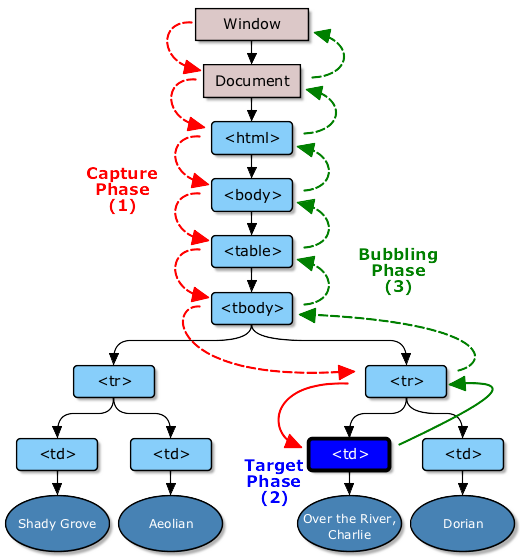
W3C中DOM 3级别标准事件模型中关于文档的事件流及事件流中三个阶段的说明,并附图如下。
###DOM event flow
The DOM event flow is the process through which the event originates from the DOM Events implementation and is dispatched into a tree. Each event has an event target, a targeted node in the case of the DOM Event flow, toward which the event is dispatched by the DOM Events implementation.
###Event Phases
The event is dispatched following a path from the root of the tree to this target node. It can then be handled locally at the target node level or from any target ancestor higher in the tree. The event dispatching (also called event propagation) occurs in three phases:
- The capture phase: the event is dispatched on the target ancestors from the root of the tree to the direct parent of the target node.
- The target phase: the event is dispatched on the target node.
- The bubbling phase: the event is dispatched on the target ancestors from the direct parent of the target node to the root of the tree.
更多关于事件模型的说明,以及在IE中的事件模型缺陷,可以查看ppk的几篇文章,还有篇中文文章:
- http://www.quirksmode.org/js/this.html
- http://www.quirksmode.org/js/events_order.html
- http://www.quirksmode.org/js/events_advanced.html
- DOM 2级别的标准事件模型与IE的事件模型区别
###custom special event
// multiple click example$(function($) { $('#multiclick_exmple') .bind('multiclick', { threshold: 3 }, function( event ) { alert('Clicked three times!'); }) .bind('multiclick', { threshold: 5 }, function( event ) { alert('Clicked 5 times!'); });}); |
###mouseenter and mouseleave
在下面这个div.out.overout元素中测试mouseover/mouseout事件,可注意控制台中的输出,鼠标在此元素内部移动而触发的mouseover/mouseout事件的状况,如鼠标移动经过子元素P:first再进入到div.out.overout元素时,会先触发一个此元素div.out.overout上的mouseout事件,此时event.relatedTarget为鼠标即将进入的元素,即其本身div.out.overout,然后再一次触发其mouseover事件,此时event.relatedTarget为鼠标之前所离开的元素,即当前元素中的子元素P:first。
从例子中可观察知道,鼠标在元素内部移动时,会非常频繁的触发mouseover/mouseout事件,当鼠标进出元素时只需要触发一次事件监听器,mouseover/mouseout事件特性就不符合要求了,jQuery采用了IE中的二个事件类型名称,即mouseenter/mouseleave。
var livemouseenter = $('.livemouseenter');livemouseenter.live('mouseenter', function(event){ $(this).css('background', '#fdd'); $.console.log("mouseentered into element: ", this);});$(document).delegate('.livemouseenter', 'mouseleave', function() { $(this).css('background', '#ff0'); $.console.log("mouseleaved from element: ", this);}); |
###stopImmediatePropagation and stopPropagation
说明如下:
stopImmediatePropagation 是DOM3引入的事件API,这个方法是用来阻止同组的事件监听器被触发,与Event.stopPropagation()不同的是,这个方法一旦调用,再次调用stopImmediatePropagation这个方法将不会有任何作用.这个方法并不会阻止事件的默认行为,需要用Event.preventDefault()来阻止事件的默认行为.
stopImmediatePropagation 也会与 stopPropagation 方法一样,将阻止事件的冒泡,事件的target的祖先对象将无法获得这个事件,并且在这个元素上绑定的相同事件的其他监听器也将不会被触发,这个与事件组event group的概念又有关系,所谓immediate就是指在当前对象的事件组中的其他事件监听器将不会触发.
var livemouseenter = $('.livemouseenter');livemouseenter.bind('mouseenter', {selector: '.livemouseenter'}, function(event){ $(this).css('background', '#fdd'); $.console.log("mouseentered into element: ", this);});$(document).delegate('.livemouseenter', 'mouseleave', function() { $(this).css('background', '#ff0'); $.console.log("mouseleaved from element: ", this);}); |
var i = 0;$("div.overout").mouseover(function(e){ $("p:first", this).text("mouse over"); $("p:last", this).text(++i); $(this).css('background', '#FF6'); $.console.log("mouseover relatedTarget:", e.relatedTarget);}).mouseout(function(e){ $("p:first", this).text("mouse out"); $(this).css('background', '#D6EDFC'); $.console.log("mouseout relatedTarget:", e.relatedTarget);});var n = 0;$("div.enterleave").mouseenter(function(e){ $("p:first", this).text("mouse enter"); $("p:last", this).text(++n); $(this).css('background', '#6F6'); $.console.log("mouseenter relatedTarget:" + e.type, e.relatedTarget);}).mouseleave(function(e){ $("p:first", this).text("mouse leave"); $(this).css('background', '#FC0'); $.console.log("mouseleave relatedTarget:" + e.type, e.relatedTarget);}); |
// 注意.live()方法在链式操作中发生的错误// $("div").find("p").next().live("click", function(){alert(1)}); // uncaught exception |
// As of jQuery 1.4.2 duplicate event handlers can be bound to an element instead of being discarded. For example:function test(){ $.console.log("Hello"); }$("#button").click( test );$("#button").click( test );// The above will generate two alerts when the button is clicked. |
var fn1 = function() { $.console.log('fn1'); $.console.log(fn1.guid);};var fn2 = function() { $.console.log('fn2'); $.console.log(fn2.guid);};// fn1代理fn2,也可以说是fn2代理fn1,这个没有关系jQuery.proxy(fn1, fn2);$('body').click(fn1).click();$('body').click(fn2).click();// 因为fn1和fn2都使用了fn1的guid,所以在移除fn1时,会将fn2绑定的事件监听器也一起移除,反之亦然// $('body').unbind('click', fn1);// 如果修改了fn2的guid值,则使用unbind将无法达到移除事件监听器的目的,jQuery.event.remove实际上是根据传进来的handler.guid控制事件监听器删除的fn2.guid = jQuery.guid++;// 因为fn2的guid发生了变化,下面的这个操作实际上并不会从body上移除fn1和fn2的这2个事件监听器,因为那二个事件监听器的guid是使用fn1的guid进行控制的$('body').unbind('click', fn2); |
// 在IE8中下面这个代码不能准确执行,总是会在延迟一次按键触发,当前版本1.4.2中的jQuery.event.special.change实现有小问题$('#test_change_event').change(function(){ $.console.log($(this).val());}); |
// 下面3篇文章由上到下阅读,了解jQuery的特殊事件类型的设计思想// http://brandonaaron.net/blog/2009/03/26/special-events// http://brandonaaron.net/blog/2009/06/4/jquery-edge-new-special-event-hooks// http://brandonaaron.net/blog/2010/02/25/special-events-the-changes-in-1-4-2// http://benalman.com/news/2010/03/jquery-special-events/// In jQuery 1.4.2,添加自定义的特殊事件类型$.event.special.multiclick = { add: function( details ) { // called for each bound handler // 此方法在每次此特殊事件类型的事件绑定时,都会调用,一般都是用来代替掉原来的事件处理方法 var handler = details.handler, data = details.data, threshold = data && data.threshold || 1, clicks = 0; // replace the handler // 注意这里将details这个object中的handler属性修改了,原来加在details.handler.guid就被丢掉了,需要在special.add方法执行后,重新添加回去: if ( !handleObj.handler.guid ) { handleObj.handler.guid = handler.guid; } details.handler = function(event) { // increase number of clicks // 因为在multiclick.handler中用$.event.handle.apply( this, arguments )来触发此特殊事件,所以这个匿名方法在click发生时,会一直被调用,如果这个特殊事件类型有多个事件绑定,那么每次点击会多次运行 clicks += 1; if ( clicks === threshold ) { // required number of clicks reached, reset clicks = 0; // call the actual supplied handler handler.apply( this, arguments ); } }; }, setup: function( data, namespaces ) { // called once per an element // 在当前元素上此特殊事件类型第一次发生时,会调用此方法 $( this ).bind( "click", $.event.special.multiclick.handler ); }, teardown: function( namespaces ) { // called once per an element // 在此特殊事件类型的最后一个事件监听器被移除,会调用此方法 $( this ).unbind( "click", $.event.special.multiclick.handler ); }, remove: function( details ) { // called for each bound handler // 每个事件监听器删除时,都会调用此方法做一些清理动作 }, handler: function( event ) { // 指定事件类型,并手动触发特殊类型的事件处理器 // set correct event type event.type = "multiclick"; // trigger multiclick handlers $.event.handle.apply( this, arguments ); }};$(function($) { $('#multiclick_exmple') .bind('multiclick', { threshold: 3 }, function( event ) { alert('Clicked three times!'); }) .bind('multiclick', { threshold: 5 }, function( event ) { alert('Clicked 5 times!'); });}); |
$('#immediate').bind('click', function(e){ $.console.log('first');});$('#immediate').bind('click', function(e){ $.console.log('second'); e.stopImmediatePropagation();});// never trigger this event listener because of event.stopImmediatePropagation()$('#immediate').bind('click', function(e){ $.console.log('third');}); |