9.3 Positioning schemes[CSS2.1中的定位方式]
In CSS 2.1, a box may be laid out according to three positioning schemes:
Normal flow [p. 130] . In CSS 2.1, normal flow includes block formatting [p. 130]
of block [p. 121] boxes, inline formatting [p. 130] of inline [p. 123] boxes, relative
positioning [p. 133] of block or inline boxes, and positioning of run-in [p. 124]
boxes.Floats [p. 134] . In the float model, a box is first laid out according to the normal
flow, then taken out of the flow and shifted to the left or right as far as possible.
Content may flow along the side of a float.Absolute positioning [p. 141] . In the absolute positioning model, a box is
removed from the normal flow entirely (it has no impact on later siblings) and
assigned a position with respect to a containing block.Note. CSS 2.1’s positioning schemes help authors make their documents more accessible by allowing them to avoid mark-up tricks (e.g., invisible images) used for layout effects.
在CSS中关于position的说明:
position:relative | absolute | static | fixed
static 没有特别的设定,遵循基本的定位规定,不能通过z-index进行层次分级。
relative 不脱离文档流,参考自身静态位置,并可通过 top, bottom, left, right 相对于其原来的静态位置进行定位,并且可以通过z-index进行层次分级。
absolute 脱离文档流,通过 top, bottom, left, right 定位。选取其最近的non-static父级定位元素,当全部祖先元素的 position 为 static 时,absolute元素将以body坐标原点进行定位,可以通过z-index进行层次分级。
fixed 固定定位,这里他所固定的对像是可视窗口而并非是body或是父级元素。可通过z-index进行层次分级。
一、DOM元素对于offset提供了offsetParent、offsetTop、offsetLeft、offsetWidth、offsetHeight五个属性来定位于元素的相对位置。
offsetParent是指当前元素的相对定位时的参考元素,当前元素可以根据offsetParent和top/left进行定位。
offsetParent、parentNode(IE: parentElement)都是指元素的父节点。它们的针对的目标是不一样,功能也不一样。
parentNode就是取文档层次中包含该节点的最近父节点(直接的父节点)。在FF中对于Attr, Document, DocumentFragment, Entity和Notation这些父节点,其parentNode返回null。还有如果没有附加到文档树的元素也是返回null。
offsetParent是指可视的父节点。如:
<html><body><form><input type="text" id="t1"/></form></body></html> |
id为t1的元素的offsetParent是body,而parentNode则是form。
offsetLeft和offsetTop是指当前元素左边框或上边框到offsetParent的左边框或上边框的距离。
包含了当前元素的margin和其offsetParent的padding。不包含offsetParent的border的宽度(在IE8中将会包括offsetParent的border宽度)。如果当前元素为non-position的元素,并且有left/top偏移量的话,offsetLeft和offsetTop受这个偏移量的影响,也就是说在offsetLeft/offsetTop会包含元素style中的left/top值。
offsetWidth/offsetHeight与offsetLeft/offsetTop相对offsetParent计算的方式不一样,它们就是当前元素自身的宽度或高度。它包含border、padding、scrollBar(显示的话),不包括因为overflow而hidden的宽度。
分析了offset,我们可以发现offsetLeft、offsetTop与CSS中top,left的属性有相通性,offsetLeft、offsetTop只能取值。而我们可以通过CSS中top,left的属性来设定一个元素的相对其它元素的位置(绝对定位,就是相对于body)。
二、DOM元素对于scroll提供了scrollWidth、scrollHeigth、scrollTop、scrollLeft四个属性,这四个属性是对于产生了scroll的元素进行操作的。scroll的Width、Heigth是指元素真实的宽度和高度,它包含被scroll起来的部分,而scrollTop、scrollLeft则是被卷起来的隐藏部分的大小。
scrollHeight 是元素的实际高度 + 元素padding,包含元素的隐藏的部分,但其 border、margin 不应计算在内。
offsetHeight 是自身元素的宽度,而scrollHeight是内部元素的绝对宽度,包含内部元素的隐藏的部分。
三、DOM元素对于client提供了clientWidth、clientHeigth、clientTop、clientLeft四个属性,这组属性是对于client进行操作的。clientWidth、clientHeigth是元素的内容可视区域的高度或宽度,包含padding,不包含scrollbar、border、margin,可以看出是元素可视的区域。
文档流中哪些元素可以用于定位
document.body(0, 0)是元素的终结offsetParent(没有找到就是它了), absolute、relative、fixed 都采用可以top, left来定其在文档的位置,也能计算其位置。
而static是不需要top/left来设定其位置,offset是当前元素相对已经定位的元素的位移。当前元素的offsetParent是其父辈节点中的 position 为 non-static 的节点。
在mozilla中http://developer.mozilla.org/en/DOM/element.offsetParent,可以看到如果元素没有定位,offsetParent就是body。
jQuery针对于获取offsetParent提供了一个改进的方法,它还是在浏览器的offsetParent基础之上多加了一个判断的处理,筛选过滤其有可能会是static的祖先节点。
定义jQuery.fn.offset()方法,注意这个方法不是返回当前元素的offsetLeft/offsetTop,而是当前元素相对于当前document的位置。
根据是否有Element.getBoundingClientRect()方法,而分别定义offset方法,这里这样的写法造成数十行代码重复的出现,并不像传统的jQuery代码那么优雅:
// http://msdn.microsoft.com/en-us/library/ms536433.aspx// 下面这个判断测试了IE6/IE7/IE8/Opera/Safari/Chrome/Firefox3这些浏览器,"getBoundingClientRect" in document.documentElement 都返回true// 只有linux下面的Konqueror4.3中这个值返回为false// Get the current coordinates of the first element in the set of matched elements, relative to the document.if ( "getBoundingClientRect" in document.documentElement ) { // 定义jQuery.fn.offset()方法,获取当前元素在整个document文档中的偏移量 // 注意:返回的这个值与elem.offsetLeft/elem.offsetTop不一样,关于offsetLeft/offsetTop的说明在上面已有详细说明 // Get the current coordinates of the first element in the set of matched elements, relative to the document. jQuery.fn.offset = function( options ) { var elem = this[0]; // 如果设置了options,则利用jQuery.offset.setOffset()方法,设置jquery对象匹配到的所有元素的offset值 if ( options ) { return this.each(function( i ) { jQuery.offset.setOffset( this, options, i ); }); } // 如果elem是window/document的话,jQuery.fn.offset返回null if ( !elem || !elem.ownerDocument ) { return null; } // 如果elem是document.body的话,调用jQuery.offset.bodyOffset()方法返回body的offset值 if ( elem === elem.ownerDocument.body ) { return jQuery.offset.bodyOffset( elem ); } // Document.documentElement: A read-only reference to the html tag of the document. // Gecko/webkit 中的元素有getBoundingClientRect方法,返回ClientRect对象,包括以下属性: bottom, height, left, right, top, width // 其中height/width指元素的offsetHeight/offsetWidth,是包括元素的padding和border宽高的 var box = elem.getBoundingClientRect(), doc = elem.ownerDocument, body = doc.body, docElem = doc.documentElement, clientTop = docElem.clientTop || body.clientTop || 0, clientLeft = docElem.clientLeft || body.clientLeft || 0, // pageXOffset, pageYOffset: Read-only integers that specify the number of pixels that the current document has been scrolled to the right (pageXOffset) and down (pageYOffset). top = box.top + (self.pageYOffset || jQuery.support.boxModel && docElem.scrollTop || body.scrollTop ) - clientTop, left = box.left + (self.pageXOffset || jQuery.support.boxModel && docElem.scrollLeft || body.scrollLeft) - clientLeft; return { top: top, left: left }; };} else { jQuery.fn.offset = function( options ) { var elem = this[0]; if ( options ) { return this.each(function( i ) { jQuery.offset.setOffset( this, options, i ); }); } if ( !elem || !elem.ownerDocument ) { return null; } if ( elem === elem.ownerDocument.body ) { return jQuery.offset.bodyOffset( elem ); } jQuery.offset.initialize(); var offsetParent = elem.offsetParent, prevOffsetParent = elem, doc = elem.ownerDocument, computedStyle, docElem = doc.documentElement, body = doc.body, defaultView = doc.defaultView, prevComputedStyle = defaultView ? defaultView.getComputedStyle( elem, null ) : elem.currentStyle, top = elem.offsetTop, left = elem.offsetLeft; while ( (elem = elem.parentNode) && elem !== body && elem !== docElem ) { if ( jQuery.offset.supportsFixedPosition && prevComputedStyle.position === "fixed" ) { break; } computedStyle = defaultView ? defaultView.getComputedStyle(elem, null) : elem.currentStyle; top -= elem.scrollTop; left -= elem.scrollLeft; if ( elem === offsetParent ) { top += elem.offsetTop; left += elem.offsetLeft; if ( jQuery.offset.doesNotAddBorder && !(jQuery.offset.doesAddBorderForTableAndCells && /^t(able|d|h)$/i.test(elem.nodeName)) ) { top += parseFloat( computedStyle.borderTopWidth ) || 0; left += parseFloat( computedStyle.borderLeftWidth ) || 0; } prevOffsetParent = offsetParent, offsetParent = elem.offsetParent; } if ( jQuery.offset.subtractsBorderForOverflowNotVisible && computedStyle.overflow !== "visible" ) { top += parseFloat( computedStyle.borderTopWidth ) || 0; left += parseFloat( computedStyle.borderLeftWidth ) || 0; } prevComputedStyle = computedStyle; } if ( prevComputedStyle.position === "relative" || prevComputedStyle.position === "static" ) { top += body.offsetTop; left += body.offsetLeft; } if ( jQuery.offset.supportsFixedPosition && prevComputedStyle.position === "fixed" ) { top += Math.max( docElem.scrollTop, body.scrollTop ); left += Math.max( docElem.scrollLeft, body.scrollLeft ); } return { top: top, left: left }; };} |
定义jQuery.offset这个Object,这个对象中的3个方法主要是jQuery.fn.offset()方法定义时用到:
jQuery.offset = { // 通过initialize()方法检查浏览器关于border/position/margin与offset的关系,代码取出来可单独执行查看效果 // 如在IE8中doesNotAddBorder为false,即元素的offsetLeft值会包括offsetParent的borderLeftWidth值,在Firefox3/safari4/chrome2中此值为true // 这些变量在以下几个浏览器的表现情况如下: // safari4/chrome2 // doesNotAddBorder: true // doesAddBorderForTableAndCells: false // supportsFixedPosition: true // subtractsBorderForOverflowNotVisible: false // doesNotIncludeMarginInBodyOffset: true // // IE8 // doesNotAddBorder: false // doesAddBorderForTableAndCells: true // supportsFixedPosition: true // subtractsBorderForOverflowNotVisible: false // doesNotIncludeMarginInBodyOffset: true // // firefox3 // doesNotAddBorder: true // doesAddBorderForTableAndCells: true // supportsFixedPosition: true // subtractsBorderForOverflowNotVisible: false // doesNotIncludeMarginInBodyOffset: true initialize: function() { var body = document.body, container = document.createElement("div"), innerDiv, checkDiv, table, td, bodyMarginTop = parseFloat( jQuery.curCSS(body, "marginTop", true) ) || 0, html = "<div style='position:absolute;top:0;left:0;margin:0;border:5px solid #000;padding:0;width:1px;height:1px;'><div></div></div><table style='position:absolute;top:0;left:0;margin:0;border:5px solid #000;padding:0;width:1px;height:1px;' cellpadding='0' cellspacing='0'><tr><td></td></tr></table>"; jQuery.extend( container.style, { position: "absolute", top: 0, left: 0, margin: 0, border: 0, width: "1px", height: "1px", visibility: "hidden" } ); container.innerHTML = html; body.insertBefore( container, body.firstChild ); innerDiv = container.firstChild; checkDiv = innerDiv.firstChild; td = innerDiv.nextSibling.firstChild.firstChild; this.doesNotAddBorder = (checkDiv.offsetTop !== 5); this.doesAddBorderForTableAndCells = (td.offsetTop === 5); checkDiv.style.position = "fixed", checkDiv.style.top = "20px"; // safari subtracts parent border width here which is 5px this.supportsFixedPosition = (checkDiv.offsetTop === 20 || checkDiv.offsetTop === 15); checkDiv.style.position = checkDiv.style.top = ""; innerDiv.style.overflow = "hidden", innerDiv.style.position = "relative"; this.subtractsBorderForOverflowNotVisible = (checkDiv.offsetTop === -5); this.doesNotIncludeMarginInBodyOffset = (body.offsetTop !== bodyMarginTop); body.removeChild( container ); body = container = innerDiv = checkDiv = table = td = null; jQuery.offset.initialize = jQuery.noop; }, bodyOffset: function( body ) { var top = body.offsetTop, left = body.offsetLeft; // 通过initialize()方法是为了设置jQuery.offset对象的几个属性值,如下面会使用到的doesNotIncludeMarginInBodyOffset属性 jQuery.offset.initialize(); if ( jQuery.offset.doesNotIncludeMarginInBodyOffset ) { top += parseFloat( jQuery.curCSS(body, "marginTop", true) ) || 0; left += parseFloat( jQuery.curCSS(body, "marginLeft", true) ) || 0; } return { top: top, left: left }; }, setOffset: function( elem, options, i ) { // set position first, in-case top/left are set even on static elem // 如果当前对象position为static则将其置为relative if ( /static/.test( jQuery.curCSS( elem, "position" ) ) ) { elem.style.position = "relative"; } var curElem = jQuery( elem ), // 获取当前元素的offset值,后面可作为参数使用 curOffset = curElem.offset(), // elem已经被设置为relative position,计算出当前elem的位置偏移量 // 但如果是absolute元素,此处会因为top/left为auto值,而使得curTop/curLeft返回为0,这个结果有时候并不是想要的,会产生计算BUG,下面会继续说明 curTop = parseInt( jQuery.curCSS( elem, "top", true ), 10 ) || 0, curLeft = parseInt( jQuery.curCSS( elem, "left", true ), 10 ) || 0; // function(index, coords) // A function to return the coordinates to set. Receives the index of the element in the collection as the first argument and the current coordinates as the second argument. The function should return an object with the new top and left properties. // The .offset() setter method allows us to reposition an element. The element's position is specified relative to the document. If the element's position style property is currently static, it will be set to relative to allow for this repositioning. // 如果options是一个方法,则将options作为每个elem的方法,传入其在jquery对象中的位置和当前的offset值作为方法参数,进行调用返回的值作为新的options if ( jQuery.isFunction( options ) ) { options = options.call( elem, i, curOffset ); } // .offset( coordinates ) Returns: jQuery // Description: Set the current coordinates of every element in the set of matched elements, relative to the document. // coordinates: An object containing the properties top and left, which are integers indicating the new top and left coordinates for the elements. // 注意此处代码有计算bug // jQuery此处计算relative元素,结果是正确的,如果是absolute元素,并且其offsetParent不是body元素,结果也是正确的 // 如果当前elem为absolute定位元素,并且其offsetParent为body时,需要注意在不同浏览器中,会出现不同的结果: // firefox3: 因为curTop其实根据浏览器的window.getComputedStyle()方法返回的是像素值,所以parseInt之后是一个数字,而不是0,所以在下面的计算中也没问题 // IE8/safari4/chrome2: 因为elem.currentStyle(IE8)和window.getComputedStyle()方法返回的可能是"auto"值,从而curTop/curLeft被设置为0,而实际当前元素到body是有top/left值的,从而导致下面的公式计算产生问题。 // jQuery bug tracker: http://dev.jquery.com/ticket/6483 var props = { top: (options.top - curOffset.top) + curTop, left: (options.left - curOffset.left) + curLeft }; // 此处正确的计算方法应该再补上以下判断: if (jQuery.nodeName(curElem.offsetParent()[0], 'body') && curElem.css('position') === 'absolute') { props = {top: options.top, left: options.left}; } // options = {top: 1, left: 1, using: function(i, corps){}} if ( "using" in options ) { // options中不但包括了位置的新偏移量,还有一个方法用于设置当前elem的offset options.using.call( elem, props ); } else { // 调用jQuery.fn.css()方法将offset值设置给当前elem curElem.css( props ); } }}; |
定义jQuery.fn.position()方法和jQuery.fn.offsetParent()方法:
jQuery.fn.position(): Get the current coordinates of the first element in the set of matched elements, relative to the offset parent.
The jQuery.fn.position() method allows us to retrieve the current position of an element relative to the offset parent.
Contrast this with .offset(), which retrieves the current position relative to the document. When positioning a new element near another one and within the same containing DOM element, .position() is the more useful.
jQuery.fn.position()方法是计算当前元素(包括当前元素的margin在内)相对于其offsetParent的border的偏移量。
即position方法返回的值为:如果当前元素为static元素,则值为offsetParent的paddingLeft/paddingTop值,如果当前元素为non-static元素,则是offsetParent.paddingLeft + elem.style.left的值。
jQuery.fn.extend({ position: function() { if ( !this[0] ) { return null; } var elem = this[0], // Get *real* offsetParent // 找到elem的offsetParent offsetParent = this.offsetParent(), // Get correct offsets offset = this.offset(), parentOffset = /^body|html$/i.test(offsetParent[0].nodeName) ? { top: 0, left: 0 } : offsetParent.offset(); // Subtract element margins // 减去当前元素的marginTop/marginLeft // note: when an element has margin: auto the offsetLeft and marginLeft are the same in Safari causing offset.left to incorrectly be 0 offset.top -= parseFloat( jQuery.curCSS(elem, "marginTop", true) ) || 0; offset.left -= parseFloat( jQuery.curCSS(elem, "marginLeft", true) ) || 0; // Add offsetParent borders // 添加offsetParent的边框值 parentOffset.top += parseFloat( jQuery.curCSS(offsetParent[0], "borderTopWidth", true) ) || 0; parentOffset.left += parseFloat( jQuery.curCSS(offsetParent[0], "borderLeftWidth", true) ) || 0; // jQuery.fn.position()方法是计算当前元素(包括当前元素的margin在内)相对于其offsetParent的border的偏移量。 // Subtract the two offsets return { top: offset.top - parentOffset.top, left: offset.left - parentOffset.left }; }, // 通过offsetParent()方法,找到当前元素所有祖先元素中,position为non-static的祖先元素,如果没找到,则最后为document.body // 在文档流中找到position为非static的祖先元素,当前元素能根据此元素进行top/left定位 offsetParent: function() { return this.map(function() { var offsetParent = this.offsetParent || document.body; while ( offsetParent && (!/^body|html$/i.test(offsetParent.nodeName) && jQuery.css(offsetParent, "position") === "static") ) { offsetParent = offsetParent.offsetParent; } return offsetParent; }); }}); |
- jQuery.fn.scrollLeft(): Get the current horizontal position of the scroll bar for the first element in the set of matched elements.
- jQuery.fn.scrollLeft( value ): Set the current horizontal position of the scroll bar for each of the set of matched elements.
- jQuery.fn.scrollTop(): Get the current vertical position of the scroll bar for the first element in the set of matched elements.
- jQuery.fn.scrollTop( value ): Set the current vertical position of the scroll bar for each of the set of matched elements.
// scrollLeft: 对象的最左边到对象在当前窗口显示的范围内的左边的距离,即是在出现了横向滚动条的情况下,滚动条拉动的距离// scrollTop: 对象的最顶部到对象在当前窗口显示的范围内的顶边的距离,即是在出现了纵向滚动条的情况下,滚动条拉动的距离,或者说对象被“卷”起的高度// scrollLeft/scrollTop在对象被设置了overview属性,产生滚动条之后产生// Create scrollLeft and scrollTop methodsjQuery.each( ["Left", "Top"], function( i, name ) { var method = "scroll" + name; jQuery.fn[ method ] = function(val) { var elem = this[0], win; if ( !elem ) { return null; } // 如果val有值,则将window对象scrollTo对应的位置 // 其他elem元素则设置elem.scrollLeft属性为val值 if ( val !== undefined ) { // Set the scroll offset return this.each(function() { win = getWindow( this ); if ( win ) { win.scrollTo( !i ? val : jQuery(win).scrollLeft(), i ? val : jQuery(win).scrollTop() ); } else { this[ method ] = val; } }); } else { // 如果当前元素elem是window或者是document时,返回window对象,不然返回false win = getWindow( elem ); // Return the scroll offset return win ? ("pageXOffset" in win) ? win[ i ? "pageYOffset" : "pageXOffset" ] : jQuery.support.boxModel && win.document.documentElement[ method ] || win.document.body[ method ] : // 调用elem.scrollLeft属性返回结果 elem[ method ]; } };});// 获取当前元素elem所在的window对象function getWindow( elem ) { return ("scrollTo" in elem && elem.document) ? elem : elem.nodeType === 9 ? elem.defaultView || elem.parentWindow : false;} |
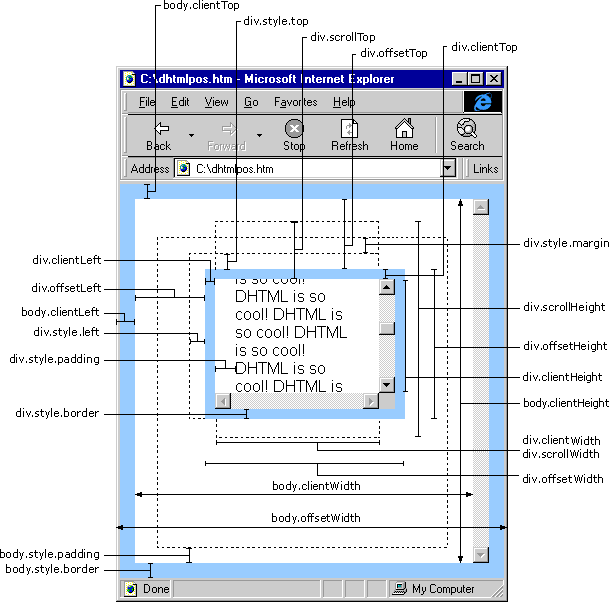
图注:其中中间的div的position为non-static属性,其有style.left,style.top属性值,div向右下角有偏移量
clientLeft为左边border宽度的像素值(只有数值),即clientLeft == parseFloat(jQuery(div).css('borderLeftWidth'), 10)
clientWidth为div中间的可视区域宽度,不包括scrollbar的宽度,这里因为浏览器不同,scrollbar的宽度也是不同的,所以不同浏览器中clientWidth值也会不一样