服务器中的错误记录类似于这种:
127.0.0.1 - - [01/Oct/2011:11:51:04 +0800] "-" 400 0 "-" "-" "-" |
这个问题都是发生在google chrome浏览器访问之后产生的,也就是说400错误是由chrome浏览器产生的。
通过smartsniff抓取了一下tcp的包,如图所示,注意选中的那三条记录的字节数,原来chrome发送了一条无http请求头的空连接给服务器,所以服务器自然返回400了,
其原因与chrome的预先连接pre-connection这项技术有关系。
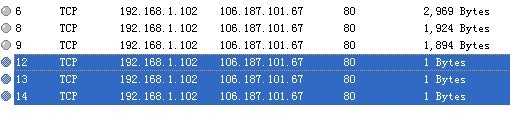
stackexchange.com上也有人做了如下回复:
Check and see if the ip address causing the 400 is using Google Chrome. Chrome uses pre-connection to establish several connection with server, and close them if not used.Since no request is made in the connection, nginx will record this error. |
测试
要验证上面的分析结果很简单,打开命令行cmd.exe,在里面输入telnet server_ip 80,等待连接成功之后直接关掉cmd,这时去查看nginx的log文件中就多了一条400错误记录。
关闭默认主机的日志记录就可以解决问题:
server { listen *:80 default; server_name _; return 444; access_log off;} |