tldr openssl
tldr opensslOpenSSL cryptographic toolkit.- Generate a 2048bit RSA private key and save it to a file: openssl genrsa -out filename.key 2048- Generate a certificate signing request to be sent to a certificate authority: openssl req -new -sha256 -key filename.key -out filename.csr- Generate a self-signed certificate from a certificate signing request valid for some number of days: openssl x509 -req -days days -in filename.csr -signkey filename.key -out filename.crt- Display certificate information: openssl x509 -in filename.crt -noout -text- Display the start and expiry dates for a domain certificate: openssl s_client -connect host:port 2>/dev/null | openssl x509 -noout -dates- Display the certificate presented by an SSL/TLS server: openssl s_client -connect host:port </dev/null- Display the complete certificate chain of an HTTPS server: openssl s_client -connect host:443 -showcerts </dev/null |
OpenSSL
OpenSSL 是一个开放源代码的软件库包,其主要库是以 C 语言所写成,实现了基本的加密功能,实现了 SSL 与 TLS 协议。
OpenSSL 功能组成
OpenSSL 整个软件包大概可以分成三个主要的功能部分:
- libcryto,这是一个具有通用功能的加密库,里面实现了众多的加密库。
- libssl,这个是实现ssl机制的,它是用于实现TLS/SSL的功能。
- openssl,是个多功能命令行工具,它可以实现加密解密,甚至还可以当CA来用,可以让你创建证书、吊销证书。
OpenSSL 基本功能
- Creation and management of private keys, public keys and parameters
- Public key cryptographic operations
- Creation of X.509 certificates, CSRs and CRLs
- Calculation of Message Digests
- Encryption and Decryption with Ciphers
- SSL/TLS Client and Server Tests
- Handling of S/MIME signed or encrypted mail
- Time Stamp requests, generation and verification
对称加密
OpenSSL 一共提供了8种对称加密算法,其中7种是分组加密算法,仅有的一种流加密算法是 RC4。
这7种分组加密算法分别是:
- AES
- DES
- Blowfish
- CAST
- IDEA
- RC2
- RC5
都支持电子密码本模式(ECB)、加密分组链接模式(CBC)、加密反馈模式(CFB)和输出反馈模式(OFB)四种常用的分组密码加密模式。其中,AES使用的加密反馈模式(CFB)和输出反馈模式(OFB)分组长度是128位,其它算法使用的则是64位。事实上,DES算法里面不仅仅是常用的DES算法,还支持三个密钥和两个密钥3DES算法。
非对称加密
OpenSSL 一共实现了4种非对称加密算法,包括DH算法、RSA算法、DSA算法和椭圆曲线算法(EC)。DH 算法一般用于密钥交换。RSA 算法既可以用于密钥交换,也可以用于数字签名,当然,如果你能够忍受其缓慢的速度,那么也可以用于数据加密。DSA 算法则一般只用于数字签名。
信息摘要
OpenSSL实现了5种信息摘要算法,分别是MD2、MD5、MDC2、SHA(SHA1)和RIPEMD。SHA算法事实上包括了SHA和SHA1两种信息摘要算法。此外,OpenSSL还实现了DSS标准中规定的两种信息摘要算法DSS和DSS1。
SSL
SSL 是Secure Sockets Layer(安全套接层协议)的缩写,可以在Internet上提供秘密性传输。
SSL包含记录层(Record Layer)和传输层,记录层协议确定传输层数据的封装格式。传输层安全协议使用X.509认证,之后利用非对称加密演算来对通信方做身份认证,之后交换对称密钥作为会谈密钥(Session key)。这个会谈密钥是用来将通信两方交换的数据做加密,保证两个应用间通信的保密性和可靠性,使客户与服务器应用之间的通信不被攻击者窃听。
TLS
传输层安全性协议(英语:Transport Layer Security,缩写作 TLS),及其前身安全套接层(Secure Sockets Layer,缩写作 SSL)是一种安全协议,目的是为互联网通信,提供安全及数据完整性保障。
TLS 协议的优势是与高层的应用层协议(如HTTP、FTP、Telnet等)无耦合,应用层协议能透明地运行在 TLS 协议之上,由 TLS 协议进行创建加密通道需要的协商和认证,应用层协议传送的数据在通过 TLS 协议时都会被加密,从而保证通信的私密性。
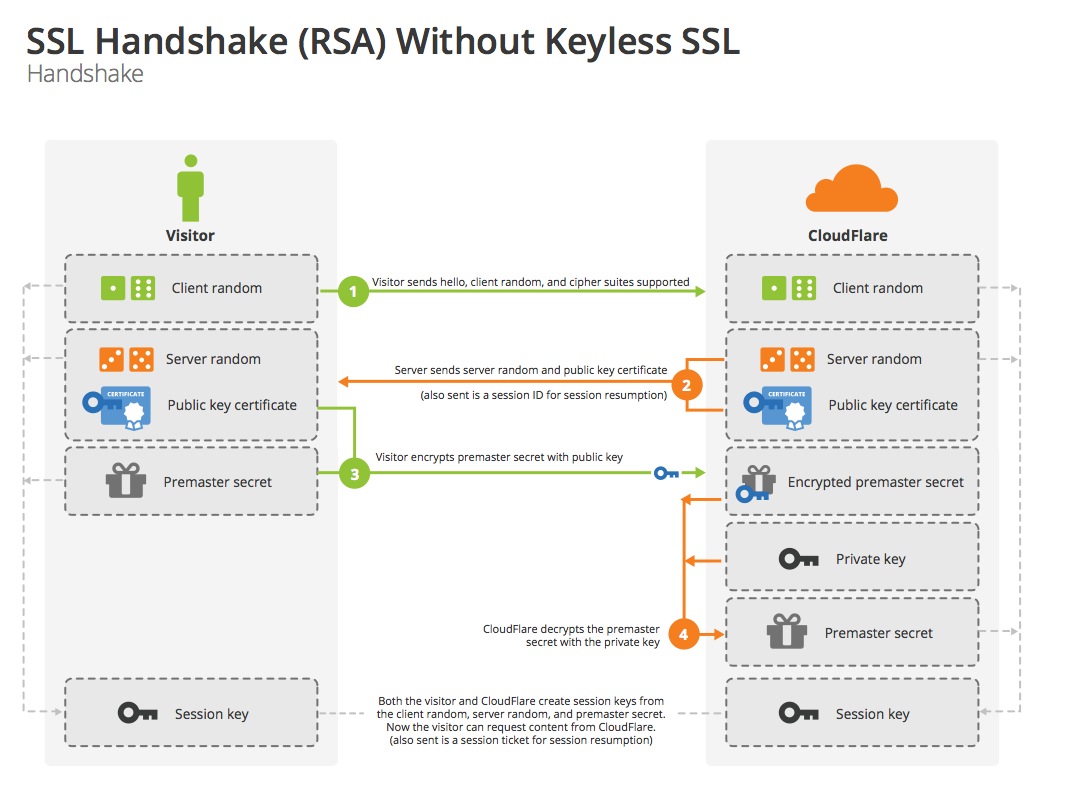
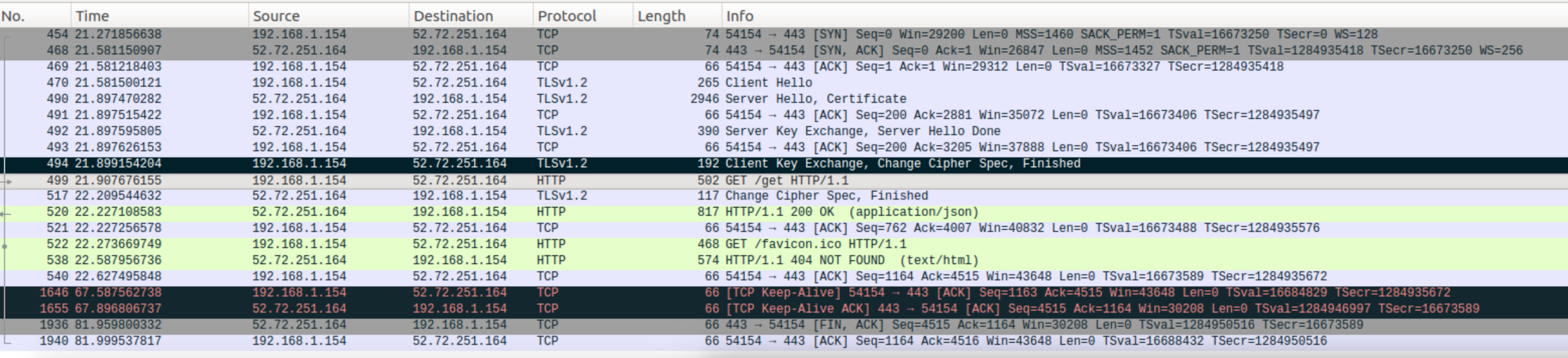
一旦客户端和服务器都同意使用 TLS 协议,他们通过使用一个握手过程协商出一个有状态的连接以传输数据。通过握手,客户端和服务器协商各种参数用于创建安全连接:
- 当客户端连接到支持 TLS 协议的服务器要求创建安全连接,并发送客户端支持的加密算法和哈希算法,以及用于生成密钥的随机数,握手开始。
- 服务器从该列表中决定加密和散列函数,并生成服务器端的随机数,通知客户端,并且一起发回服务器数字证书(X.509 数字证书),此证书通常包含服务器的名称、受信任的证书颁发 CA 机构和服务器的公钥。
- 客户端通过CA 机构的公钥(已默认安装在浏览器中),确认服务器证书的有效性。同时客户端使用服务器的公钥加密随机生成的密钥,并将其发送到服务器。
- 服务器收到客户端公钥加密的密钥,使用自己的私钥解密,获得密钥。
- 利用第1个客户端生成的随机数,第2个服务端的随机数,加上最后一个客户端生成的密钥,双方通过算法生成用于加密和解密的对称密钥。
这就是 TLS 协议的握手,握手完毕后的连接是安全的,直到连接(被)关闭。如果上述任何一个步骤失败,TLS 握手过程就会失败,并且断开所有的连接。
SSL RSA handshake
wireshark SSL stream
TLS包含三个基本阶段
- 对等协商支持的密钥算法
- 基于非对称密钥的信息传输加密和身份认证、基于PKI证书的身份认证
- 基于对称密钥的数据传输保密
在第一阶段,客户端与服务器协商所用密码算法,当前广泛实现的算法选择如下:
- 公钥私钥非对称密钥保密系统:RSA、Diffie-Hellman、DSA
- 对称密钥保密系统:RC2、RC4、IDEA、DES、Triple DES、AES以及Camellia
- 单向散列函数:MD5、SHA1以及SHA256
TLS/SSL有多样的安全保护措施:
- 所有的记录层数据均被编号,用于消息验证码校验
OpenSSL 特性
数据保密性
信息加密就是把明码的输入文件用加密算法转换成加密的文件以实现数据的保密。加密的过程需要用到密钥来加密数据然后再解密。没有了密钥,就无法解开加密的数据。数据加密之后,只有密钥要用一个安全的方法传送。加密过的数据可以公开地传送。
数据完整性
加密也能保证数据的一致性。例如:消息验证码(MAC),能够校验用户提供的加密信息,接收者可以用MAC来校验加密数据,保证数据在传输过程中没有被篡改过。
安全验证
加密的另外一个用途是用来作为个人的标识,用户的密钥可以作为他的安全验证的标识。SSL是利用公开密钥的加密技术(RSA)来作为用户端与服务器端在传送机密资料时的加密通讯协定。
OpenSSL 包含一个命令行工具用来完成 OpenSSL 库中的所有功能,更好的是,它可能已经安装到你的系统中了。
OpenSSL 是一个强大的安全套接字层密码库,Apache 使用它加密 HTTPS,OpenSSH 使用它加密 SSH,但是,你不应该只将其作为一个库来使用,它还是一个多用途的、跨平台的密码工具。
OpenSSL SYNOPSIS
openssl command [ command_opts ] [ command_args ]openssl [ list-standard-commands | list-message-digest-commands | list-cipher-commands | list-cipher-algorithms | list-message-digest-algorithms | list-public-key-algorithms] |
openssl commands list
在新版本openssl-1.1.0版本中新加了一个子命令list,可以显示所有子命令,以及加密算法和哈希算法。在1.0.2版本中没有这个子命令。
openssl versionOpenSSL 1.0.2g 1 Mar 2016 openssl listopenssl:Error: 'list' is an invalid command.Standard commandsasn1parse ca certhash cipherscrl crl2pkcs7 dgst dhdhparam dsa dsaparam ececparam enc engine errstrgendh gendsa genpkey genrsanseq ocsp passwd pkcs12pkcs7 pkcs8 pkey pkeyparampkeyutl prime rand reqrsa rsautl s_client s_servers_time sess_id smime speedspkac ts verify versionx509Message Digest commands (see the `dgst` command for more details)gost-mac md4 md5 md_gost94ripemd160 sha sha1 sha224sha256 sha384 sha512 streebog256streebog512 whirlpoolCipher commands (see the `enc` command for more details)aes-128-cbc aes-128-ecb aes-192-cbc aes-192-ecbaes-256-cbc aes-256-ecb base64 bfbf-cbc bf-cfb bf-ecb bf-ofbcamellia-128-cbc camellia-128-ecb camellia-192-cbc camellia-192-ecbcamellia-256-cbc camellia-256-ecb cast cast-cbccast5-cbc cast5-cfb cast5-ecb cast5-ofbchacha des des-cbc des-cfbdes-ecb des-ede des-ede-cbc des-ede-cfbdes-ede-ofb des-ede3 des-ede3-cbc des-ede3-cfbdes-ede3-ofb des-ofb des3 desxrc2 rc2-40-cbc rc2-64-cbc rc2-cbcrc2-cfb rc2-ecb rc2-ofb rc4rc4-40 |
OpenSSL genrsa 创建密钥和 OpenSSL req 生成 CSR 请求证书
mkdir -p ca |
创建私钥
openssl genrsa -out ca/key.pem 2048Generating RSA private key, 2048 bit long modulus..............+++..................+++e is 65537 (0x10001) |
创建证书请求
最后密码输入时可以不用密码,直接回车。
openssl req -new -out ca/req.csr -key ca/key.pemYou are about to be asked to enter information that will be incorporatedinto your certificate request.What you are about to enter is what is called a Distinguished Name or a DN.There are quite a few fields but you can leave some blankFor some fields there will be a default value,If you enter '.', the field will be left blank.-----Country Name (2 letter code) []:CNState or Province Name (full name) []:SHLocality Name (eg, city) []:SHOrganization Name (eg, company) []:TESTOrganizational Unit Name (eg, section) []:YUCommon Name (eg, fully qualified host name) []:example.comEmail Address []:test.yu@example.comPlease enter the following 'extra' attributesto be sent with your certificate requestA challenge password []: |
自签署证书
如果是在公网上使用的证书,一般是将req.csr交给权威的 CA 机构进行认证,并由 CA 机构发放cert.pem给申请一方。另外如果是内部使用则可以采用以下这种自签署证书的方式。
openssl x509 -req -in ca/req.csr -out ca/cert.pem -signkey ca/key.pem -days 3650Signature oksubject=/C=CN/ST=SH/L=SH/O=TEST/OU=YU/CN=example.com/emailAddress=test.yu@example.comGetting Private key |
一步生成私钥和公用证书
上面的几个命令可以用下面的命令一步完成,导出自签名证书cert.pem:
openssl req -newkey rsa:2048 -nodes -keyout ca/key.pem -x509 -days 365 -out ca/cert.pem |
将密钥和证书组合在 PKCS#12 (P12)文件中
openssl pkcs12 -export -in ca/cert.pem -inkey ca/key.pem -out ca/cert.p12 |
导出.p12格式客户端证书
下面只导出客户端证书,因为前面生成请求证书时没有加密码,下面输入密码时直接回车即可。
openssl pkcs12 -export -clcerts -in ca/cert.pem -inkey ca/key.pem -out ca/cacert.p12Enter Export Password:Verifying - Enter Export Password: |
检查已创建的CA证书
openssl x509 -text -noout -in ca/cert.pem |
验证 p12 文件
openssl pkcs12 -noout -info -in ca/cert.p12 |
OpenSSL pkcs 命令
pkcs#12 文件
在密码学中,PKCS #12定义了一种存档文件格式,用于实现存储许多加密对象在一个单独的文件中。通常用它来打包一个私钥及有关的X.509证书,或者打包信任链的全部项目。
- PKCS #12 是 RSA 实验室发布的公钥密码学标准之中的一员
- PKCS #12 文件扩展名为
.p12或者.pfx - PKCS #12 是微软 PFX 文件的替代者
- PKCS #12 文件通常使用 OpenSSL 来创建,OpenSSL 只支持在命令行界面使用单个私钥
- 这些文件可以通过使用 OpenSSL
pkcs12命令被创建、解析并读出
OpenSSL pkcs12 命令参数
openssl pkcs12 -Usage: pkcs12 [options]where options are-export output PKCS12 file-chain add certificate chain-inkey file private key if not infile-certfile f add all certs in f-CApath arg - PEM format directory of CA's-CAfile arg - PEM format file of CA's-name "name" use name as friendly name-caname "nm" use nm as CA friendly name (can be used more than once).-in infile input filename-out outfile output filename-noout don't output anything, just verify.-nomacver don't verify MAC.-nocerts don't output certificates.-clcerts only output client certificates.-cacerts only output CA certificates.-nokeys don't output private keys.-info give info about PKCS#12 structure.-des encrypt private keys with DES-des3 encrypt private keys with triple DES (default)-aes128, -aes192, -aes256 encrypt PEM output with cbc aes-camellia128, -camellia192, -camellia256 encrypt PEM output with cbc camellia-nodes don't encrypt private keys-noiter don't use encryption iteration-nomaciter don't use MAC iteration-maciter use MAC iteration-nomac don't generate MAC-twopass separate MAC, encryption passwords-descert encrypt PKCS#12 certificates with triple DES (default RC2-40)-certpbe alg specify certificate PBE algorithm (default RC2-40)-keypbe alg specify private key PBE algorithm (default 3DES)-macalg alg digest algorithm used in MAC (default SHA1)-keyex set MS key exchange type-keysig set MS key signature type-password p set import/export password source-passin p input file pass phrase source-passout p output file pass phrase source-engine e use engine e, possibly a hardware device.-CSP name Microsoft CSP name-LMK Add local machine keyset attribute to private key |
OpenSSL pkcs12 命令示例
更多详细说明和示例可参考官方文档。
输出文件
openssl pkcs12 -in ca/cert.p12 -out ca/out-cert.pem |
输出客户端证书
openssl pkcs12 -in ca/cert.p12 -clcerts -out ca/cl-cert.pem |
输出不加密私钥文件
openssl pkcs12 -in ca/cert.p12 -out ca/nodes-cert.pem -nodes |
OpenSSL s_client 和 s_server 命令
OpenSSL提供了简单的client和server工具,可以用来模拟SSL连接,做测试使用。
usage: s_client args -4 - Force IPv4 -6 - Force IPv6 -host host - use -connect instead -port port - use -connect instead -connect host:port - who to connect to (default is localhost:4433) -proxy host:port - connect to http proxy -verify arg - turn on peer certificate verification -cert arg - certificate file to use, PEM format assumed -certform arg - certificate format (PEM or DER) PEM default -key arg - Private key file to use, in cert file if not specified but cert file is. -keyform arg - key format (PEM or DER) PEM default -pass arg - private key file pass phrase source -CApath arg - PEM format directory of CA's -CAfile arg - PEM format file of CA's -reconnect - Drop and re-make the connection with the same Session-ID -pause - sleep(1) after each read(2) and write(2) system call -showcerts - show all certificates in the chain -debug - extra output -msg - Show protocol messages -nbio_test - more ssl protocol testing -state - print the 'ssl' states -nbio - Run with non-blocking IO -crlf - convert LF from terminal into CRLF -quiet - no s_client output -ign_eof - ignore input eof (default when -quiet) -no_ign_eof - don't ignore input eof -tls1_2 - just use TLSv1.2 -tls1_1 - just use TLSv1.1 -tls1 - just use TLSv1 -dtls1 - just use DTLSv1 -mtu - set the link layer MTU -no_tls1_2/-no_tls1_1/-no_tls1/-no_ssl3/-no_ssl2 - turn off that protocol -bugs - Switch on all SSL implementation bug workarounds -cipher - preferred cipher to use, use the 'openssl ciphers' command to see what is available -starttls prot - use the STARTTLS command before starting TLS for those protocols that support it, where 'prot' defines which one to assume. Currently, only "smtp", "lmtp", "pop3", "imap", "ftp" and "xmpp" are supported. -engine id - Initialise and use the specified engine -sess_out arg - file to write SSL session to -sess_in arg - file to read SSL session from -servername host - Set TLS extension servername in ClientHello -tlsextdebug - hex dump of all TLS extensions received -status - request certificate status from server -no_ticket - disable use of RFC4507bis session tickets -nextprotoneg arg - enable NPN extension, considering named protocols supported (comma-separated list) -alpn arg - enable ALPN extension, considering named protocols supported (comma-separated list) -use_srtp profiles - Offer SRTP key management with a colon-separated profile list -keymatexport label - Export keying material using label -keymatexportlen len - Export len bytes of keying material (default 20) |
OpenSSL 查看服务端的根证书
openssl s_client -showcerts -connect github.com:443 |
OpenSSL 获取服务端根证书
.der、.cer和.crt通常被用于二进制的DER文件格式。
openssl s_client -connect github.com:443 </dev/null 2>/dev/null | openssl x509 -outform DER > github.com.cer openssl s_client -connect github.com:443 </dev/null 2>/dev/null | sed -ne '/-begin certificate-/,/-end certificate-/p' > github.com.pem |
验证服务端根证书
openssl verify github.com.pemgithub.com.pem: businessCategory = Private Organization, 1.3.6.1.4.1.311.60.2.1.3 = US, 1.3.6.1.4.1.311.60.2.1.2 = Delaware, serialNumber = 5157550, street = "88 Colin P Kelly, Jr Street", postalCode = 94107, C = US, ST = California, L = San Francisco, O = "GitHub, Inc.", CN = github.com |
解码服务端根证书
openssl x509 -text -in github.com.pemCertificate: Data: Version: 3 (0x2) Serial Number: 0b:fd:b4:09:0a:d7:b5:e6:40:c3:0b:16:c9:52:9a:27 Signature Algorithm: sha256WithRSAEncryption Issuer: C=US, O=DigiCert Inc, OU=www.digicert.com, CN=DigiCert SHA2 Extended Validation Server CA Validity Not Before: Mar 10 00:00:00 2016 GMT Not After : May 17 12:00:00 2018 GMT Subject: businessCategory=Private Organization/1.3.6.1.4.1.311.60.2.1.3=US/1.3.6.1.4.1.311.60.2.1.2=Delaware/serialNumber=5157550/street=88 Colin P Kelly, Jr Street/postalCode=94107, C=US, ST=California, L=San Francisco, O=GitHub, Inc., CN=github.com Subject Public Key Info: Public Key Algorithm: rsaEncryption Public-Key: (2048 bit) |
连接到远程服务器
openssl s_client -connect www.github.com:443 |
模拟的 HTTPS 服务
sudo openssl s_server -accept 443 -cert ca/cert.pem -key ca/key.pem -wwwUsing auto DH parametersUsing default temp ECDH parametersACCEPT |
使用 nc 连接本地 443 端口
nc -vz localhost 443Connection to localhost port 443 [tcp/https] succeeded! |
OpenSSL s_client 连接 443 端口
下面这个命令会输出 SSL 连接建立过程中的很多信息,包括服务端根证书,使用的协议,加密算法等。
openssl s_client -state -connect localhost:443CONNECTED(00000005)SSL_connect:before/connect initializationSSL_connect:unknown stateSSL_connect:SSLv3 read server hello Adepth=0 C = CN, ST = SH, L = XH, O = TEST, OU = YU, CN = example.com, emailAddress = test.yu@example.comverify error:num=18:self signed certificateverify return:1depth=0 C = CN, ST = SH, L = XH, O = TEST, OU = YU, CN = example.com, emailAddress = test.yu@example.comverify return:1SSL_connect:SSLv3 read server certificate ASSL_connect:SSLv3 read server key exchange ASSL_connect:SSLv3 read server done ASSL_connect:SSLv3 write client key exchange ASSL_connect:SSLv3 write change cipher spec ASSL_connect:SSLv3 write finished ASSL_connect:SSLv3 flush dataSSL_connect:SSLv3 read server session ticket ASSL_connect:SSLv3 read finished A---Certificate chain 0 s:/C=CN/ST=SH/L=XH/O=TEST/OU=YU/CN=example.com/emailAddress=test.yu@example.com i:/C=CN/ST=SH/L=XH/O=TEST/OU=YU/CN=example.com/emailAddress=test.yu@example.com---Server certificate-----BEGIN CERTIFICATE-----MIIDdjCCAl4CCQDqY6bYvZkBPzANBgkqhkiG9w0BAQsFADB9MQswCQYDVQQGEwJDTjELMAkGA1UECAwCU0gxCzAJBgNVBAcMAlhIMQ0wCwYDVQQKDARURVNUMQswCQYDVQQLDAJZVTEUMBIGA1UEAwwLZXhhbXBsZS5jb20xIjAgBgkqhkiG9w0BCQEWE3Rlc3QueXVAZXhhbXBsZS5jb20wHhcNMTgwNTA2MDgzODQwWhcNMTkwNTA2MDgzODQwWjB9MQswCQYDVQQGEwJDTjELMAkGA1UECAwCU0gxCzAJBgNVBAcMAlhIMQ0wCwYDVQQKDARURVNUMQswCQYDVQQLDAJZVTEUMBIGA1UEAwwLZXhhbXBsZS5jb20xIjAgBgkqhkiG9w0BCQEWE3Rlc3QueXVAZXhhbXBsZS5jb20wggEiMA0GCSqGSIb3DQEBAQUAA4IBDwAwggEKAoIBAQCjdfg3cXBHnn59wynyV8H4VjA0yyF+7fd3MFAY6Hsw54Sb3icxB1HTkLCWg6pTRIcjGJgIyeZOdrxwrOQ9jSLkA7jiZMQEzdiZda2/0o0Pk4fFJZunmrA8QbXBAkb1vcpX56boea0D7PKQVsPzYRU5+8AE6K4SM0NAObIAnabDx3WFI8opCLX72kDQS9YEGUvc2Ypf50VFpJcMYdK4LWsPDXMT1HZ0fTOHlCzt3RsNHBfQ/IQX20OBEOlg+7/6RHwKP578IaSuQ41X6hCrGM+f54iq0mx45z9xugprzztMM1s8ZLyAsx6rVkpx1o3HxMBrGPGWMZlVnC2TyjV0eRuLAgMBAAEwDQYJKoZIhvcNAQELBQADggEBADxDOhHXWoxATGFiWMAeOGDCAInnHc7VNp5W9euo744GghkM24UCi8Azd+0u9Kf9WI2HkP1v+4PFtYuzOabucEq/qJ2rb22kJT/jNxfrVqiZabPevJbxgUTBEzpuODw+DERxBAv5aCE63RtoZAp0PF/UzYGnR8kdwAguBYXSHYQiJgkoP4vSYwIOagcXhkZTylxYxk9TbpjTYuC00kJ99aGwrm3RBHONqlLZotSPTe45ZtBLvUAjWtZ2BJXqAGH0qx5nZI8w6u+IcV2vzaFZFwrje1b/234wMqKUFfvQO2BDS7T4ljyAC9FPHKxkybk0GgaMFi3x0+pluVtqPwJijxA=-----END CERTIFICATE-----subject=/C=CN/ST=SH/L=XH/O=TEST/OU=YU/CN=example.com/emailAddress=test.yu@example.comissuer=/C=CN/ST=SH/L=XH/O=TEST/OU=YU/CN=example.com/emailAddress=test.yu@example.com---No client certificate CA names sent---SSL handshake has read 1536 bytes and written 436 bytes---New, TLSv1/SSLv3, Cipher is ECDHE-RSA-CHACHA20-POLY1305Server public key is 2048 bitSecure Renegotiation IS supportedCompression: NONEExpansion: NONENo ALPN negotiatedSSL-Session: Protocol : TLSv1.2 Cipher : ECDHE-RSA-CHACHA20-POLY1305 Session-ID: C220F8F280BE5EBED4CA498D45FE114064063FCF628290F8E0304EFE227423DD Session-ID-ctx: Master-Key: 3FB9259C9FFF7E1263A3A55C535BC1E9D7229A5CD3F8EBB3C348304F915073BFDCD8345D722D6A5ECDC17429143AA205 TLS session ticket lifetime hint: 300 (seconds) TLS session ticket: 0000 - 27 c4 2e df e6 27 6a 23-71 d0 cd 5d 91 3c 21 73 '....'j#q..].<!s 0010 - ef f7 0d c2 e3 24 ad 94-64 2d 3c b1 aa 78 e3 dc .....$..d-<..x.. 0020 - 7b 68 c0 02 c5 23 2b 8f-55 65 6b 89 91 a4 dd 01 {h...#+.Uek..... 0030 - 13 68 12 8c fd 5c 7b ef-4f 33 7e eb 94 ac ec ba .h...\{.O3~..... 0040 - 78 66 ad c0 7c c4 33 8b-a1 72 7d 24 3c 72 e9 89 xf..|.3..r}$<r.. 0050 - be 4d 15 1f a0 cc f2 e0-2f 0e 6f 8d 57 1c 7d 9e .M....../.o.W.}. 0060 - e9 91 66 df 49 23 5b ef-44 c2 36 9b 30 96 48 fc ..f.I#[.D.6.0.H. 0070 - a2 ab 92 07 2d 32 b7 7b-db 90 00 2b e5 79 da 17 ....-2.{...+.y.. 0080 - aa 17 c0 12 29 78 a0 14-14 e2 a6 3a 16 19 ab af ....)x.....:.... 0090 - 45 b7 e5 4e d6 9d 09 02-f2 eb 6f 7c 00 65 28 f2 E..N......o|.e(. Start Time: 1525621137 Timeout : 300 (sec) Verify return code: 18 (self signed certificate)--- |
OpenSSL x509 命令
X.509是密码学里公钥证书的格式标准。X.509证书己应用在包括TSL/SSL在内的众多Intenet协议里。X.509证书里含有公钥、身份信息(比如网络主机名,组织的名称或个体名称等)和签名信息(可以是证书签发机构CA的签名,也可以是自签名)。对于一份经由可信的证书签发机构签名或者可以通过其它方式验证的证书,证书的拥有者就可以用证书及相应的私钥来创建安全的通信,对文档进行数字签名。
OpenSSL x509 命令参数
usage: x509 args -inform arg - input format - default PEM (one of DER, NET or PEM) -outform arg - output format - default PEM (one of DER, NET or PEM) -keyform arg - private key format - default PEM -CAform arg - CA format - default PEM -CAkeyform arg - CA key format - default PEM -in arg - input file - default stdin -out arg - output file - default stdout -passin arg - private key password source -serial - print serial number value -subject_hash - print subject hash value -subject_hash_old - print old-style (MD5) subject hash value -issuer_hash - print issuer hash value -issuer_hash_old - print old-style (MD5) issuer hash value -hash - synonym for -subject_hash -subject - print subject DN -issuer - print issuer DN -email - print email address(es) -startdate - notBefore field -enddate - notAfter field -purpose - print out certificate purposes -dates - both Before and After dates -modulus - print the RSA key modulus -pubkey - output the public key -fingerprint - print the certificate fingerprint -alias - output certificate alias -noout - no certificate output -ocspid - print OCSP hash values for the subject name and public key -ocsp_uri - print OCSP Responder URL(s) -trustout - output a "trusted" certificate -clrtrust - clear all trusted purposes -clrreject - clear all rejected purposes -addtrust arg - trust certificate for a given purpose -addreject arg - reject certificate for a given purpose -setalias arg - set certificate alias -days arg - How long till expiry of a signed certificate - def 30 days -checkend arg - check whether the cert expires in the next arg seconds exit 1 if so, 0 if not -signkey arg - self sign cert with arg -x509toreq - output a certification request object -req - input is a certificate request, sign and output. -CA arg - set the CA certificate, must be PEM format. -CAkey arg - set the CA key, must be PEM format missing, it is assumed to be in the CA file. -CAcreateserial - create serial number file if it does not exist -CAserial arg - serial file -set_serial - serial number to use -text - print the certificate in text form -C - print out C code forms -md2/-md5/-sha1 - digest to use -extfile - configuration file with X509V3 extensions to add -extensions - section from config file with X509V3 extensions to add -clrext - delete extensions before signing and input certificate -nameopt arg - various certificate name options -engine e - use engine e, possibly a hardware device. -certopt arg - various certificate text options |
显示站点证书信息
openssl x509 -inform der -noout -text -in github.com.cerCertificate: Data: Version: 3 (0x2) Serial Number: 0b:fd:b4:09:0a:d7:b5:e6:40:c3:0b:16:c9:52:9a:27 Signature Algorithm: sha256WithRSAEncryption Issuer: C=US, O=DigiCert Inc, OU=www.digicert.com, CN=DigiCert SHA2 Extended Validation Server CA Validity Not Before: Mar 10 00:00:00 2016 GMT Not After : May 17 12:00:00 2018 GMT Subject: businessCategory=Private Organization/1.3.6.1.4.1.311.60.2.1.3=US/1.3.6.1.4.1.311.60.2.1.2=Delaware/serialNumber=5157550/street=88 Colin P Kelly, Jr Street/postalCode=94107, C=US, ST=California, L=San Francisco, O=GitHub, Inc., CN=github.com Subject Public Key Info: Public Key Algorithm: rsaEncryption Public-Key: (2048 bit) |
显示站点证书的主题
openssl x509 -inform der -noout -subject -in github.com.cersubject= /businessCategory=Private Organization/1.3.6.1.4.1.311.60.2.1.3=US/1.3.6.1.4.1.311.60.2.1.2=Delaware/serialNumber=5157550/street=88 Colin P Kelly, Jr Street/postalCode=94107/C=US/ST=California/L=San Francisco/O=GitHub, Inc./CN=github.com |
显示 HTTPS 证书的有效期
可以根据下面这个命令,写个脚本监控服务器 https 证书的过期时间。
openssl x509 -inform der -noout -startdate -enddate -in github.com.cernotBefore=Mar 10 00:00:00 2016 GMTnotAfter=May 17 12:00:00 2018 GMT |
OpenSSL 公私钥加解密操作
可以用openssl的子命令rsautl测试公私钥之间的加解密、签名、验证等操作,无论是使用公钥加密还是私钥加密,RSA 每次能够加密的数据长度不能超过 RSA 密钥长度,并且根据具体的补齐方式不同输入的加密数据最大长度也不一样,而输出长度则总是跟 RSA 密钥长度相等。
openssl rsautl -Usage: rsautl [options]-in file input file-out file output file-inkey file input key-keyform arg private key format - default PEM-pubin input is an RSA public-certin input is a certificate carrying an RSA public key-ssl use SSL v2 padding-raw use no padding-pkcs use PKCS#1 v1.5 padding (default)-oaep use PKCS#1 OAEP-sign sign with private key-verify verify with public key-encrypt encrypt with public key-decrypt decrypt with private key-hexdump hex dump output-engine e use engine e, possibly a hardware device.-passin arg pass phrase source |
查看密钥内容
openssl rsa -noout -text -in ca/key.pem |
从私钥中分离出公钥
openssl rsa -in ca/key.pem -pubout -out ca/pubkey.pemwriting RSA key cat ca/pubkey.pem-----BEGIN PUBLIC KEY-----MIIBIjANBgkqhkiG9w0BAQEFAAOCAQ8AMIIBCgKCAQEAo3X4N3FwR55+fcMp8lfB+FYwNMshfu33dzBQGOh7MOeEm94nMQdR05CwloOqU0SHIxiYCMnmTna8cKzkPY0i5AO44mTEBM3YmXWtv9KND5OHxSWbp5qwPEG1wQJG9b3KV+em6HmtA+zykFbD82EVOfvABOiuEjNDQDmyAJ2mw8d1hSPKKQi1+9pA0EvWBBlL3NmKX+dFRaSXDGHSuC1rDw1zE9R2dH0zh5Qs7d0bDRwX0PyEF9tDgRDpYPu/+kR8Cj+e/CGkrkONV+oQqxjPn+eIqtJseOc/cboKa887TDNbPGS8gLMeq1ZKcdaNx8TAaxjxljGZVZwtk8o1dHkbiwIDAQAB-----END PUBLIC KEY----- |
加解密测试文件内容
echo 1234567890 > test |
签名验证
用私钥签名,公钥验签,可以理解为用私钥加密,然后用公钥解密。
用私钥对文件签名
openssl rsautl -sign -inkey ca/key.pem -in test -hexdump0000 - 66 2b 1a a1 5e 35 b3 19-2b 12 9a 3d 80 44 83 42 f+..^5..+..=.D.B0010 - dc 57 ba e3 57 be 51 50-f4 26 11 a0 93 e8 5a 8f .W..W.QP.&....Z.0020 - ea ac fd fd 62 e3 c5 58-71 8e d3 8d 04 7a 9a 7a ....b..Xq....z.z0030 - 7d a1 ce a7 e0 27 a5 be-7a 86 97 9a ff e0 93 54 }....'..z......T0040 - a8 b2 6f 01 3c f7 8d 46-40 d9 e2 c4 56 93 71 4d ..o.<..F@...V.qM0050 - 7f 69 0f 10 94 cf ce 12-79 e4 d1 6d bb 63 63 88 .i......y..m.cc.0060 - 8e f1 dc e7 20 d4 91 a6-2d 18 cb 91 a8 2b 36 eb .... ...-....+6.0070 - dc 7f 46 b1 59 22 13 45-ca 96 f9 c7 0b 08 86 2c ..F.Y".E.......,0080 - 95 ee 33 11 f4 b1 59 b9-1d 34 9a 5e 49 18 84 16 ..3...Y..4.^I...0090 - 50 d1 2a 42 76 ed c2 a1-f2 f8 d7 02 f1 0a 1d 11 P.*Bv...........00a0 - 5e 22 0a 3e 0d 27 61 59-85 3d 8c 31 c6 d1 34 eb ^".>.'aY.=.1..4.00b0 - 2a 52 86 f2 65 05 ab 17-03 50 e4 9d 79 94 ab e2 *R..e....P..y...00c0 - c4 60 e1 f3 8a dc 23 4f-90 42 1d 7f ab 26 33 42 .`....#O.B...&3B00d0 - 1d aa a2 af 0e d3 f3 4d-c5 56 7f ef 75 fb 9f 61 .......M.V..u..a00e0 - d4 f4 2e d1 4c 5a f4 0b-e1 e8 f7 4e f0 21 40 17 ....LZ.....N.!@.00f0 - 35 e5 f4 0c da 18 5e 75-24 8c 7d 33 1e 4c b3 5.....^u$.}3.L.0100 - <SPACES/NULS> |
保存私钥签名文件
openssl rsautl -sign -inkey ca/key.pem -in test -out test.sig |
查看签名文件内容
xxd test.sig00000000: 662b 1aa1 5e35 b319 2b12 9a3d 8044 8342 f+..^5..+..=.D.B00000010: dc57 bae3 57be 5150 f426 11a0 93e8 5a8f .W..W.QP.&....Z.00000020: eaac fdfd 62e3 c558 718e d38d 047a 9a7a ....b..Xq....z.z00000030: 7da1 cea7 e027 a5be 7a86 979a ffe0 9354 }....'..z......T00000040: a8b2 6f01 3cf7 8d46 40d9 e2c4 5693 714d ..o.<..F@...V.qM00000050: 7f69 0f10 94cf ce12 79e4 d16d bb63 6388 .i......y..m.cc.00000060: 8ef1 dce7 20d4 91a6 2d18 cb91 a82b 36eb .... ...-....+6.00000070: dc7f 46b1 5922 1345 ca96 f9c7 0b08 862c ..F.Y".E.......,00000080: 95ee 3311 f4b1 59b9 1d34 9a5e 4918 8416 ..3...Y..4.^I...00000090: 50d1 2a42 76ed c2a1 f2f8 d702 f10a 1d11 P.*Bv...........000000a0: 5e22 0a3e 0d27 6159 853d 8c31 c6d1 34eb ^".>.'aY.=.1..4.000000b0: 2a52 86f2 6505 ab17 0350 e49d 7994 abe2 *R..e....P..y...000000c0: c460 e1f3 8adc 234f 9042 1d7f ab26 3342 .`....#O.B...&3B000000d0: 1daa a2af 0ed3 f34d c556 7fef 75fb 9f61 .......M.V..u..a000000e0: d4f4 2ed1 4c5a f40b e1e8 f74e f021 4017 ....LZ.....N.!@.000000f0: 35e5 f40c da18 5e75 248c 7d33 1e4c b300 5.....^u$.}3.L.. |
公钥验证
相当于是公钥解密私钥加密的文件。
openssl rsautl -verify -in test.sig -out test.vfy -inkey ca/pubkey.pem -pubin |
比较 test 和 test.vfy 二个文件的内容
diff test test.vfy |
公钥加密私钥解密
公钥加密之后只能用私钥解密,公钥不能解密公钥加密的内容,而私钥可以解密私钥自己加密的内容。
私钥加密
openssl rsautl -encrypt -in test -out test.enc -inkey ca/key.pem |
公钥加密
openssl rsautl -encrypt -in test -out test.pub.enc -inkey ca/pubkey.pem -pubin |
私钥解密私钥加密的文件
openssl rsautl -decrypt -in test.enc -out test.dec -inkey ca/key.pem |
私钥解密公钥加密的文件
openssl rsautl -decrypt -in test.pub.enc -out test.pub.dec -inkey ca/key.pem |
比较 test/test.dec/test.pub.dec 三个文件的内容
diff test test.dec test.pub.dec |
OpenSSL dgst 命令
OpenSSL dgst 参数说明
-c to output the digest with separating colons-r to output the digest in coreutils format-d to output debug info-hex output as hex dump-binary output in binary form-sign file sign digest using private key in file-verify file verify a signature using public key in file-prverify file verify a signature using private key in file-keyform arg key file format (PEM or ENGINE)-out filename output to filename rather than stdout-signature file signature to verify-sigopt nm:v signature parameter-hmac key create hashed MAC with key-mac algorithm create MAC (not neccessarily HMAC)-macopt nm:v MAC algorithm parameters or key-engine e use engine e, possibly a hardware device.-gost-mac to use the gost-mac message digest algorithm-streebog512 to use the streebog512 message digest algorithm-streebog256 to use the streebog256 message digest algorithm-md_gost94 to use the md_gost94 message digest algorithm-md4 to use the md4 message digest algorithm-md5 to use the md5 message digest algorithm-ripemd160 to use the ripemd160 message digest algorithm-sha to use the sha message digest algorithm-sha1 to use the sha1 message digest algorithm-sha224 to use the sha224 message digest algorithm-sha256 to use the sha256 message digest algorithm-sha384 to use the sha384 message digest algorithm-sha512 to use the sha512 message digest algorithm-whirlpool to use the whirlpool message digest algorithm |
MD5 digest
openssl dgst -md5 filename |
SHA1 digest
openssl dgst -sha1 filename |
References
- OpenSSL - manpage
- github.com - TLS/SSL and crypto library
- OpenSSL - Cryptography and SSL/TLS Toolkit
- OPENSSL - manpage
- OpenSSL - 维基百科
- PKCS 12 - RFC7292
- PKCS 12 - manpage
- OpenSSL - ca
- PKCS 12 - 维基百科
- TLS - 传输层安全性协议 - 维基百科
- 使用 OpenSSL 生成证书
- SSL/TLS原理详解
- OpenSSL 与 SSL 数字证书概念贴
- 应用 OpenSSL 工具进行 SSL 故障分析
- Keyless SSL: The Nitty Gritty Technical Details