一

{"type":"编程笔记"}


  • Home

  • Archives
  • Search

hotspot source code - jdk8u downloads

Posted on 2018-08-04   |   In java

hotspot 源码下载

hotspot下载链接:http://hg.openjdk.java.net/jdk8u/jdk8u/hotspot/archive/tip.tar.gz

或者指定某个版本:http://hg.openjdk.java.net/jdk8u/jdk8u/hotspot/archive/1c0a59cee0e4.tar.gz

源码查看

解压下载的文件,使用vscode打开解压后的目录,按vscode提示安装C/C++ for Visual Studio Code插件。

jdk 源码下载

jdk8u下载链接:http://hg.openjdk.java.net/jdk8u/jdk8u/jdk/archive/tip.tar.gz

java native 方法查看

在vscode中打开上面下载的jdk8u源代码,如 Java String#intern()方法的源码即为share/native/java/lang目录下的Java_java_lang_String_intern。

JNIEXPORT jobject JNICALLJava_java_lang_String_intern(JNIEnv *env, jobject this){    return JVM_InternString(env, this);}

在openjdk/hotspot/src/share/vm/prims/jvm.cpp文件第4058行,找到JVM_InternString方法定义如下:

4058405940604061406240634064406540664067
// String support ///////////////////////////////////////////////////////////////////////////JVM_ENTRY(jstring, JVM_InternString(JNIEnv *env, jstring str))  JVMWrapper("JVM_InternString");  JvmtiVMObjectAllocEventCollector oam;  if (str == NULL) return NULL;  oop string = JNIHandles::resolve_non_null(str);  oop result = StringTable::intern(string, CHECK_NULL);  return (jstring) JNIHandles::make_local(env, result);JVM_END

上面代码中的StringTable::intern()方法是关键代码,这个方法定义在openjdk/hotspot/src/share/vm/classfile/symbolTable.cpp第730行,代码如下:

730731732733734735736737738739740741742743744745746747748749750751752753754755756757758759760761762763764765766767768769770771772773774775776777778779780781782783784785786787788789790791792793794795796797798799800801802803804805806807808809810811812813814815816817818819820821822823824825826827828829
oop StringTable::lookup(jchar* name, int len) {  unsigned int hash = hash_string(name, len);  int index = the_table()->hash_to_index(hash);  oop string = the_table()->lookup(index, name, len, hash);  ensure_string_alive(string);  return string;}oop StringTable::intern(Handle string_or_null, jchar* name,                        int len, TRAPS) {  unsigned int hashValue = hash_string(name, len);  int index = the_table()->hash_to_index(hashValue);  oop found_string = the_table()->lookup(index, name, len, hashValue);  // Found  if (found_string != NULL) {    ensure_string_alive(found_string);    return found_string;  }  debug_only(StableMemoryChecker smc(name, len * sizeof(name[0])));  assert(!Universe::heap()->is_in_reserved(name),         "proposed name of symbol must be stable");  Handle string;  // try to reuse the string if possible  if (!string_or_null.is_null()) {    string = string_or_null;  } else {    string = java_lang_String::create_from_unicode(name, len, CHECK_NULL);  }#if INCLUDE_ALL_GCS  if (G1StringDedup::is_enabled()) {    // Deduplicate the string before it is interned. Note that we should never    // deduplicate a string after it has been interned. Doing so will counteract    // compiler optimizations done on e.g. interned string literals.    G1StringDedup::deduplicate(string());  }#endif  // Grab the StringTable_lock before getting the_table() because it could  // change at safepoint.  oop added_or_found;  {    MutexLocker ml(StringTable_lock, THREAD);    // Otherwise, add to symbol to table    added_or_found = the_table()->basic_add(index, string, name, len,                                  hashValue, CHECK_NULL);  }  ensure_string_alive(added_or_found);  return added_or_found;}oop StringTable::intern(Symbol* symbol, TRAPS) {  if (symbol == NULL) return NULL;  ResourceMark rm(THREAD);  int length;  jchar* chars = symbol->as_unicode(length);  Handle string;  oop result = intern(string, chars, length, CHECK_NULL);  return result;}oop StringTable::intern(oop string, TRAPS){  if (string == NULL) return NULL;  ResourceMark rm(THREAD);  int length;  Handle h_string (THREAD, string);  jchar* chars = java_lang_String::as_unicode_string(string, length, CHECK_NULL);  oop result = intern(h_string, chars, length, CHECK_NULL);  return result;}oop StringTable::intern(const char* utf8_string, TRAPS) {  if (utf8_string == NULL) return NULL;  ResourceMark rm(THREAD);  int length = UTF8::unicode_length(utf8_string);  jchar* chars = NEW_RESOURCE_ARRAY(jchar, length);  UTF8::convert_to_unicode(utf8_string, chars, length);  Handle string;  oop result = intern(string, chars, length, CHECK_NULL);  return result;}void StringTable::unlink_or_oops_do(BoolObjectClosure* is_alive, OopClosure* f, int* processed, int* removed) {  BucketUnlinkContext context;  buckets_unlink_or_oops_do(is_alive, f, 0, the_table()->table_size(), &context);  _the_table->bulk_free_entries(&context);  *processed = context._num_processed;  *removed = context._num_removed;}

References

  1. jdk8u / hotspot
  2. jdk8u/jdk
  3. vm/prims/jvm.cpp
  4. vm/classfile/symbolTable.cpp

linux 上使用 wireshark 查看 https 请求的内容

Posted on 2018-06-26   |   In web

第一步

 SSLKEYLOGFILE=$HOME/premaster.txt chromium-browser &>/dev/null &

在控制台中启动wireshark应用。

 wireshark &>/dev/null
Read more »

命令行神器之 docker 篇

Posted on 2018-06-23   |   In linux

tldr docker

 tldr dockerManage Docker containers and images.- List currently running docker containers:    docker container ls- List all docker containers (running and stopped):    docker container ls -a- Start a container:    docker container start container- Stop a container:    docker container stop container- Start a container from an image and get a shell inside of it:    docker container run -it image bash- Run a command inside of an already running container:    docker container exec container command- Remove a stopped container:    docker container rm container- Fetch and follow the logs of a container:    docker container logs -f container

本文以实际操作为例,演示的docker的基本用法,操作示例如下:

  • ubuntu
  • mysql
  • hexo
  • portainer

ubuntu on docker

 docker pull ubuntu docker run --name ubuntu-1 -it ubuntu /bin/bash  root@c5bfcf6cf3ce:/# uname -aLinux c5bfcf6cf3ce 4.9.87-linuxkit-aufs #1 SMP Wed Mar 14 15:12:16 UTC 2018 x86_64 x86_64 x86_64 GNU/Linux docker run --name ubuntu-2 -it ubuntu /bin/bash  root@0e2ad964e587:/# uname -aLinux 0e2ad964e587 4.9.87-linuxkit-aufs #1 SMP Wed Mar 14 15:12:16 UTC 2018 x86_64 x86_64 x86_64 GNU/Linux

docker image 与 docker container 的关系

 docker psCONTAINER ID        IMAGE                 COMMAND                  CREATED             STATUS              PORTS                    NAMES0e2ad964e587        ubuntu                "/bin/bash"              23 seconds ago      Up 23 seconds                                ubuntu-2c5bfcf6cf3ce        ubuntu                "/bin/bash"              41 seconds ago      Up 41 seconds                                ubuntu-1

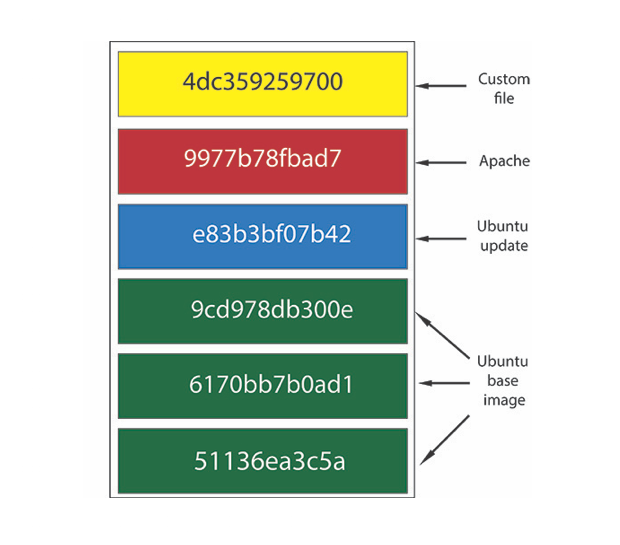
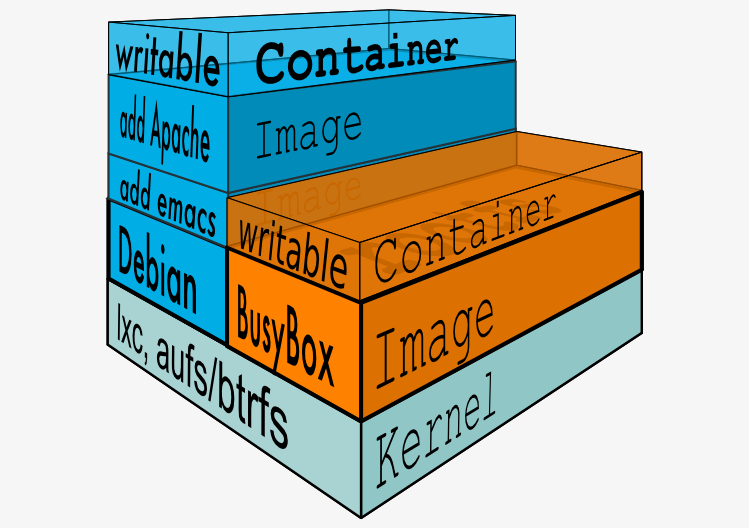
从上面的docker ps结果可以看到,由同一个 IMAGE 通过docker run产生了2个独立的容器,一个容器内部文件修改不会影响另一个容器。IMAGE 和 CONTAINER 的关系,有点类似 Class 和其实例的关系,CONTAINER 只是 IMAGE 运行后的一个实例,可参考这篇关于AUFS的文章和Containers 101: Docker fundamentals这篇介绍 docker 基本原理的文章,从文章中各选了一张图作为示例说明如下。

docker image 和 docker container 图例说明

除了运行的容器这一层是可读写的,下面每一层(Layer)都是只读的,像运行 Dockerfile 中的每个RUN都会创建一个 IMAGE,IMAGE 下一层为其父 IMAGE,最下层无父 IMAGE 的称之为 BASE IMAGE。

在容器中增加新文件

退出当前的伪终端,同时退出容器。如果容器里有类似 MySQL 这样的服务在运行,退出伪终端并不会导致容器退出,如果需要停止此容器,需要运行docker container stop CONTAINER命令。

root@0e2ad964e587:/# echo test > ~/test.txtroot@0e2ad964e587:/# exit

docker container stop 关闭容器

 docker container stop ubuntu-2ubuntu-2

docker container start 启动容器

 docker container start ubuntu-2ubuntu-2

docker exec 进入正在运行的容器

 docker exec -it ubuntu-2 bashubuntu-2

查看前面新增文件的内容

使用docker container start CONTAINER可以恢复此容器上次退出时的最后状态。

root@0e2ad964e587:/# cat ~/test.txttestroot@0e2ad964e587:/#
Read more »

gc algorithms: implementations

Posted on 2018-06-15   |   In java

GC Algorithms: Implementations

Now that we have reviewed the core concepts behind GC algorithms, let us move to the specific implementations one can find inside the JVM. An important aspect to recognize first is the fact that, for most JVMs out there, two different GC algorithms are needed – one to clean the Young Generation and another to clean the Old Generation.

You can choose from a variety of such algorithms bundled into the JVM. If you do not specify a garbage collection algorithm explicitly, a platform-specific default will be used. In this chapter, the working principles of each of those algorithms will be explained.

For a quick cheat sheet, the following list is a fast way to get yourself up to speed with which algorithm combinations are possible. Note that this stands true for Java 8, for older Java versions the available combinations might differ a bit:

Young Tenured JVM options
Incremental Incremental -Xincgc
Serial Serial -XX:+UseSerialGC
Parallel Scavenge Serial -XX:+UseParallelGC -XX:-UseParallelOldGC
Parallel New Serial N/A
Serial Parallel Old N/A
Parallel Scavenge Parallel Old -XX:+UseParallelGC -XX:+UseParallelOldGC
Parallel New Parallel Old N/A
Serial CMS -XX:-UseParNewGC -XX:+UseConcMarkSweepGC
Parallel Scavenge CMS N/A
Parallel New CMS -XX:+UseParNewGC -XX:+UseConcMarkSweepGC
G1 -XX:+UseG1GC

If the above looks too complex, do not worry. In reality it all boils down to just four combinations highlighted in the table above. The rest are either deprecated, not supported or just impractical to apply in real world. So, in the following chapters we cover the working principles of the following combinations: |

  • Serial GC for both the Young and Old generations
  • Parallel GC for both the Young and Old generations
  • Parallel New for Young + Concurrent Mark and Sweep (CMS) for the Old Generation
  • G1, which encompasses collection of both Young and Old generations
Read more »

linux 常用命令之 chmod 设置特殊权限

Posted on 2018-06-14   |   In linux

三种特殊权限简介

在 Linux 下,除了rwx权限外,有时还会看到s和t这样的权限,这些是 Linux 下的特殊权限,包括SUID,SGID,SBIT。

本文内容主要参考鸟哥的文章 - Linux 文件与目录管理,更多内容可阅读鸟哥原文。

示例

注意原来的权限的x位置上的变化,x被s和t所替换了。

 ls -ld /usr/bin/passwd /tmp /usr/bin/walldrwxrwxrwt 12 root root  4096 Jun 14 15:51 /tmp-rwsr-xr-x  1 root root 59640 Jan 25 15:09 /usr/bin/passwd-rwxr-sr-x  1 root tty  30800 May 16 10:41 /usr/bin/wall

Linux 命令行中运行其实是有不同的高亮背景表示这些文件拥有特殊权限的。

SUID

当一个设置了 SUID 位的可执行文件被执行时,该文件将以所有者的身份运行,也就是说无论谁来执行这个文件,他都有文件所有者的特权。

如果所有者是 root 的话,那么执行人就有超级用户的特权了,因此不要轻易设置该位。

SUID 特殊权限说明

  1. SUID 权限仅对可执行文件有效,也就是说 SUID 只能用在 文件 上,不能用在目录
  2. 执行者对于该程序需要具有x的可执行权限
  3. 本权限仅在执行该程序的过程中有效
  4. 执行者将具有该程序拥有者的权限

SUID example

以/usr/bin/passwd为例:

  1. git用户对于/usr/bin/passwd这个程序具有x权限,表明git用户可以执行passwd
  2. passwd的所有者为root
  3. git用户执行passwd的过程中会暂时获得root的权限
  4. 因此/etc/shadow可以被git用户所执行的passwd所修改

SGID

当一个设置了 SGID 位的可执行文件运行时,该文件将具有所属组的特权,任意操作组所能使用的系统资源。

SGID 目录说明

SGID 除了对二进制程序生效,也可以用目录上,而且主要就是在目录上使用这个特殊权限,当一个目录设置了 SGID 权限后,它具有如下功能:

  1. 用户若对此目录具有r和x权限,该用户能够进入该目录
  2. 用户在此目录下的有效用户组将变成该目录的用户组
  3. 若用户在此目录下拥有w权限,则用户所创建的新文件的用户组与该目录的用户组相同

SGID 示例

 mkdir sgid chmod 4755 sgid ls -l sgidtotal 0drwsr-xr-x    2 yu staff   68 Jun 17 22:53 .drwx------+ 149 yu staff 5066 Jun 17 22:53 .. cp /etc/hosts sgid ls -l /etc/hosts-rw-r--r-- 1 root wheel 262 Feb 27 22:09 /etc/hosts ls -l sgidtotal 4drwsr-xr-x    3 yu staff  102 Jun 17 22:54 .drwx------+ 149 yu staff 5066 Jun 17 22:53 ..-rw-r--r--    1 yu staff  262 Jun 17 22:54 hosts

SBIT

Sticky-bit现在仅对目录有效。

SBIT 特殊权限说明

对一个目录设置了Sticky-bit之后,存放在该目录的文件仅准许其属主执行删除、移动等操作,因此该位可以理解为防删除位。

SBIT 示例

 cd /tmp && ls -ld .font-unix && rm -rf .font-unixdrwxrwxrwt 2 root root 4096 Jun  9 12:32 .font-unixrm: cannot remove '.font-unix': Operation not permitted
Read more »
1…678…99
yuweijun

yuweijun

492 posts
12 categories
RSS
GitHub Twitter
© 2021 yuweijun
Powered by Hexo
Theme - NexT.Mist.KISS