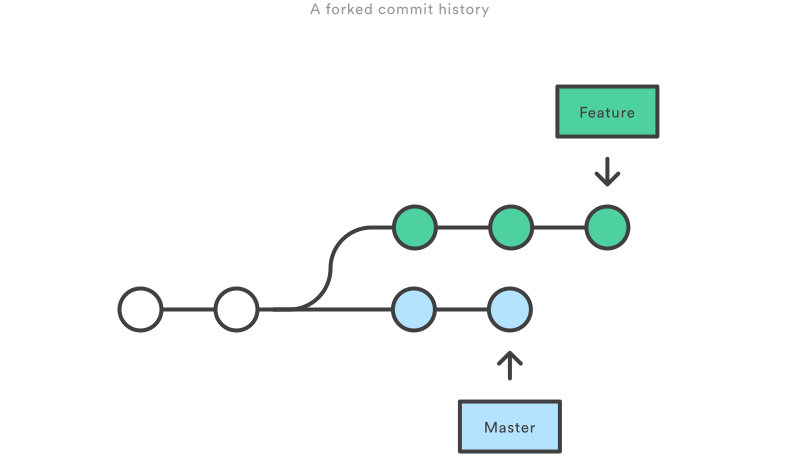
branches status before merge or rebase
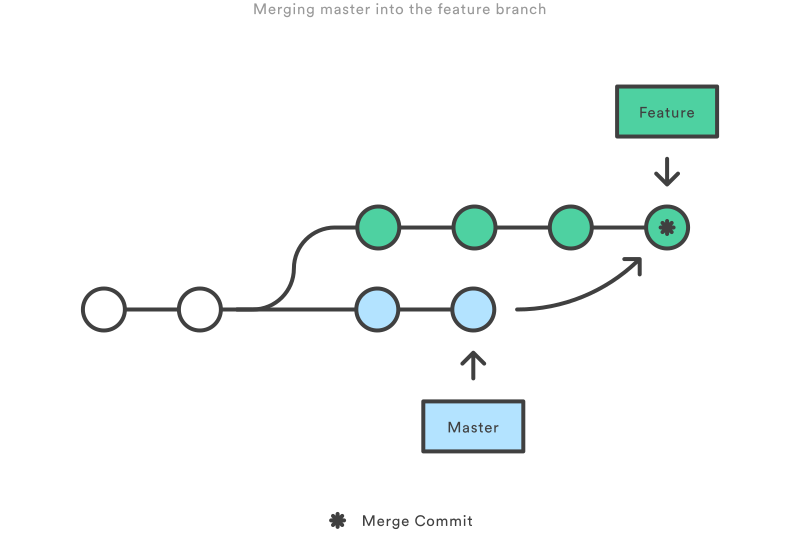
branches status after git merge
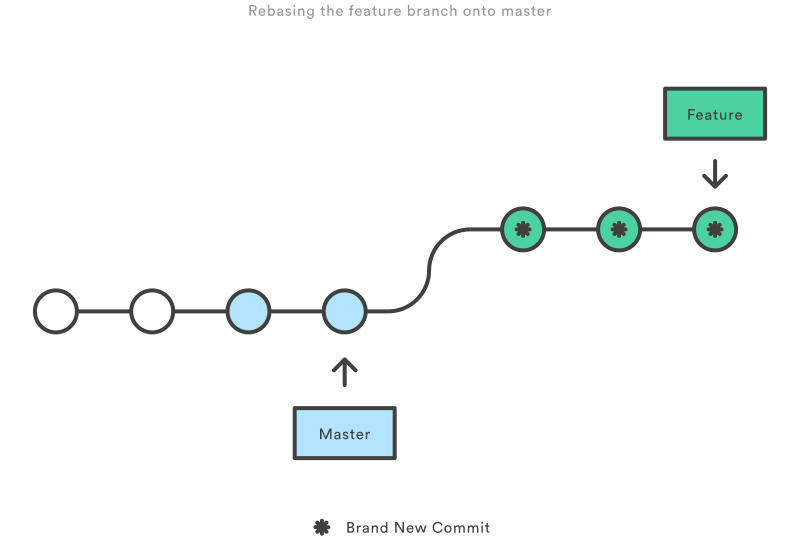
branches status after git rebase
个人苹果电脑上的.bash_profile设置,主要是关于git的命令行提示和颜色配置。
export GREP_OPTIONS='--color=auto'export GREP_COLOR='1;35;40'export CLICOLOR=1export LSCOLORS=GxFxCxDxBxegedabagacedalias ll='ls -la'# export JAVA_TOOL_OPTIONS=-Dfile.encoding=UTF-8# export JAVA_HOME=$(/usr/libexec/java_home -v 1.8)# git command completionsource /Applications/Xcode.app/Contents/Developer/usr/share/git-core/git-completion.bashsource /Applications/Xcode.app/Contents/Developer/usr/share/git-core/git-prompt.shexport PS1="\u@\W\[\033[35m\]\$(git branch 2> /dev/null | sed -e '/^[^*]/d' -e 's/* \(.*\)/ (\1)/')\[\033[00m\] \[\033[1;32m\]\[\033[00m\] " |
PS1中的命令部分不要提到function里,否则使用screen命令会提示方法找不到。
如果不安装Xcode,可以通过brew命令安装,也可以达到相同的效果,按照安装完成的提示相应设置即可:
brew install git bash-completion |
个人的git全局配置文件~/.gitconfig的内容:
本文是关于TCP Keepalive的一些基本知识点和系统设置方式说明,原文TCP Keepalive HOWTO,作者Fabio Busatto fabio.busatto@sikurezza.org
This document describes the TCP keepalive implementation in the linux kernel, introduces the overall concept and points to both system configuration and software development.
Understanding TCP keepalive is not necessary in most cases, but it's a subject that can be very useful under particular circumstances. You will need to know basic TCP/IP networking concepts, and the C programming language to understand all sections of this document.
The main purpose of this HOWTO is to describe TCP keepalive in detail and demonstrate various application situations. After some initial theory, the discussion focuses on the Linux implementation of TCP keepalive routines in the modern Linux kernel releases (2.4.x, 2.6.x), and how system administrators can take advantage of these routines, with specific configuration examples and tricks.
In order to understand what TCP keepalive (which we will just call keepalive) does, you need do nothing more than read the name: keep TCP alive. This means that you will be able to check your connected socket (also known as TCP sockets), and determine whether the connection is still up and running or if it has broken.
The keepalive concept is very simple: when you set up a TCP connection, you associate a set of timers. Some of these timers deal with the keepalive procedure. When the keepalive timer reaches zero, you send your peer a keepalive probe packet with no data in it and the ACK flag turned on. You can do this because of the TCP/IP specifications, as a sort of duplicate ACK, and the remote endpoint will have no arguments, as TCP is a stream-oriented protocol. On the other hand, you will receive a reply from the remote host (which doesn't need to support keepalive at all, just TCP/IP), with no data and the ACK set.
If you receive a reply to your keepalive probe, you can assert that the connection is still up and running without worrying about the user-level implementation. In fact, TCP permits you to handle a stream, not packets, and so a zero-length data packet is not dangerous for the user program.
This procedure is useful because if the other peers lose their connection (for example by rebooting) you will notice that the connection is broken, even if you don't have traffic on it. If the keepalive probes are not replied to by your peer, you can assert that the connection cannot be considered valid and then take the correct action.
You can live quite happily without keepalive, so if you're reading this, you may be trying to understand if keepalive is a possible solution for your problems. Either that or you've really got nothing more interesting to do instead, and that's okay too. :)
Keepalive is non-invasive, and in most cases, if you're in doubt, you can turn it on without the risk of doing something wrong. But do remember that it generates extra network traffic, which can have an impact on routers and firewalls.
In short, use your brain and be careful.
In the next section we will distinguish between the two target tasks for keepalive: Checking for dead peers
Preventing disconnection due to network inactivity
Keepalive can be used to advise you when your peer dies before it is able to notify you. This could happen for several reasons, like kernel panic or a brutal termination of the process handling that peer. Another scenario that illustrates when you need keepalive to detect peer death is when the peer is still alive but the network channel between it and you has gone down. In this scenario, if the network doesn't become operational again, you have the equivalent of peer death. This is one of those situations where normal TCP operations aren't useful to check the connection status.
Think of a simple TCP connection between Peer A and Peer B: there is the initial three-way handshake, with one SYN segment from A to B, the SYN/ACK back from B to A, and the final ACK from A to B. At this time, we're in a stable status: connection is established, and now we would normally wait for someone to send data over the channel. And here comes the problem: unplug the power supply from B and instantaneously it will go down, without sending anything over the network to notify A that the connection is going to be broken. A, from its side, is ready to receive data, and has no idea that B has crashed. Now restore the power supply to B and wait for the system to restart. A and B are now back again, but while A knows about a connection still active with B, B has no idea. The situation resolves itself when A tries to send data to B over the dead connection, and B replies with an RST packet, causing A to finally to close the connection.
Keepalive can tell you when another peer becomes unreachable without the risk of false-positives. In fact, if the problem is in the network between two peers, the keepalive action is to wait some time and then retry, sending the keepalive packet before marking the connection as broken.
经常在linux命令行或者是bash脚本里定义变量和操作字符串,其中语法比较多,转LDP文档做为手册和示例,便于查询。
Same as $parameter, i.e., value of the variable parameter. In certain contexts, only the less ambiguous ${parameter} form works.
May be used for concatenating variables with strings.
your_id=${USER}-on-${HOSTNAME}echo "$your_id"#echo "Old \$PATH = $PATH"PATH=${PATH}:/opt/bin # Add /opt/bin to $PATH for duration of script.echo "New \$PATH = $PATH" |
If parameter not set, use default.
var1=1var2=2# var3 is unset.echo ${var1-$var2} # 1echo ${var3-$var2} # 2# ^ Note the $ prefix.echo ${username-`whoami`}# Echoes the result of `whoami`, if variable $username is still unset. |
根据spring-boot项目中的logback配置,定义了一份自己测试环境中使用的logback配置文件,并且对其中主要配置添加了备注说明。
<configuration debug="true"> <!-- Defining variables The syntax of variable substitution is similar to that of Unix shells. The string between an opening ${ and closing } is interpreted as a reference to the value of the property. For property aName, the string "${aName}" will be replaced with the value held by the aName property. Default values for variables Under certain circumstances, it may be desirable for a variable to have a default value if it is not declared or its value is null. As in the Bash shell, default values can be specified using the ":-" operator. For example, assuming the variable named aName is not defined, "${aName:-golden}" will be interpreted as "golden". Locate log file according by system property: ${catalina.home} or ${java.io.tmpdir} if $catalina.home} not defined. --> <property name="LOG_FILE" value="${catalina.home:-${java.io.tmpdir:-/tmp}}/logs/spring-jdbc.log}"/> <!-- Below is a configuration file illustrating coloring. Note the %cyan conversion specifier enclosing "%logger{39}". This will output the logger name abbreviated to 39 characters in cyan. The %codeblock lang:conversion specifier prints its sub-pattern in bold-red for events of level ERROR, in red for WARN, in BLUE for INFO, and in the default color for other levels. --> <property name="CONSOLE_LOG_PATTERN" value="%d{yyyy-MM-dd HH:mm:ss.SSS} %highlight(-%5p) --- [%15.15thread] %cyan(%-40.40logger{39} [%5line] :) %m%n%ex"/> <property name="FILE_LOG_PATTERN" value="%d{yyyy-MM-dd HH:mm:ss.SSS} -%5p --- [%15.15thread] %-40.40logger{39} [%5line] : %m%n%ex"/> <!-- What is an Appender? - http://logback.qos.ch/manual/appenders.html Logback delegates the task of writing a logging event to components called appenders. Appenders must implement the ch.qos.logback.core.Appender interface. --> <appender name="CONSOLE" class="ch.qos.logback.core.ConsoleAppender"> <!-- What is an encoder - http://logback.qos.ch/manual/encoders.html Encoders are responsible for transforming an event into a byte array as well as writing out that byte array into an OutputStream. Encoders were introduced in logback version 0.9.19. In previous versions, most appenders relied on a layout to transform an event into a string and write it out using a java.io.Writer. In previous versions of logback, users would nest a PatternLayout within FileAppender. Since logback 0.9.19, FileAppender and sub-classes expect an encoder and no longer take a layout. --> <encoder> <!-- What is a layout? - http://logback.qos.ch/manual/layouts.html Layouts are logback components responsible for transforming an incoming event into a String. PatternLayout/XMLLayout/HTMLLayout --> <pattern>${CONSOLE_LOG_PATTERN}</pattern> <charset>utf8</charset> </encoder> </appender> <!-- RollingFileAppender extends FileAppender to backup the log files depending on RollingPolicy and TriggeringPolicy. --> <appender name="FILE" class="ch.qos.logback.core.rolling.RollingFileAppender"> <encoder> <pattern>${FILE_LOG_PATTERN}</pattern> </encoder> <file>${LOG_FILE}</file> <rollingPolicy class="ch.qos.logback.core.rolling.FixedWindowRollingPolicy"> <fileNamePattern>${LOG_FILE}.%i</fileNamePattern> </rollingPolicy> <!-- SizeBasedTriggeringPolicy looks at size of the file being currently written to. If it grows bigger than the specified size, the FileAppender using the SizeBasedTriggeringPolicy rolls the file and creates a new one. --> <triggeringPolicy class="ch.qos.logback.core.rolling.SizeBasedTriggeringPolicy"> <MaxFileSize>10MB</MaxFileSize> </triggeringPolicy> </appender> <!-- To ensure that all loggers can eventually inherit a level, the root logger always has an assigned level. By default, this level is DEBUG. --> <root level="DEBUG"> <appender-ref ref="CONSOLE"/> <appender-ref ref="FILE"/> </root></configuration> |